
Is Google Gemini Free?
December 15, 2025
December 15, 2025
September 20, 2026
September 20, 2026

Yes, Google Gemini still offers a free tier. Google also added Google AI Plus, a $4.99 monthly plan sitting between the free tier and Google AI Pro, and split its top tier into two Ultra plans.
Understanding the Free Tier in Google Gemini
Google still gives away a real version of Gemini at no cost, and the free plan covers more than a quick chatbot. It runs Gemini 3.6 Flash by default, with varying access to the more powerful Gemini 3.1 Pro model for harder prompts.
The catch shows up in usage limits, which now work differently than they did even a few months ago.
What Google Gemini free includes
The free Gemini app gives you:
- Access to Gemini 3.6 Flash, with varying access to Gemini 3.1 Pro
- Image generation and editing
- Deep Research for multi-source reports
- Gemini Live for voice conversations and brainstorming
- Canvas for guided, interactive work
- Gems to save custom instructions
- 15 GB of cloud storage across Gmail, Drive, and Photos
💡 Pro tip: Want consistent meeting notes without juggling a Google AI plan? Tactiq captures real-time transcripts and generates AI summaries on Zoom, Google Meet, and Microsoft Teams, independent of your Gemini usage limits.
What changed in Google Gemini's usage limits
Google dropped fixed daily prompt counts entirely from the Gemini app. Since May 2026, the app has run on compute-based limits instead. Your allowance now refreshes every 5 hours, up to a weekly ceiling.
Usage depends on prompt complexity, the features and models you use, and how long your conversation runs. Google no longer publishes exact prompt numbers, only relative multipliers against the free tier. Paid plans scale up from there.
Free tier limitations
The free plan works well for everyday tasks, but it comes with real restrictions:
- 32,000-token context window (~50 pages), versus 128,000 tokens on Google AI Plus and 1 million on Pro and Ultra
- Limited file uploads, since a smaller context window caps how much you can upload and have Gemini read at once
- Video uploads capped at 5 minutes total length, and audio at 10 minutes; Pro and Ultra extend these to 1 hour and 3 hours
- No video generation model access, reserved for Plus, Pro, and Ultra
- No "Redo" with Nano Banana Pro, though standard Nano Banana 2 image generation is included
- Deep Research is included, but Google may deprioritize free-tier access during high-demand periods
- No Daily Brief or Gemini Spark, both reserved for paid plans
How to Get More From Gemini's Free Plan With Tactiq
.png)
Those limits don't have to get in the way of your meetings. If you want more insight from your calls without upgrading to a paid Gemini plan, pairing Tactiq with the Gemini app is an easy way to get extra value.
Tactiq handles everything during the meeting with its own built-in AI: real-time transcription, summaries, action items, and highlights. Gemini picks up afterward for research, brainstorming, or more complex analysis.
Tactiq + Gemini workflow
- Use the free Tactiq Chrome extension to capture a real-time transcript on Zoom, Google Meet, or Microsoft Teams.
- Let Tactiq's AI create instant summaries, key points, and decisions.
- Export your transcript and upload it to the Gemini app when you want extended analysis or help tackling complex topics.
This gives you live transcription from Tactiq's own AI, plus the option to use Gemini for deeper work, all without drawing on your Gemini usage limits.
How Tactiq complements Gemini's native note-taker
Gemini's built-in meeting notes in Google Meet require a paid Workspace plan (Business Standard or higher) or a standalone Google AI Pro or Ultra subscription. Free Google accounts get no access to it, and it only works inside Google Meet.
Tactiq works differently:
- Tactiq works across Zoom, Google Meet, and Microsoft Teams
- Tactiq's built-in AI handles your summaries, so you're not limited by Gemini's usage caps
- You can watch the transcript populate live in the Tactiq window as the call happens
- No Workspace plan or Google AI Pro subscription required
- Stronger integrations with Notion, Slack, Google Docs, and Google Drive
- Pull transcripts into Claude or ChatGPT through the Tactiq MCP connector for deeper analysis
Install the Tactiq Chrome extension to get a live transcript and summary of your next meeting.
{{rt_cta_ai-convenience}}
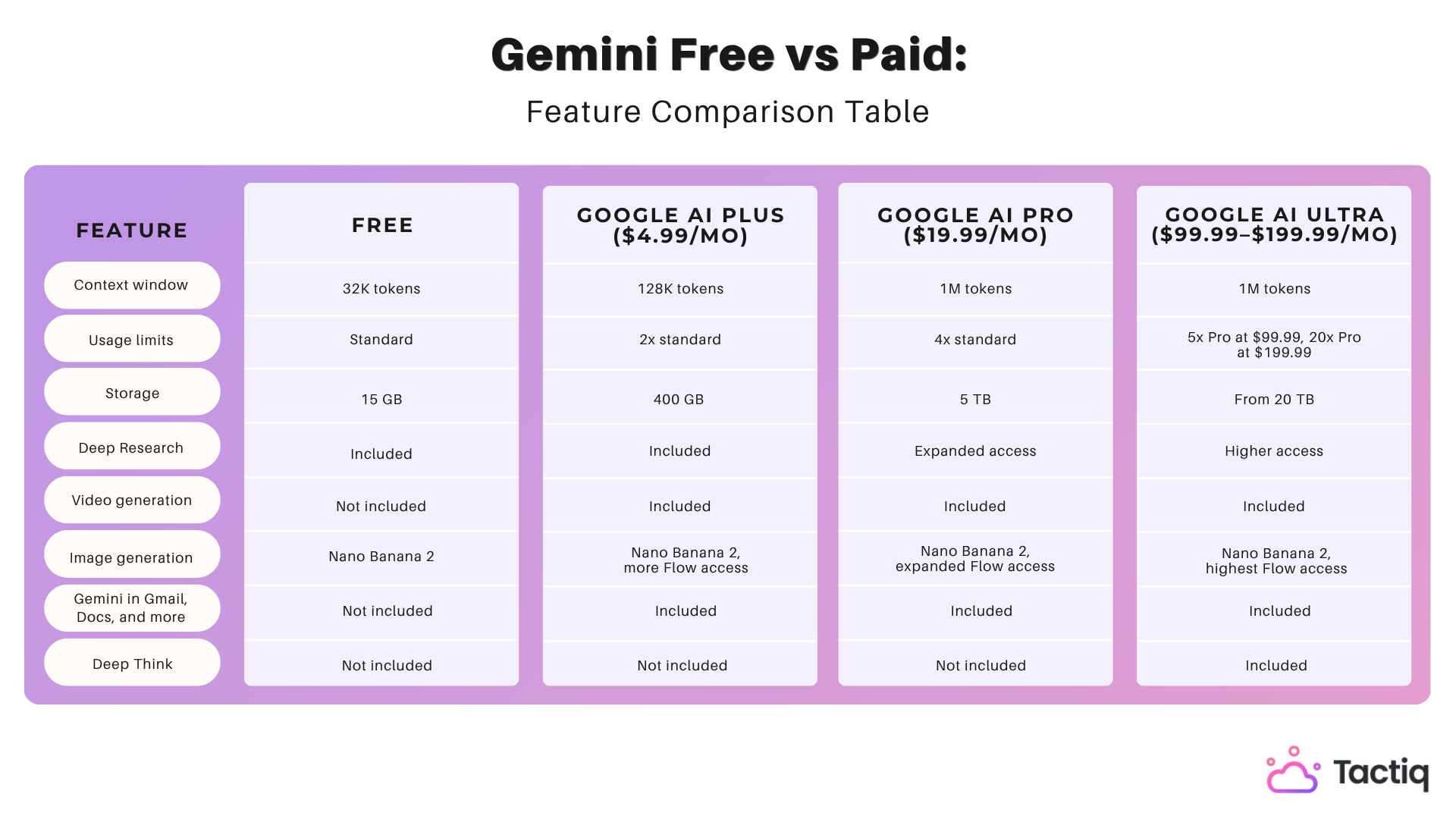
Gemini Free vs Paid: Feature Comparison Table
Here's how the four tiers stack up on the features that matter most.
For a broader look at how Gemini stacks up against other assistants, see our comparisons of Perplexity vs Gemini and Gemini vs Copilot.
Is Free Gemini Enough Or Should You Upgrade?
Choosing between Free, Plus, Pro, or Ultra comes down to how often you hit your usage limits and which features you actually need.
When is Google Gemini's free tier enough?
The free tier works well if you:
- Use Gemini for quick prompts, summaries, or everyday writing help
- Want Deep Research, Gemini Live, Canvas, and Gems without paying anything
- Only need standard image generation, not video
- Don't need Gmail, Docs, or Sheets integration
- Are comfortable with a 32,000-token context window
If you mostly send short prompts and don't hit your usage limit often, the free tier covers most casual use.
When you should upgrade to Google AI Plus
Google AI Plus makes sense if you:
- Want 2x higher usage limits without paying for the full Pro tier
- Need video generation or Daily Brief, both missing from Free
- Want a bigger context window (128,000 tokens) for longer documents
- Are looking for the cheapest way to add Gemini into Gmail, Docs, and other Google apps
- Don't need Gemini Spark, Deep Think, or expanded Deep Research access, all reserved for Pro and Ultra
At $4.99 a month, Plus is the lowest-cost way to remove Free's biggest limits without committing to Pro's price.
When you should upgrade to Google AI Pro
Google AI Pro makes sense if you:
- Work with longer documents or need the full 1 million-token context window
- Want expanded Deep Research access for detailed reports
- Need Gemini Spark, Google's agent feature, not available on Plus
- Use Gemini in Gmail, Docs, and Sheets daily for work
- Want higher usage limits (4x standard) without Ultra's price
When is Google AI Ultra worth it?
Google AI Ultra is built for the heaviest use. Upgrade if you:
- Need Deep Think, Ultra's most advanced reasoning mode
- Want the highest usage limits available, 5x Pro at $99.99 a month or 20x Pro at $199.99
- Handle large-scale storage needs, starting at 20 TB
- Rely on Gemini daily for demanding, complex work across formats
Getting the Most From Free and Paid Gemini Plans
Google Gemini's free tier covers most everyday tasks, but its limits show up fast once you need longer documents, video generation, or deeper research. Google AI Plus, Pro, and Ultra each remove different limits, from bigger context windows to Deep Think's advanced reasoning.
None of that affects your meetings, though. See how Tactiq fits into your workflow above, no matter which Gemini plan you're on.
Yes. Google offers a free version with access to Gemini 3.6 Flash, varying access to Gemini 3.1 Pro, image generation, Deep Research, Gemini Live, Canvas, and Gems. Usage runs on compute-based limits that refresh every 5 hours.
"Gemini Advanced" is an old name. Today it's Google AI Pro. Free has standard limits and a 32K context window. Plus doubles usage and adds video generation. Pro expands further with a 1M-token window and Gemini Spark.
Google AI Plus costs $4.99 a month. It includes 2x higher usage limits than Free, a 128,000-token context window, video generation, and 400 GB of storage.
Google AI Pro costs $19.99 a month. It includes 4x higher usage limits, a 1 million-token context window, Deep Research, Gemini Spark, and 5 TB of storage.
Free Google Meet allows 24-hour one-on-one calls and 60-minute group calls with 3 or more people, capped at 100 participants. Paid Workspace plans remove the 60-minute limit entirely.
Related articles








Want the convenience of AI summaries?
Try Tactiq for your upcoming meeting.
Want the convenience of AI summaries?
Try Tactiq for your upcoming meeting.
Want the convenience of AI summaries?
Try Tactiq for your upcoming meeting.