
Copilot MCP: Can Copilot Access Your Meeting Transcripts?
- Published:
- November 14, 2026
- Updated:
- November 14, 2026

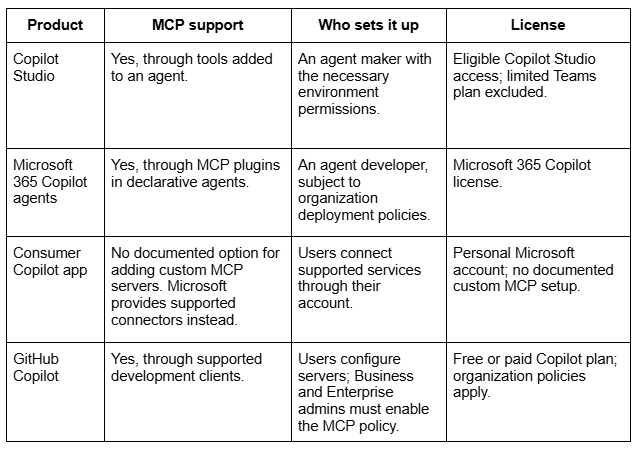
Copilot MCP support depends on which Copilot product you use. In Copilot Studio, Model Context Protocol (MCP) connects agents to external tools and data sources. The setup happens inside an agent, so instructions for one Copilot product may not apply to another.
That distinction matters when your meetings span Teams, Zoom, and Google Meet. Before asking Copilot what a client approved, you need to know which meeting transcripts it can access.
This guide covers:
- Which Copilot products support MCP
- How to connect an MCP server in Copilot Studio
- What limits Copilot’s access to meeting data
If you want meeting transcripts ready for AI workflows, Tactiq captures conversations across Teams, Zoom, and Google Meet. Its MCP server makes saved transcripts available to compatible tools. Keep reading to learn which Copilot products support MCP and what each connection can access.
TL;DR: Does Copilot Support MCP for Meeting Transcripts?
Copilot Studio supports MCP connections within an agent. Setup differs between the classic and new authoring experiences.
For meeting workflows, MCP support alone doesn’t guarantee transcript access: the connected server must provide it.
Which Copilot Supports MCP?
Copilot Studio, Microsoft 365 Copilot agents, and GitHub Copilot support Model Context Protocol (MCP). However, each product handles setup differently.
How to Add an MCP Server to Copilot Studio
You connect an MCP server to an agent in Copilot Studio. Before starting, you need:
- Copilot Studio access: Access to your chosen authoring experience and permission to create or edit agents.
- An allowed connection: Your organization’s data policies must permit access to the MCP server.
- Server details: The server URL and any required credentials or authentication configuration.
Follow Microsoft’s setup guide for the interface you use:
- New experience (preview): Use Add an MCP server to your agent as a tool. It covers adding servers through the Build tab and testing them in Preview.
- Classic experience: Use Connect your agent to an existing MCP server. This workflow requires generative orchestration to be enabled.
Authentication depends on the server. Follow its provider’s requirements and the configuration instructions in the relevant Microsoft guide.
💡 Pro tip: For meeting workflows, choose a server that provides transcript access. Tactiq’s MCP server supports meeting search on Free and Pro. Reading full transcripts requires Team or higher.
Copilot MCP Limitations for Meeting Data
Connecting an MCP server doesn’t automatically give your agent every meeting transcript. Three distinctions matter when searching for decisions or commitments.
- Copilot needs a saved transcript to answer meeting questions afterward. During a Teams meeting, it can answer questions without saving a transcript. Afterward, it can reference only transcribed portions of the discussion or messages in the meeting chat. See our guide to Microsoft Copilot meeting notes.
- Teams messages aren’t meeting transcripts. Microsoft’s legacy Teams MCP server documents chat, channel, and membership tools, without a transcript-retrieval tool. Microsoft recommends Work IQ for new projects. Other Microsoft MCP connections may offer different tools and access. Our Microsoft Teams MCP guide explains the different routes.
- Cross-platform transcripts need another data source. Enabling Copilot in Teams doesn’t automatically supply transcripts from Zoom or Google Meet.
For example, a decision made in Zoom won’t appear in a Teams transcript simply because both meetings concern the same project. Before querying your agent, check where the conversation was captured and which connected tools can retrieve it.
Tactiq Meeting Transcripts as an MCP Data Source
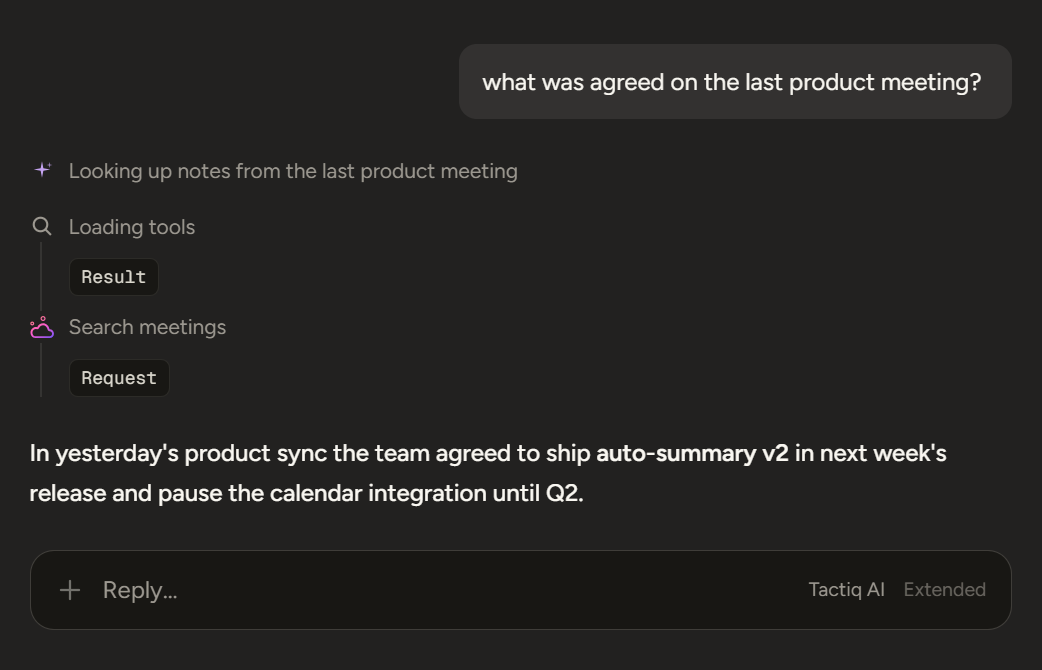
Tactiq transcribes meetings across Microsoft Teams, Zoom, and Google Meet. Its MCP server lets compatible clients search saved meetings and retrieve transcript content, subject to your plan and permissions.
For a comparison of cross-platform transcription tools, see our Copilot meeting notes alternatives guide.
Tactiq MCP connection details
Tactiq’s setup guide lists the server address, authentication method, and access requirements:
- Server URL: https://mcp.tactiq.io
- Authentication: Browser-based OAuth sign-in. No static API key is required.
- Free and Pro: Search and list meetings.
- Team or higher: Also read meeting details, summaries, and full transcripts.
- Permissions: Authorized scopes determine access to your own meetings, shared meetings, and meetings in shared spaces.
Want the convenience of AI summaries?
Try Tactiq for your upcoming meeting.
Prompts to try with a connected MCP client
Once a compatible client can retrieve your transcripts, ask questions tied to specific meetings, participants, or dates:
- “Find my latest client call and list the action items, owners, and deadlines.”
- “Compare this week’s project meetings. Which decisions changed, and which questions remain unresolved?”
- “Find where we discussed the launch deadline. Include the meeting date and relevant transcript excerpts.”
- “Summarize the client’s concerns across our last three calls, with supporting quotes.”
These prompts require transcript access through a Team or higher plan and the appropriate permissions. Review names, commitments, and deadlines against the cited meeting content before sharing the results.
Bring the Right Meeting Context to Copilot
Start by identifying your Copilot product, then choose an MCP connection that exposes the meeting content you need.
For conversations across Teams, Zoom, and Google Meet, explore Tactiq’s MCP server. Search saved meetings and use accessible transcripts to check decisions, commitments, and follow-ups.
FAQ
Your questions, answered.
If you have any further questions, Get in touch (opens in a new tab) with our friendly team
Does Copilot support MCP?
Do I need Copilot Studio to use MCP?
Can I use MCP with the free Copilot app?
Can Copilot access my Teams meeting transcripts?
Can Copilot search my Zoom and Google Meet transcripts?
Related articles

Gemini 3.5 Transcribe: Google Transcript Model Explained
Context Engineering vs Prompt Engineering: What Your AI Agents Are Missing

Google Gemini MCP Support: Where It Works and Setup Tips

5 Best AI Scheduling Assistants

Microsoft Teams MCP: How to Access Meeting Content With AI

How Do I Turn Off Google Gemini?

Best Free Dictation App Options

6 Best Wispr Flow Alternatives
Want the convenience of AI summaries?
Try Tactiq for your upcoming meeting.
Bringing AI into your meetings has never been so easy.
Add to Chrome - It's free!(opens in a new tab)Try Tactiq in your upcoming meeting!
Sign up now