
Context Engineering vs Prompt Engineering: What Your AI Agents Are Missing
- Published:
- October 25, 2026
- Updated:
- October 25, 2026

- Context engineering is designing everything an AI model sees before it responds: instructions, retrieved knowledge, tool outputs, memory and history.
- Prompt engineering is about phrasing one request. Context engineering is about what the agent knows across a whole multi-step task.
- Anthropic’s 2026 study of its own workplace found meetings went up as agents took on more work, and decisions that never get written down are invisible to agents.
- The fix: log decisions, work in the open, capture meetings automatically, and give agents context they can pull from, with sources.
At Anthropic, AI agents now log six hours of work for every hour their human colleagues put in. You’d expect meetings to shrink. They didn’t. The median employee spends about 20% more time in meetings than a year ago.
That detail, from Anthropic’s October 2026 study of how work is changing inside the company (opens in a new tab), says something important about context engineering: the discipline that has quietly replaced prompt engineering as the thing that decides whether an AI agent is useful or confidently wrong.
This guide covers what context engineering is, how it differs from prompt engineering, what actually goes into an agent’s context, and the layer most teams forget.
What is context engineering?
Context engineering is the practice of designing everything an AI model sees before it responds (instructions, retrieved documents, tool results, memory and conversation history) so it has exactly the information it needs for the task, and nothing that distracts it.
Prompt engineering asks, “How should I phrase this?” Context engineering asks, “What does the model need to know, and where will it get it?”
Think about a smart new hire on day one. They can be brilliant and still useless if nobody tells them who the customer is, what was agreed last week, or which project got cut. The quality of their work depends on the onboarding pack. An AI agent is that new hire on every task, every time. Context engineering is writing the onboarding pack, and keeping it current.
Anthropic’s engineering team frames context as a finite resource (opens in a new tab): models have a limited attention budget, so the goal isn’t more context. It’s the smallest set of high-signal information that gets the job done.
Context engineering vs prompt engineering
Why the shift? A chatbot answers one question. An agent runs a loop: it plans, calls a tool, reads the result, decides the next step, and repeats. By step ten, your carefully worded prompt is a small fraction of what’s in its context window. The rest is retrieved files, tool outputs and earlier steps. Get that wrong and no prompt will save you.
Prompt engineering didn’t die. It became one part of a bigger job. If you’re building agents yourself, LangChain’s technical overview of context engineering for agents (opens in a new tab) is a good companion to this guide.
What goes into an agent’s context
Most frameworks break context into a handful of layers. Here’s a practical version.
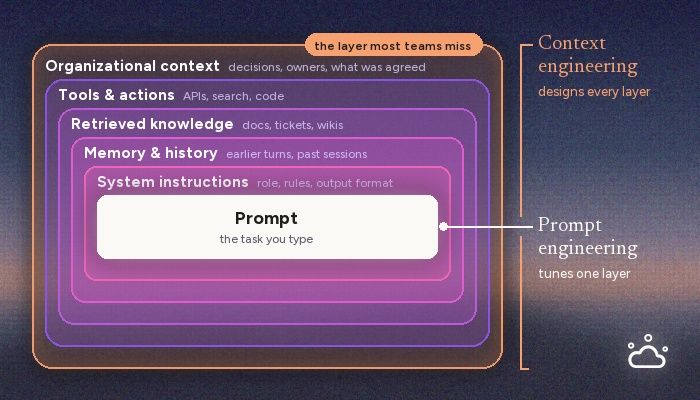
1. Instructions
The system prompt, standing rules and reusable skills that tell the agent how to behave. These pile up fast: at Anthropic, written standing instructions for agents grew from a few hundred in mid-2025 to around 8,500 a year later.
2. Memory and history
Short-term memory is the current conversation and task. Long-term memory is what persists across sessions: preferences, past results, lessons learned. Without it, every task starts from zero.
3. Retrieved knowledge
Docs, wikis, code, tickets and records, pulled into the context window by search or retrieval-augmented generation (RAG). The skill here is retrieving the right three paragraphs, not the whole folder.
4. Tools and actions
APIs, databases and other apps the agent can call, and the results they return. Open standards like the Model Context Protocol (MCP) (opens in a new tab) make it much easier to connect an agent to the tools your team already uses.
5. Organizational context
What the company has decided, promised and changed its mind about. Who owns what now. Which customer asked for what on last Tuesday’s call. This is the layer that’s least often written down, and the one agents get wrong most quietly.
Why AI agents fail: four context problems
- Missing context. The information exists, but the agent never got it. It drafts a renewal email without knowing the customer asked for a discount on last week’s call.
- Stale context. The agent works from something that used to be true. Anthropic describes an employee whose name sat on an old internal document about company swag. Months after they changed roles, agents were still sending them requests for t-shirts and mugs.
- Too much context. Dump everything in and the signal drowns. Models often get worse, not better, when the window is stuffed with irrelevant material.
- Unsourced context. The agent states something as fact and nobody can check where it came from. Without sources, you can’t tell recall from hallucination.
Only the third is a purely technical problem. The other three are about how a company records what it knows.
The context your agents can’t see: what Anthropic found
In October 2026, Anthropic’s economics team published a detailed study of how AI has reshaped work inside the company (opens in a new tab), drawing on internal data on AI use, output, calendars, communication and hiring. It’s one company, and an unusual one. But it’s the closest thing we have to a preview of an agent-heavy workplace, and several findings matter for context engineering.
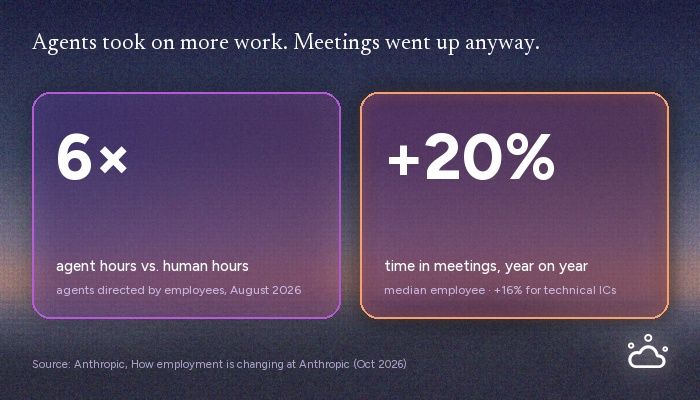
- Agents outwork their humans. By August 2026, agents directed by individual employees were logging six times as many hours as the employees themselves.
- Meetings went up, not down. Median meeting time rose about 20% in a year, and 16% even for technical individual contributors. Strategic decisions still get made by people debating with people.
- Unrecorded decisions are invisible to agents. The researchers point out that when a decision is made in a meeting and never written up, agents lose the context they need to update their goals and assumptions. Private, unlogged work becomes a liability.
- Humans are the bottleneck. Interactive agent sessions spend roughly 80% of their time waiting for human input. As one engineer put it, people are “bottlenecking the agents.”
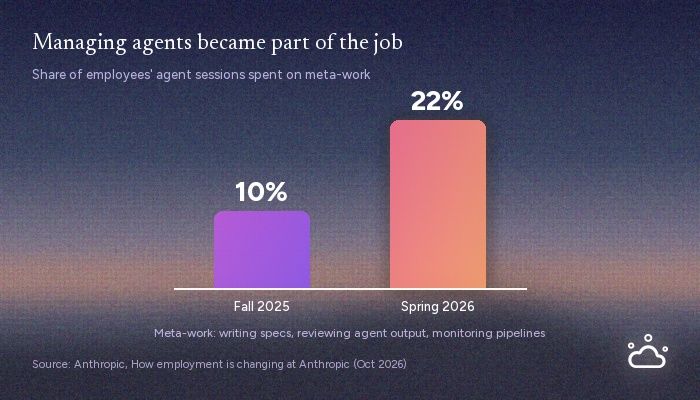
- Managing agents became a job. Work about the work (writing specs, monitoring pipelines, building tools for agents) rose from 10% to 22% of employees’ agent sessions between fall 2025 and spring 2026.
Anthropic’s response was largely cultural: default to open channels, move work into places agents can see, and make decisions in the open. It works. It also asks every person to write up every decision, every time, which is exactly the kind of task busy people skip.
A caveat worth stating: part of the rise in meeting time reflects Anthropic’s rapid growth and a shift toward more meeting-heavy roles, and the researchers note that the people who adopted AI tools weren’t randomly selected. Treat the numbers as a signal, not a law.
But the direction is clear. The more work agents do, the more the decisions that steer them matter, and many of those decisions are spoken, not written.
How to engineer organizational context
You don’t need a platform team for this. Five habits get you most of the way.
1. Keep a decision log
One line per decision: what was decided, by whom, when, and why. If your team already writes minutes, add a decisions section to your meeting minutes template. It’s the single cheapest fix for stale context.
2. Default to open
A decision made in a direct message is invisible to your colleagues and your agents alike. Move it to a shared channel or doc.
3. Capture meetings automatically
If the record depends on someone remembering to write it up, it won’t exist for half your meetings. Automatic transcription and summaries close that gap without adding a task to anyone’s list. (Here’s how AI agents and AI assistants for meeting notes differ.)
4. Make context permissioned and sourced
An agent should only pull what the person running it is allowed to see. And every claim it makes should trace back to who said it, in which meeting, word for word. Sources are what turn an agent’s answer from “probably right” into something you can act on.
5. Prune stale context
Retire outdated docs and ownership info, or agents will keep acting on them. Remember the swag requests.
Where Tactiq fits
Tactiq is AI meeting notes for people, teams and agents. It transcribes live in Google Meet, Zoom and Microsoft Teams, right in your browser with no bot joining the call. When the meeting ends, the summary and action items are already written.
For teams, every meeting becomes shared, permissioned memory you can search. “What did we promise this customer in March?” “Who decided to cut that feature?” Every answer comes with its source.
For agents, Tactiq’s MCP server gives the AI tools you already use, including Claude, Claude Code, Cursor and ChatGPT, meeting context they can pull from, with sources, before they draft the follow-up, update the CRM or write the spec.
If you work in Claude, Tactiq is a verified connector in Claude’s directory, reviewed by Anthropic. Connect it in two clicks, then ask what was decided on last week’s call. The answer comes back quoted, with the speaker and timestamp attached.
It’s also built with the “too much context” problem in mind. A 20,000-word transcript would blow an agent’s context budget, and a summary alone drops the reasoning behind a decision. So the connector exposes meetings at increasing levels of detail: a list of calls, then summaries, then action items, then the exact quoted moment, then the full transcript. The agent only goes as deep as the question needs. That’s context engineering in practice.
Your agents can’t attend your meetings. They can still know what was decided in them.
Over 1 million people use Tactiq. Most say the same thing: “I wish I’d had this sooner.” Try Tactiq free in your next meeting.
The bottom line
Prompt engineering was about asking well. Context engineering is about knowing what to hand over. As AI agents get cheaper and more capable, the advantage moves to the context you can give them. And the freshest, least-recorded part of that context is what your team says out loud. Capture it, source it, and let your agents pull from it.
FAQ
Your questions, answered.
If you have any further questions, Get in touch (opens in a new tab) with our friendly team
Is context engineering replacing prompt engineering?
What is the difference between context engineering and RAG?
Do non-developers need to care about context engineering?
How do AI agents remember past meetings?
What is a context window?
Related articles
Context Engineering vs Prompt Engineering: What Your AI Agents Are Missing

Claude Memory: How to Import and Manage Your AI Context

Claude Cowork Connectors: Automate Recurring Work

Google Gemini MCP Support: Where It Works and Setup Tips

Best Claude Skills: Top Picks for Meetings, Content, and Code

5 Best AI Scheduling Assistants

Microsoft Teams MCP: How to Access Meeting Content With AI

How Do I Turn Off Google Gemini?
Want the convenience of AI summaries?
Try Tactiq for your upcoming meeting.
Bringing AI into your meetings has never been so easy.
Add to Chrome - It's free!(opens in a new tab)Try Tactiq in your upcoming meeting!
Sign up now