
AI Agents vs. AI Assistants for Meeting Notes
- Published:
- March 8, 2025
- Updated:
- June 17, 2025

Meetings generate a lot of information—ideas, decisions, action items—but capturing it all can be challenging. AI-powered tools promise to take meeting notes off your plate, but not all AI works the same way.
Some tools act as AI assistants, responding to prompts and transcribing conversations when asked. Others function as AI agents, operating autonomously to capture notes, summarize discussions, and distribute insights—without manual input.
The difference between the two isn’t just about automation—it’s about how much work you still have to do. This guide breaks down AI agents vs. AI assistants and which one actually saves you time.
Understanding AI Assistants for Meetings
Artificial intelligence assistants have become a go-to solution for handling basic meeting tasks, but their capabilities are limited to reactive support—they don’t take independent action.
What Are AI Assistants?
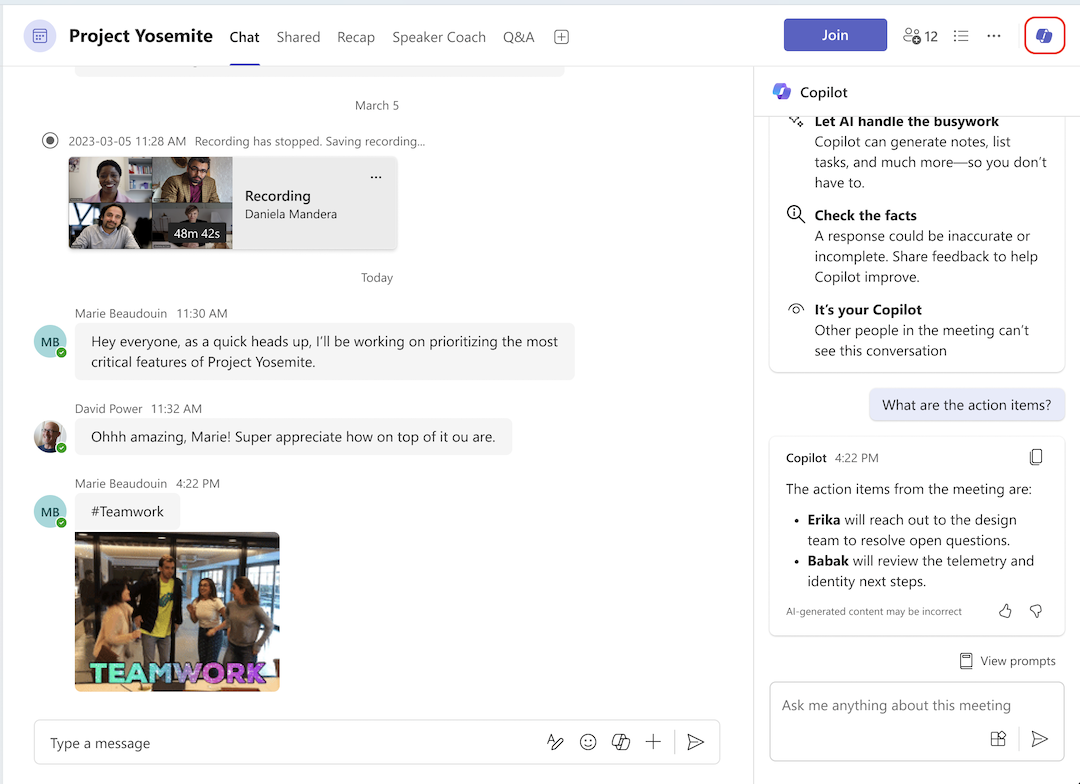
AI Assistants in MS Teams (opens in a new tab)
AI assistants are rule-based or generative AI tools that perform tasks when prompted. They use natural language processing to understand commands and generate responses but require user input to function.
For example, Microsoft Copilot can summarize discussions and highlight key points and action items, but only after a user prompts it.
Benefits of AI Assistants
- On-demand support – AI assistants can transcribe, summarize, and retrieve information when asked.
- Familiar and easy to use – Most AI assistants integrate into existing tools like Google Meet and Microsoft Teams.
- Basic automation – They can handle routine tasks like setting reminders, answering questions, and summarizing discussions.
Limitations of AI Assistants for Workflows
- Manual activation required – Unlike AI agents, AI assistants operate only when prompted. You must start a transcription, request a summary, or give a specific command.
- No workflow optimization – They don’t independently analyze meetings or take proactive actions, such as following up with action items or updating a project management tool.
- Limited decision-making – AI assistants follow predefined rules and can’t adjust dynamically based on context or past meetings.
AI Agents for Automatic Note-Taking
Unlike AI assistants, which require manual input, AI agents operate autonomously. They make decisions based on workflows rather than user prompts, making them a powerful alternative for teams looking to fully automate meeting documentation without having to remember to hit “record.”
What Are AI Agents?
AI agents (opens in a new tab) work independently and handle specific tasks without ongoing human input. They use machine learning and large language models (LLMs) to analyze conversations, extract key insights, and execute actions automatically.
How AI Agents Improve Workflows
AI agents create end-to-end workflows to reduce the need for manual intervention and ensure meetings lead to real action.
- Automated note-taking – AI agents perform tasks like recording, summarizing, and organizing discussions across multiple tools.
- Seamless integration – They can connect with project management systems, updating task lists and notifying teams instantly.
- Minimal human intervention – Instead of waiting for a prompt, AI agents proactively capture and process meeting data.
- Better decision-making – With the ability to analyze past meetings and identify patterns, AI agents help teams tackle complex tasks and ensure continuity.
With AI agents, meetings don’t just get recorded—they turn into structured, actionable knowledge.
For example, an AI agent could:
- Detect when a meeting starts and begin transcribing automatically.
- Summarize discussions and extract action items.
- Distribute notes across multiple platforms like Slack, Notion, and email—without requiring a manual request.
This level of automation allows AI agents to eliminate repetitive tasks for teams that rely on structured workflows.
How Tactiq Can Help You Build AI Workflows (Without Code)
If you want the easiest way to automate your AI workflows (opens in a new tab) without using any technical tools, Tactiq is your best option.
With Tactiq’s AI workflows, you can create any automation after a call once the transcript is available. This makes it easier to share summaries, tasks, and data with other tools you’re already using.
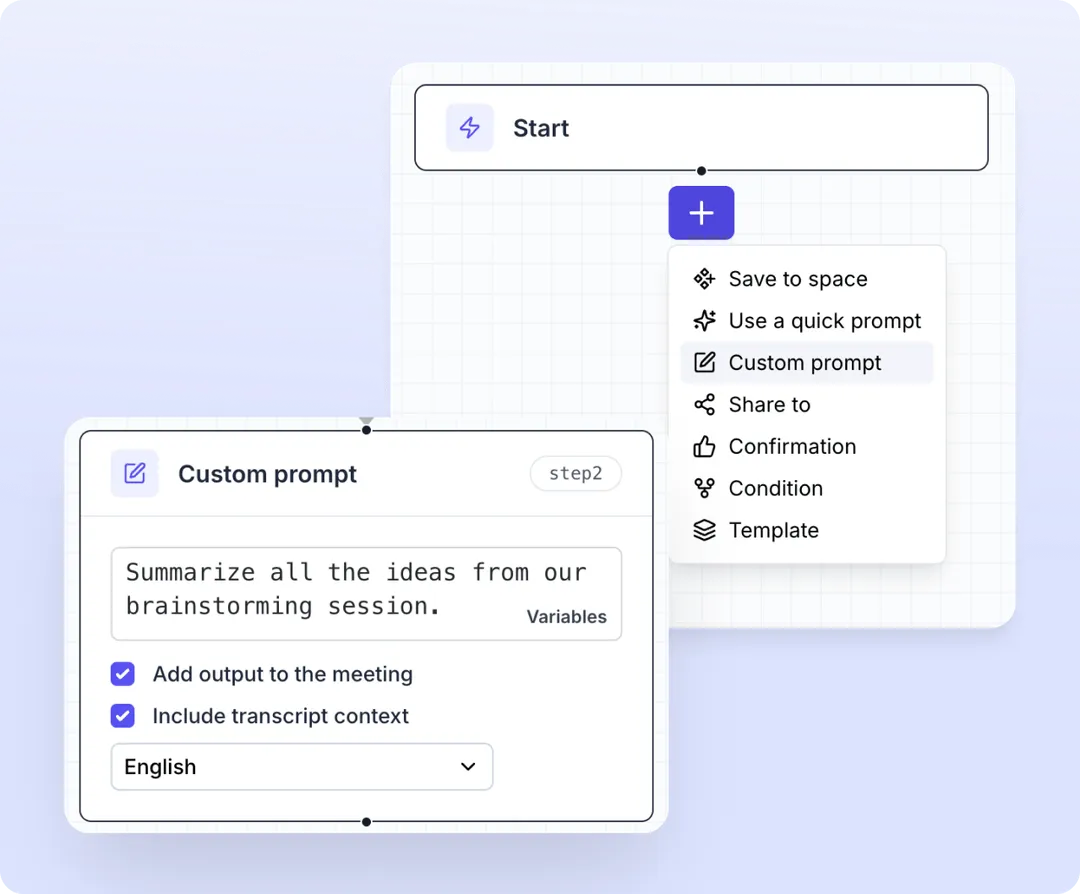
Here’s how to get started:
Access Workflows
- Download the Tactiq Chrome Extension (opens in a new tab) and create an account.
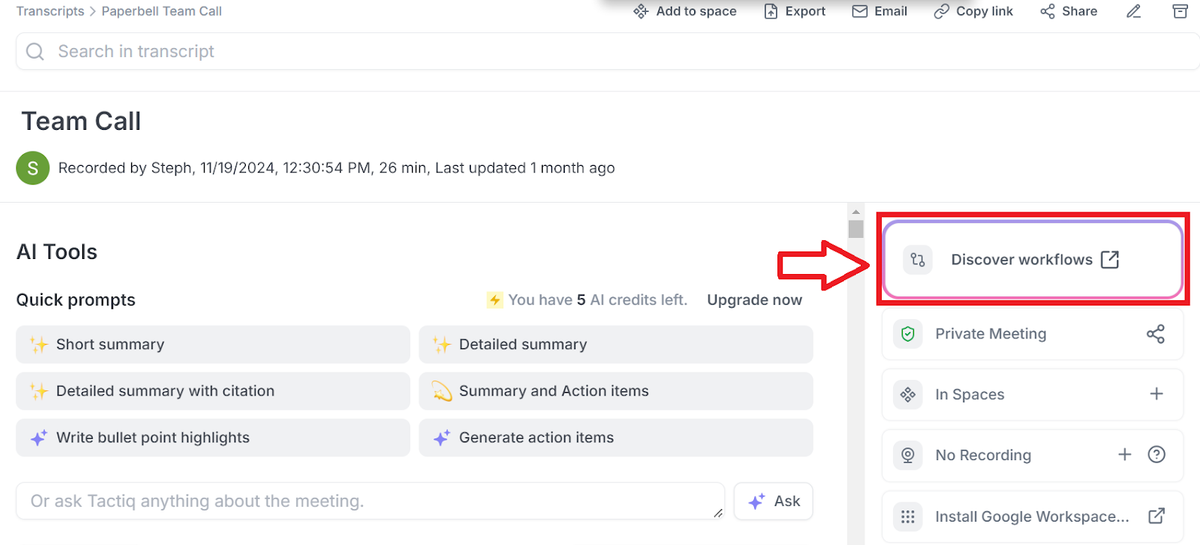
- Open your meeting transcript after a call.
- Click on the Discover Workflows option in the top-right corner.
Choose or Create a Workflow
- Click Start with a blank workflow to build one from scratch.
- If you prefer a ready-to-use setup, choose one of Tactiq’s pre-made templates.
Select a Workflow Template
- Pick a template—such as one that creates a meeting summary, lets you review it, and sends it to a Slack channel.
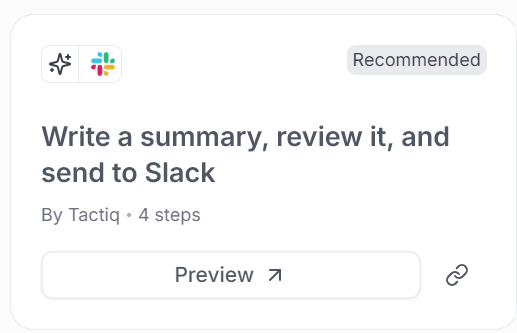
- Click Duplicate to modify the selected template to fit your needs.
Customize the Workflow
- Select where the summary should be shared (e.g., a Slack channel or Notion database).
- Add a custom message to provide context, using variables like "Previous Step" to ensure the right data is sent.
- Rename the workflow for easy reference (e.g., "Weekly Team Sync Notes").
Save and Apply the Workflow
- Click Save to finalize your workflow.
- Go back to your meeting transcript, where the workflow will now appear under Run Workflow.
Run the Workflow
- From the list of saved workflows, select the one you just created.
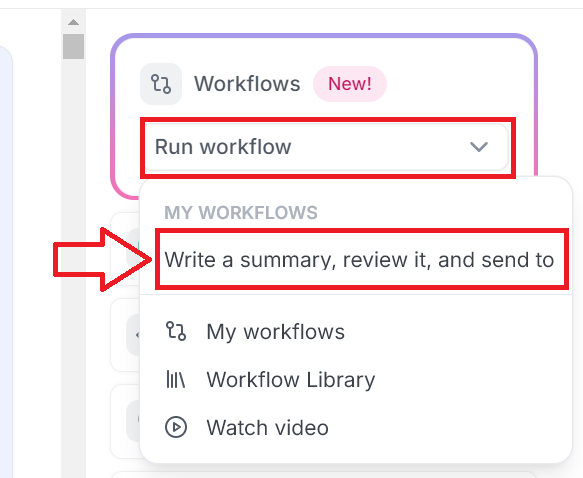
- Click Run Workflow, and Tactiq will begin generating the meeting summary.
Review and Confirm
- Click Review to check the AI-generated summary.
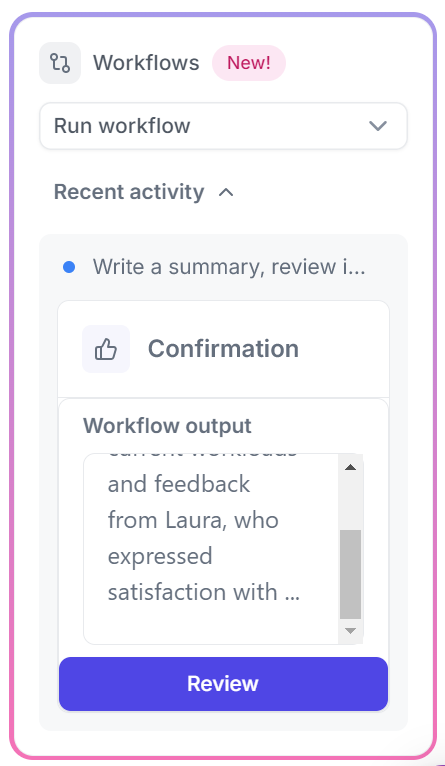
- Make any necessary edits before clicking Accept to confirm.
Share the Summary
The finalized meeting summary will be automatically shared in the designated Slack channel, along with your custom message.
Explore Additional Automation
- Test out different workflow templates to match your team’s needs.
- Provide feedback to Tactiq to help improve future workflow integrations.
With Tactiq, you’re not just taking notes—you’re building a system that keeps meetings productive and actionable.
Want the convenience of AI summaries?
Try Tactiq for your upcoming meeting.
Final Thoughts
AI-powered tools can take meeting notes off your plate, but not all AI is built the same. AI assistants are great for simple, on-demand tasks like transcriptions and summaries—but they still require manual input. AI agents, on the other hand, work autonomously, capturing notes, identifying key insights, and distributing them across tools like Slack and Notion without you lifting a finger.
If you’re looking for a way to automate your meeting documentation, Tactiq makes it easy to build AI-powered workflows—without code. Capture real-time transcripts, summarize discussions, and trigger follow-ups automatically, so your team can focus on what matters.
Try Tactiq today and turn your meetings into actionable insights.
FAQ
Your questions, answered.
If you have any further questions, Get in touch (opens in a new tab) with our friendly team
Can AI assistants automate my workflow?
What’s the easiest way to build an AI workflow for meetings?
Can AI agents schedule meetings and follow-ups?
How accurate are AI meeting assistants?
Is ChatGPT an AI agent?
Related articles

Gemini 3.5 Transcribe: Google Transcript Model Explained
Context Engineering vs Prompt Engineering: What Your AI Agents Are Missing

Claude Memory: How to Import and Manage Your AI Context

Claude Cowork Connectors: Automate Recurring Work

Google Gemini MCP Support: Where It Works and Setup Tips

Best Claude Skills: Top Picks for Meetings, Content, and Code

5 Best AI Scheduling Assistants

Microsoft Teams MCP: How to Access Meeting Content With AI
Want the convenience of AI summaries?
Try Tactiq for your upcoming meeting.
Bringing AI into your meetings has never been so easy.
Add to Chrome - It's free!(opens in a new tab)Try Tactiq in your upcoming meeting!
Sign up now