
What is the Best AI Note-Taking App for Meetings
February 4, 2026
February 4, 2026
February 4, 2026
February 4, 2026

Not every AI note-taking app works the same way. Some rely on bots joining meetings, while others use browser-based transcription with stronger privacy controls and fewer setup steps. Those differences matter for teams that meet often.
This guide explains what makes the best AI note-taking app for meetings and how one option compares to other apps.
Here’s what this guide covers:
- What defines the best AI note-taking app for meetings
- Features that support clear meeting notes
- How AI note takers fit different meeting types
- Answers to common questions about free AI note takers
What is the Best AI Note-Taking App for Meetings?
The best AI note-taking app for meetings captures accurate notes without interrupting the conversation. It supports popular meeting platforms, generates summaries and action items in real time, and keeps setup simple. Privacy and ease of use matter as much as advanced AI features.
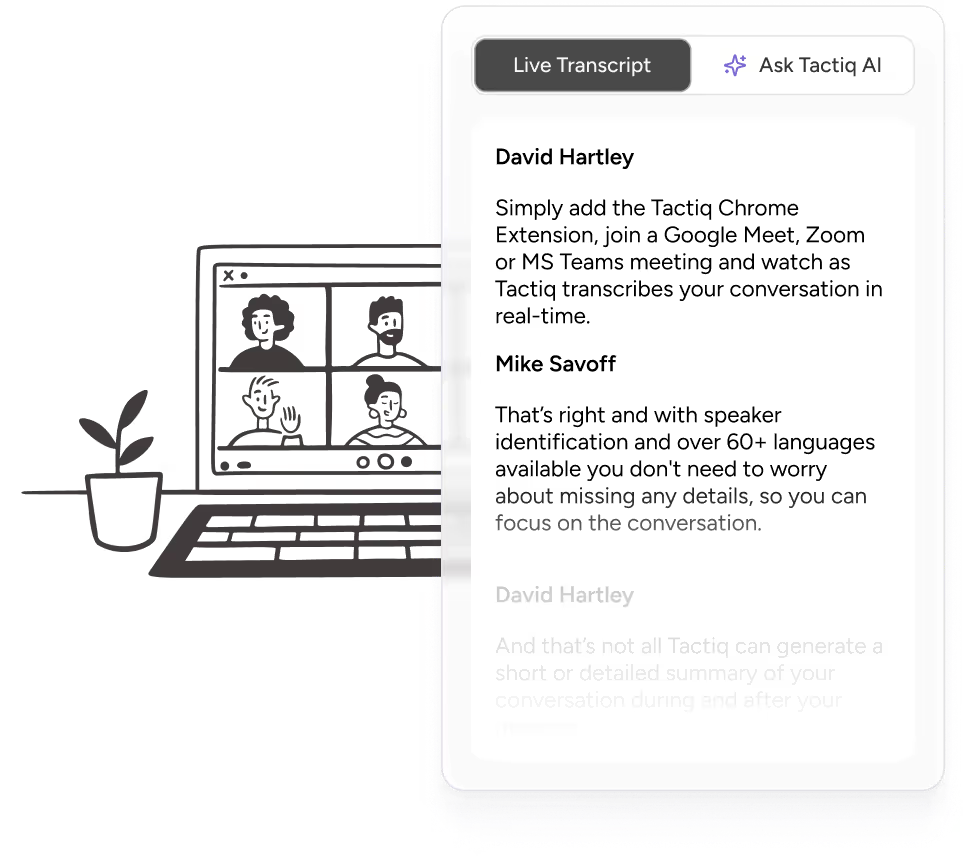
Tactiq meets these needs by handling note-taking directly in the browser. Instead of relying on bots joining meetings, it runs as a Chrome extension and starts transcribing as soon as a meeting begins.
Here’s what sets Tactiq apart:
- Chrome extension with no bot joining and no downloads
- Real-time transcription across Google Meet, Zoom, and Microsoft Teams
- In-meeting AI for summaries, action items, and follow-up questions during the call
- Live transcripts that remain available immediately after meetings
- Privacy-focused design with no audio recording or storage
- One-click sharing and exports for meeting notes and transcripts
- Free plan available, with paid plans offering unlimited transcripts and expanded AI features
💡Pro Tip: Most AI note takers require bots to join meetings, which may raise privacy concerns for participants. Tactiq works as a browser extension, capturing transcripts without using bots or recording audio.
Pricing overview
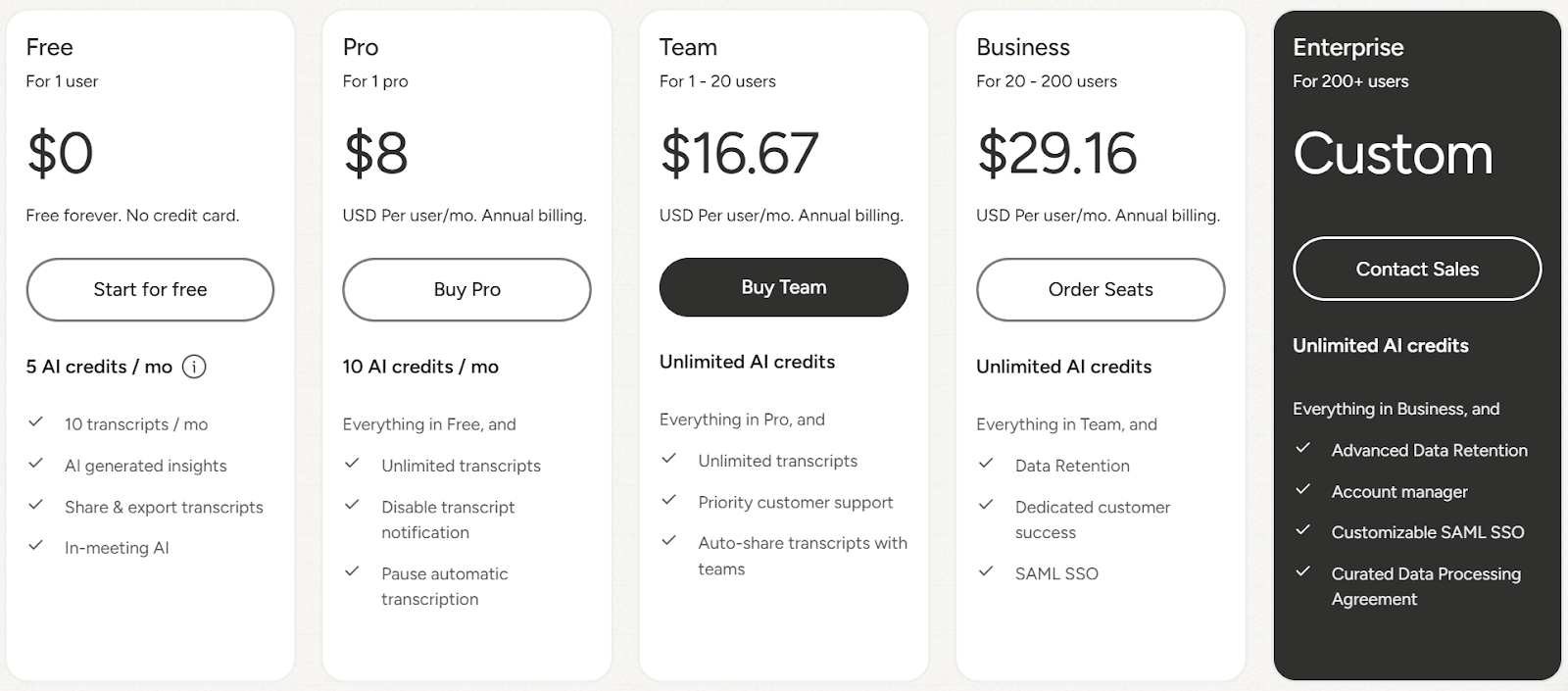
Tactiq offers a free plan that works well for lighter meeting schedules. It includes:
- Free forever for one user
- Up to 10 meeting transcripts per month
- 5 AI credits per month
- Access to in-meeting AI and transcript sharing
Paid plans unlock unlimited transcription and more advanced AI features:
- Pro plan: $8 per user per month, billed annually
- Team plan: $16.67 per user per month, billed annually
- Business plan: $29.16 per user per month, billed annually
- Enterprise: Custom pricing for larger organizations
Not sure which plan fits your team? Start with the free plan to test real-time transcription across your meetings, then upgrade as your needs grow. Paid plans add unlimited transcripts, higher or unlimited AI credits, team sharing, and advanced admin controls.
Note: Pricing and plan details may change, so it’s best to check the latest information on Tactiq’s pricing page before choosing a plan.
How to Use Tactiq for Different Types of Meetings
Different meetings create different kinds of follow-up work. Some need quick summaries, others require structured updates across tools and teams. Tactiq supports both by combining real-time transcription, built-in AI, and workflows that automate post-meeting tasks.
Sales and client meetings

Sales and client meetings often generate follow-ups, CRM updates, and internal handovers. Tactiq captures real-time transcripts with speaker identification, which makes it easier to track requests, objections, and commitments.
For teams that run frequent customer calls, AI workflows are especially useful here. Instead of manually rewriting notes, workflows can automatically extract meeting insights and update CRM records, create follow-up tasks, or send recap emails once the meeting ends.
This reduces manual admin and ensures customer calls translate into action without delays.
Team standup and sprint planning
Standups move quickly and focus on blockers, progress, and next steps. Tactiq records live transcripts and allows teams to tag updates during the meeting. Afterward, teams can use built-in AI to structure notes when needed.
Example AI prompts:
- “Summarize blockers mentioned in today’s standup”
- “List sprint commitments discussed by the team”
- “Highlight risks that may impact delivery this week”
Searchable transcripts also make it easier to revisit decisions from past internal meetings when priorities change.
Interviews and research sessions
Interviews require attention and consistency. Tactiq handles note-taking quietly in the background and separates transcripts by speaker, keeping responses organized. Built-in AI works well here for analysis rather than automation.
Example AI prompts:

- “Summarize key strengths discussed by [Candidate Name]”
- “List concerns or gaps mentioned during the interview”
- “Extract notable quotes related to [Skill or Topic]”
This helps teams compare interviews and extract insights without having to replay recordings.
Training and onboarding
Training sessions often include demos, questions, and explanations that teams need to reference later.
Tactiq captures transcripts and screenshots during video calls, turning sessions into reusable material. AI workflows are helpful when training happens often. Teams can automate the creation of structured notes, FAQs, or shared documentation and send them to a knowledge base or shared workspace (like Slack) automatically.
This reduces repeated questions and keeps onboarding materials up to date.
Executive and board meetings
Executive and board meetings focus on decisions, accountability, and confidentiality. Tactiq supports these sessions with private transcripts and structured summaries.
Built-in AI helps document decisions and action items clearly after the meeting, while workflows can automatically share approved summaries with the right stakeholders.
Since audio is not recorded or stored, sensitive discussions remain text-based and easier to manage under stricter data privacy expectations.
Choosing the Best AI Note-Taking App for Your Team
The best AI note-taking app for meetings helps teams stay focused during conversations and clear on next steps after the call. It captures meeting notes in real time, highlights action items, and supports follow-ups without disrupting the meeting flow.
Tactiq does this directly in the browser, without bots joining calls or audio being recorded. Real-time transcription, searchable transcripts, and AI summaries help teams document decisions and key points across all meetings while keeping notes easy to share.
Install the free Tactiq Chrome Extension in under 60 seconds and capture your next meeting with AI-powered transcription.
{{rt_cta_ai-convenience}}
FAQs About the Best AI Note-Taking App for Meetings
What is the best AI note-taking app?
Tactiq is one of the best AI note-taking apps for meetings because it captures meeting notes in real time without bots joining calls. It works across major meeting platforms (Zoom, MS Teams, and Google Meet), generates AI summaries and action items, and keeps transcripts private by storing text only.
Is there a free AI note taker?
Yes. Tactiq offers a free AI note taker with a free plan that includes limited meeting transcripts and AI usage. This free version is useful for testing AI note-taking during video calls before moving to a paid plan.
How accurate are AI note takers?
With clear audio and stable connections, AI note takers can reach around 95% transcription accuracy. Accuracy depends on speaker clarity, background noise, and accents, but live transcription with speaker identification improves results.
Can AI note takers work without bots?
Yes. Tactiq works without bots joining meetings. It runs as a browser extension, which allows private note-taking and transcription without appearing as a meeting participant or interrupting the call.
What AI note taker works for Zoom, Google Meet, and Microsoft Teams?
Tactiq works across Zoom, Google Meet, and Microsoft Teams, offering real-time transcripts, AI summaries, and action items in one tool.
Related articles








Want the convenience of AI summaries?
Try Tactiq for your upcoming meeting.
Want the convenience of AI summaries?
Try Tactiq for your upcoming meeting.
Want the convenience of AI summaries?
Try Tactiq for your upcoming meeting.