
What Is an LLM for Meetings and Why It Matters
April 4, 2026
April 4, 2026
April 4, 2026
April 4, 2026

You finish a meeting, open the transcript, copy the whole thing, paste it into ChatGPT, and type "summarize this." It works. But it's a lot of steps just to get a few key points out of a 45-minute call.
Now multiply that by every meeting you have in a week. On average, remote professionals have 2-3 meetings daily. That’s around 10-15 separate meeting transcripts per week!
Most remote workers don't realize there's a simpler way. If you're already using an AI meeting tool like Tactiq, you don't need to pull transcripts out and feed them into another tool. Tactiq is already an LLM for meetings. It transcribes your call and lets you interact with that transcript directly, all in one place.
That's what we're going to explore in this article:
- What an LLM for meetings actually is.
- How Tactiq works as one.
- Four workflows that help you get more out of every call.
We're in a New Era of Meeting Intelligence
Pre-AI, we relied on video recordings to get the notes from our call. In 2020, AI note taker tools like Tactiq were founded, which made it very easy to keep meeting transcripts.
And during that time, we all just wanted to have a record of the meeting. You kept it around in case someone asked, "Wait, what did we decide?" You'd scan the action items, transfer them to your project management system, and then move on.
In 2026, this isn’t the full picture anymore. The transcripts sitting in your Tactiq dashboard aren't just notes. They're a living record of your team's thinking: every decision made, every idea raised, every question left open. And with AI built directly into the workflow, you can now do something with all of it.
Here’s a combined insight of my meetings in 2026 so far:

It gave me an overview of things that we’re prioritizing and what we’re letting go of.
We're no longer in the era of "save the transcript just in case." We're in an era where your transcripts are a source of real knowledge and insight.
Being able to create an insight like this from all of my meeting transcripts made me realize: it is its own LLM.
What Is an LLM for Meetings?
As you know, LLM stands for large language model, the AI technology behind tools like ChatGPT. Most times, you use it to draft an email or answer a question.
An LLM for meetings takes the same idea and applies it to your calls. Instead of feeding the AI a prompt you typed, you feed it everything that was said in a meeting. The AI can then understand the content, pull out what matters, answer questions about it, and turn it into something useful.
The important thing for remote workers is that you don't need a separate AI tool to do this. Tactiq already has it built in.
- If you want a deeper look at how LLMs work versus other types of AI, this breakdown of LLM vs. generative AI is a good place to start.
- If you're just getting started with AI meeting notes, Tactiq's built-in AI is the fastest way to see what's possible.
💡 Pro Tip: Instead of copying your transcript into ChatGPT after every call, use Tactiq's built-in AI to ask questions and generate summaries directly from your meeting — no switching tabs, no extra steps.
Why LLM for Meetings Matters for Remote Teams
ChatGPT is a general-purpose LLM. It's trained on the internet, which makes it useful for many tasks. But it doesn't know what happened in your 10 am standup. It doesn't know what your client said last Tuesday. It doesn't know what your team decided three sprints ago.
That's the gap an LLM for meetings fills. Here are three reasons it matters for remote teams.
Your own data
When you paste a transcript into ChatGPT, you're borrowing a general tool to process your specific data. An LLM for meetings like Tactiq is built around your conversations from the start. Your transcripts are the source, not an afterthought.
That means every summary, every insight, and every answer you get is grounded in what your team actually said, not a general guess.
Feed it to other LLMs
A general LLM like ChatGPT gets more useful when you give it better inputs. Your meeting transcripts are some of the most specific, relevant data you have.
Use Tactiq to capture and organize them, then feed the output into ChatGPT, Claude, or any other tool for deeper analysis, strategy docs, or client reports. The two approaches work better together than either does alone.
It works in real time
ChatGPT works after the fact. You finish the meeting, copy the transcript, open a new tab, and then start asking questions. An LLM for meetings works while the call is still happening.

Tactiq's in-meeting AI captures and processes everything in real time, so you can get summaries, surface key points, and catch action items before the call even ends.
How to Use Your Transcripts as an LLM in Tactiq
Here's what most people don't know: Tactiq isn't just a transcription tool.
Yes, it captures everything said in your Google Meet, Zoom, or Microsoft Teams call in real time without a bot joining. But after the call, Tactiq's AI (powered by OpenAI) lets you interact with that transcript directly. You can ask it questions, generate summaries, extract action items, and repurpose content, all inside the same dashboard.
{{rt_cta_ai-convenience}}
4 Workflows That Put Your Transcripts to Work
1. Search and summarize
Since the inception of AI notetakers, this has been the most popular use case.
After a long call, you don't always need the full transcript. You need the three decisions made: what the client said about pricing, or what the team agreed to do next.
Tactiq's AI generates this automatically. But you can go deeper and more specific.
Type a question like "what did we decide about the launch date?" or "what were the action items from this call?" and get a direct answer pulled from the transcript.
For example, I use it often when summarizing the content strategies we’ve discussed on the content call.
What’s great about Tactiq is the featured global meeting search. You can search specific keywords across all your meetings.

I’ve been using Tactiq for more than three years, and I’m sitting on thousands of insights from different content calls.
2. Build a knowledge base
This is the workflow most remote professionals haven't tried yet, and it's one of the most useful.
Every transcript holds context: project decisions, client preferences, team agreements, things that worked, things that didn't. When that information stays locked inside individual meeting recordings, it's almost impossible to find later. When it's organized and queryable, it becomes institutional memory.
Use Tactiq to pull summaries and key moments from your calls. Organize them by project, client, or topic. Over time, you build a knowledge base you can actually use, not just a folder of transcripts you'll never open again.
Recently, I had a series of calls with our client where we mapped out our mission and vision. I’ve used the transcript to build the foundational documents we will use to create content for the blog and X/Twitter.
3. Repurpose content
Your best thinking happens in conversations. The insight you shared in a strategy call, the framing you used with a client, the idea that came up in a team brainstorm: that's real, usable content. It's just stuck in a transcript.
Tactiq's AI helps you pull it out. From a single call, you can generate:
- Client recap emails
- Slack updates for your team
- LinkedIn posts
- Blog drafts
You don't start from scratch. You start from what was already said. Unlike LLMs like ChatGPT that used its own training data, you are using your own data to create unique and original content.
Here’s an example of a LinkedIn post taken from a transcript:
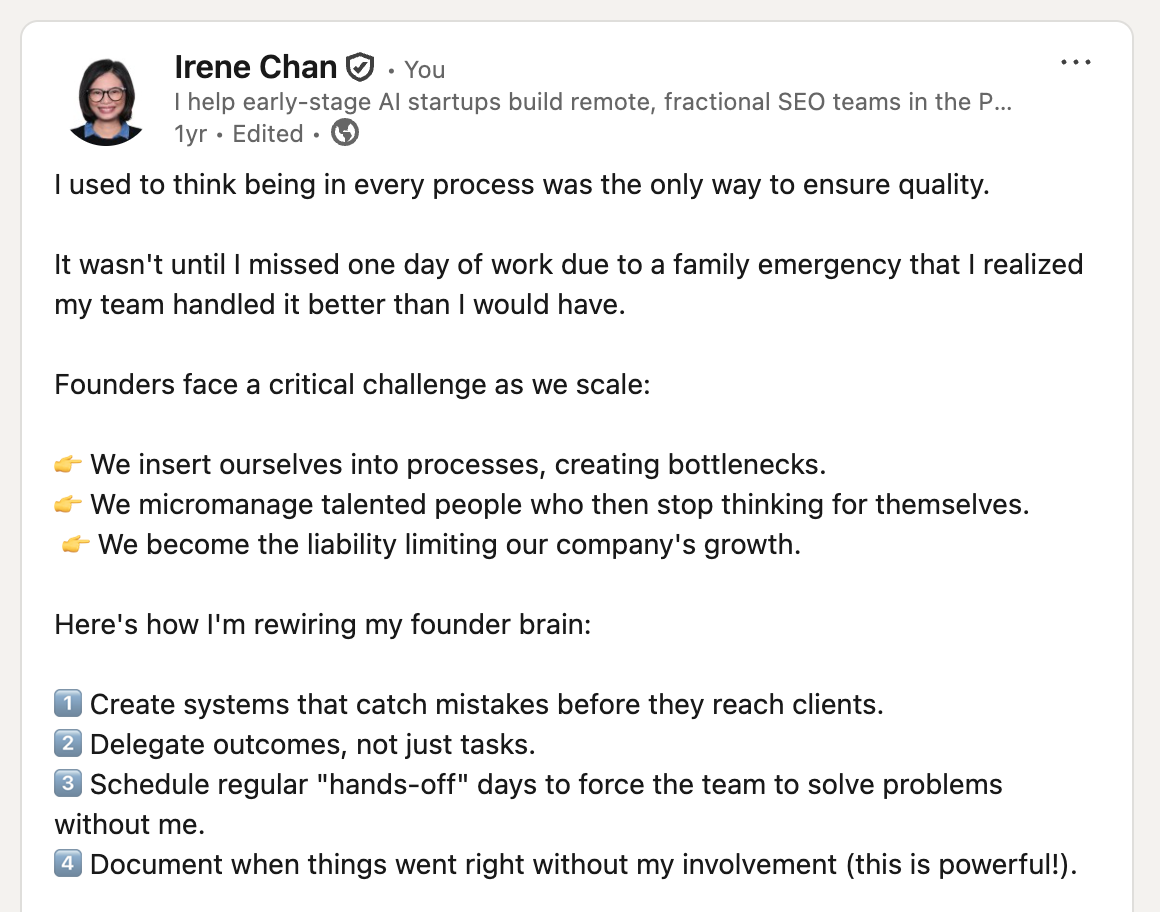
This is the power of using meeting transcripts like your own LLM. You’re not regurgitating what was fed to ChatGPT. Content stems from your own ideas that were born out of brainstorming sessions and planning meetings.
4. Extract meeting insights
Beyond what was decided, there's what keeps coming up.
Is a client raising the same concern across multiple calls? Is your team hitting the same blocker every sprint? Are there patterns in how deals move or stall?
These are the things you'd notice if you had time to read through every transcript. Tactiq's AI does that for you. Ask it to surface recurring themes, flag unresolved questions, or identify where decisions were made and what triggered them.
If you're comparing AI tools and want to know which models Tactiq uses versus other options on the market, this comparison of ChatGPT, Claude, DeepSeek, and Perplexity gives you a clear picture.
The Transcript Is Just the Beginning
Here's the bigger shift worth paying attention to.
Every meeting your team has is raw material. It's ideas, decisions, feedback, and context generated in real time, then usually forgotten within a week.
The teams that treat their transcripts as a starting point and not an endpoint are the ones that build on their shared knowledge over time. They don't repeat the same conversations. They don't lose context when a project shifts. They don't start from scratch when a new person joins.
The transcript isn't the record of a meeting. It's the source of everything that comes after.
Tactiq gives you the tools to make that happen without adding another tool to your stack: it transcribes, summarizes, and lets you extract insights from your meetings, all in one place.
FAQs
What is an LLM for meetings, and how is it different from a regular transcript tool?
A regular transcript tool captures what was said. An LLM for meetings can understand the meeting, summarize key points, answer questions about the content, and turn the conversation into something usable. Tactiq combines both in one place.
Can I use Tactiq's AI without copying my transcript into ChatGPT?
Yes. Tactiq has built-in AI powered by OpenAI. You can ask questions, generate summaries, and repurpose content directly inside Tactiq with no need to switch tools.
How do I build a knowledge base using Tactiq?
Start by using Tactiq's AI to pull summaries and key decisions from your calls. Organize these by project or client, either inside Tactiq or by exporting to a tool like Notion. Over time, this becomes a searchable record of your team's decisions and context.
What kinds of content can I create from a meeting transcript?
Quite a bit. From a single call, you can generate a client recap email, a team Slack update, a LinkedIn post, a blog draft, or a project brief. Tactiq's AI does the initial extraction, and you refine and publish.
Does this work for solo remote workers, not just teams?
Yes. Even if you're the only one using Tactiq, your transcript library becomes your personal knowledge base: a searchable record of client conversations, decisions, and ideas that would otherwise be lost after every call. Tactiq has an enterprise option if you’d like more features for organizations.
Related articles








Want the convenience of AI summaries?
Try Tactiq for your upcoming meeting.
Want the convenience of AI summaries?
Try Tactiq for your upcoming meeting.
Want the convenience of AI summaries?
Try Tactiq for your upcoming meeting.