
How to Add AI Note Taker to Microsoft Teams
May 21, 2026
May 21, 2026
July 13, 2026
July 13, 2026

Teams meetings move fast. Notes get lost, action items blur together, and whoever was typing missed half the conversation. Luckily, AI note-takers are here to save the day.
There are two ways to add an AI note-taker to Microsoft Teams: use Microsoft's built-in tools, or add a third-party app. This guide covers both, so you can pick the right setup.
This article covers:
- Microsoft's native AI note-takers and what they cost
- How to add a third-party AI note-taker to MS Teams
- How to set up Tactiq for Teams, step by step
- How Microsoft Copilot and Tactiq compare
TL;DR: How to Add AI Note-Taker to Microsoft Teams
Microsoft Teams has built-in AI note-taking through Intelligent Recap and Facilitator, but both require a paid license. Tactiq is a free, bot-free alternative that works in Teams, Zoom, and Google Meet. No admin approval needed.
How to Add AI Note-Taker to Teams
Microsoft Teams has a built-in native AI note-taker. It generates meeting notes, summaries, and follow-up tasks automatically, but it requires a Teams Premium or Microsoft 365 Copilot license to access the full feature set.
If you want AI note-taking in Teams without a paid plan or IT involvement, Tactiq is the faster path. It works as a Chrome extension, runs silently in the background during your MS Teams meetings, and gives you a live transcript plus AI-generated summaries. No bot joining the call and no admin approval required.
💡 Pro tip: If your team switches between Teams, Zoom, and Google Meet, Tactiq keeps a consistent transcript and summary ready after every call, no matter which platform you're on.
Does Microsoft Teams Have a Built-In AI Note-Taker?
Yes. Microsoft Teams has two native AI note-taking tools: Intelligent Recap and Facilitator. Both require a paid license to use.
Microsoft Copilot and Intelligent Recap
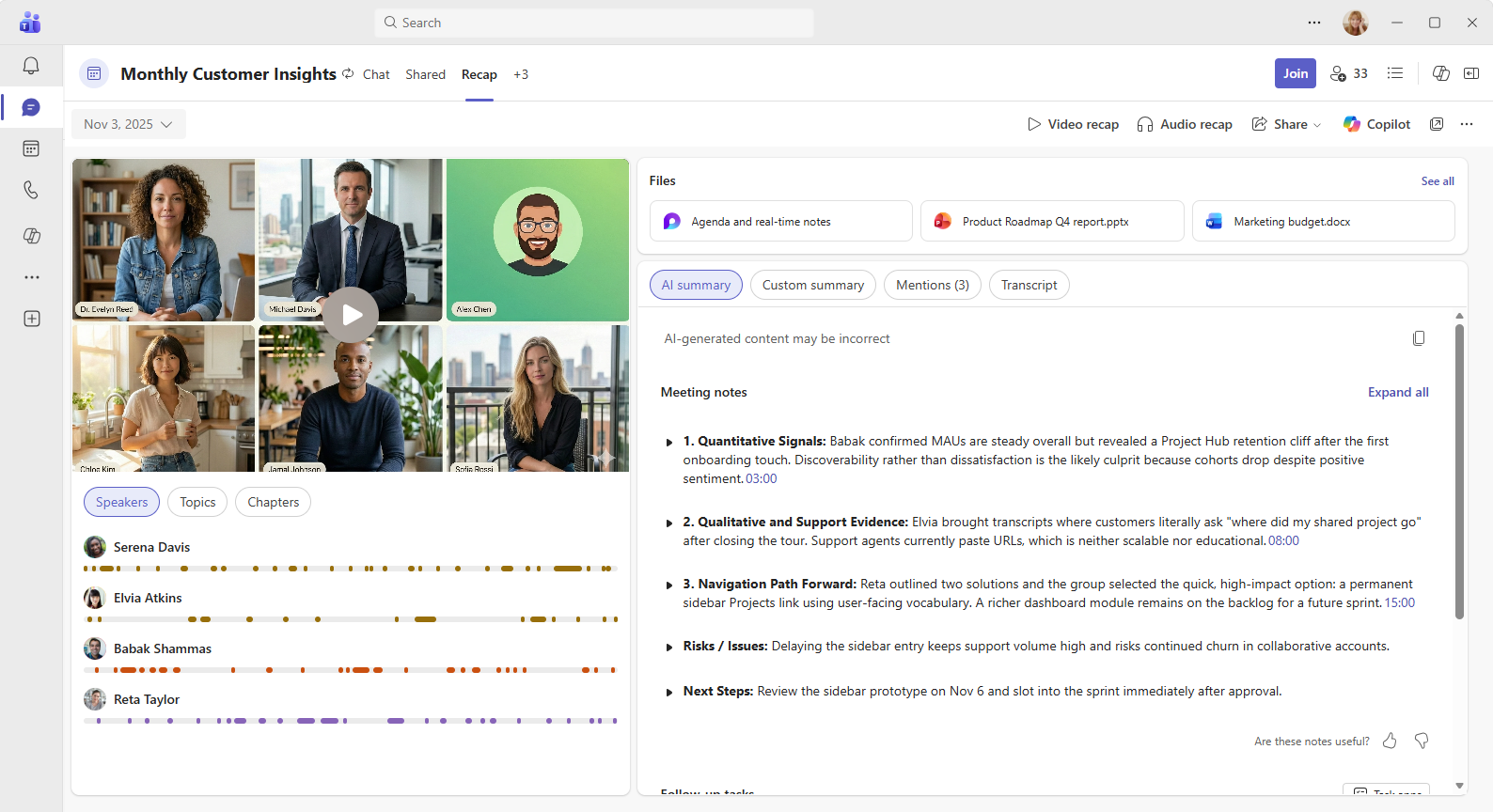
Intelligent Recap is Microsoft's post-meeting AI summary tool. After a Teams meeting ends, it generates AI-generated notes, action items, and meeting chapters organized by topic. You can access everything from the Recap tab in the meeting chat.
Intelligent Recap is available with two licenses:
- Teams Premium — an add-on to your existing Microsoft 365 plan
- Microsoft 365 Copilot — the full Copilot license that unlocks AI features across all M365 apps
A Microsoft 365 Copilot license also gives you access to Copilot during the meeting itself. Select Copilot from the meeting controls to open a private chat where you can ask questions, request a live summary, or generate a list of action items in real time. Other meeting participants can't see your Copilot conversation.
After the meeting, Copilot stays available in the Recap tab as long as a transcript was recorded. You can prompt it to pull out key points, identify decisions, or generate follow-up tasks from the full transcript.
Facilitator
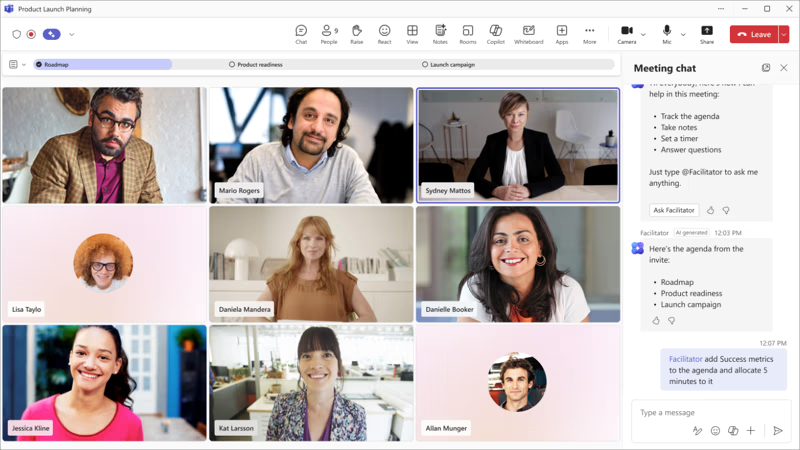
Facilitator is a separate AI agent that works inside scheduled MS Teams meetings. Unlike Intelligent Recap, which generates notes after the meeting ends, Facilitator produces live notes during the meeting as the conversation happens. All participants can see those notes updating in real time inside the Notes tab.
The organizer enables the Facilitator feature directly from the Teams calendar when scheduling the meeting, or from the meeting controls once the call starts. From there, it:
- Generates live notes and captures key decisions — everyone stays aligned without splitting focus between the conversation and a notes doc
- Tracks agenda items and alerts participants when time runs over — meetings end on time instead of running into the next one
- Assigns and syncs follow-up tasks to Microsoft Planner — action items don't get lost between the meeting and the follow-up
- Creates Loop or Word documents based on the discussion — outputs are ready to share before anyone leaves the call
A Microsoft 365 Copilot license is required to add Facilitator to a meeting or turn it on during a call. Participants without a license can still view the live notes; they just can't enable Facilitator themselves.
One important constraint: the Facilitator option only works in scheduled meetings. It can't be added to channel meetings, instant meetings, or Teams calls.
Limitations of native tools
Microsoft's built-in AI note-taking tools are powerful, but they come with real barriers:
- Cost - Both Intelligent Recap and Facilitator require Teams Premium or a Microsoft 365 Copilot license. Neither is included in standard Microsoft 365 plans.
- Admin dependency - Transcription must be enabled at the org level by an IT admin before AI note-taking features will work fully.
- Scheduled meetings only - Facilitator can't run in instant meetings or Teams calls. Intelligent Recap requires a recording or transcript, which may not exist for ad-hoc calls.
- No cross-platform support - Both tools only work inside Microsoft Teams. If your team also runs meetings on Zoom or Google Meet, you'll need a separate solution for those calls.
- External attendees - Collaborative notes and some Copilot features aren't available when external attendees or guests are present.
How to Add a Third-Party AI Note-Taker to Microsoft Teams
Not everyone has access to Teams Premium or a Microsoft 365 Copilot license. And even those who do may want AI note-taking that works across multiple platforms. That's where third-party AI note-takers come in.
Bot-based vs. bot-free: What's the difference?
There are two types of third-party AI note-takers for Microsoft Teams meetings. Understanding the difference matters before you pick one.
- Bot-based notetakers join your meeting as a separate participant. Other people on the call can see the bot in the participant list, which can feel intrusive, especially in client calls or sensitive discussions. These tools typically require admin approval to deploy across an organization and may raise questions from external attendees who didn't expect a third-party tool in the room.
- Bot-free notetakers work differently. They run as a browser extension and capture the transcript directly from your meeting window. Tactiq works this way. It runs silently in the background during your Microsoft Teams meetings and generates a live transcript and AI summaries without joining the call as a bot.
For most users, especially those who want to get started quickly without IT involvement, bot-free tools are the faster, lower-friction path.
How to add Tactiq as your AI note-taker for Teams
Tactiq is free to install and works directly inside your browser. Here's how to set it up for Microsoft Teams meetings.
- Install the free Tactiq Chrome extension.
- Sign up for a free Tactiq account.
- Open your Tactiq dashboard, select Account & Settings, then select Integrations. Click Connect under Microsoft Teams.
- Join your Teams meeting as usual via the Microsoft Teams app in your browser.
- Once you're in the meeting, Tactiq appears on the right side of your screen. Live transcription starts automatically.
- After the meeting ends, use Tactiq's built-in AI to generate a summary, pull out action items, or create follow-up tasks in one click.
Tactiq is free for up to 10 meetings per month, works in 60+ languages, and requires no bot or a paid Microsoft license to use.
It also includes in-meeting AI; you can type prompts like "summarize the last 5 minutes" or "list action items so far" and get instant answers while the meeting is still running. This gives you the same real-time AI assistance as Facilitator, without the Microsoft 365 Copilot license requirement.
For a deeper look at how transcription works in Teams, see How to Get a Transcript of a Microsoft Teams Meeting.
{{rt_cta_ai-convenience}}
Microsoft Copilot vs. Tactiq: Which Should You Use?
Both tools generate AI meeting notes inside Microsoft Teams. Which one makes sense depends on your budget, your setup, and how many platforms your team uses.
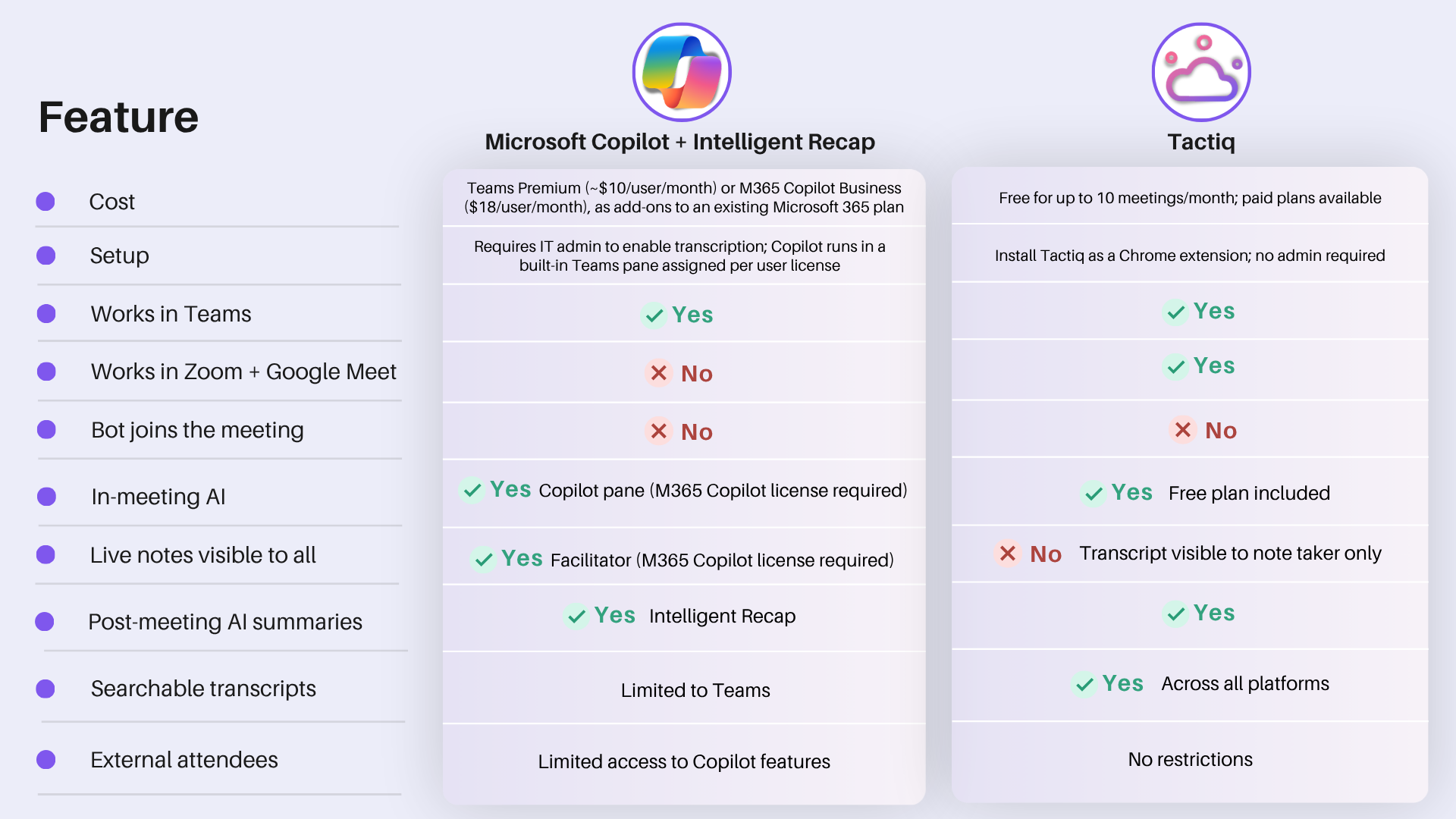
Here's a quick breakdown:
Microsoft Copilot and Intelligent Recap make the most sense if your team is already deep in the Microsoft 365 ecosystem and your org has the budget for Teams Premium or a full Copilot license. The native integration is seamless, and the Facilitator's shared live notes are a genuine advantage for collaborative meetings.
Tactiq is the better fit if you want AI meeting notes without a paid plan or IT dependency. It also works across Zoom and Google Meet, so your note-taking stays consistent no matter which platform your next meeting is on.
The right choice depends on what your team already uses, what you're willing to pay, and how much setup you want to deal with.
For a full breakdown of what AI note-taking in Teams looks like in practice, see How to Use AI Note-Taking with MS Teams Meetings.
Get AI Meeting Notes in Teams
Microsoft Teams offers multiple ways to access AI meeting notes. Intelligent Recap and Facilitator are built into Teams and work well if your org is already on Teams Premium or a Microsoft 365 Copilot license. If you're not, or if your team runs meetings across Zoom and Google Meet too, Tactiq is the faster way in.
It's free, bot-free, and takes minutes to set up. Install the Chrome extension, join your next Teams meeting, and your transcript and AI summaries are ready before anyone's closed their laptop.
For more on how to get the most out of AI transcription in Teams, see Microsoft Teams AI Transcription: A Complete Guide.
Yes. Teams has two built-in AI note-takers: Intelligent Recap (post-meeting summaries) and Facilitator (live notes during the meeting). Both require a Teams Premium or Microsoft 365 Copilot license.
Yes. Tactiq works as a Chrome extension. No bot joins the call, no one is notified, and no admin approval is needed.
Yes. Tactiq's free plan covers up to 10 meetings per month, including live transcription, AI summaries, and action item extraction.
For native tools, your IT admin must enable transcription, and you'll need a Teams Premium or Copilot license. For Tactiq, install the Chrome extension, and it starts automatically when your meeting does.
Intelligent Recap generates AI notes, action items, and meeting chapters after a Teams meeting ends. It requires Teams Premium or a Microsoft 365 Copilot license. Tactiq offers similar summaries for free across Teams, Zoom, and Google Meet. Learn more: How to Use AI Note-Taking with MS Teams Meetings.
Related articles








Want the convenience of AI summaries?
Try Tactiq for your upcoming meeting.
Want the convenience of AI summaries?
Try Tactiq for your upcoming meeting.
Want the convenience of AI summaries?
Try Tactiq for your upcoming meeting.