
Claude System Prompt Explained: What's Inside and Why It Matters
April 24, 2026
April 24, 2026
June 18, 2026
June 18, 2026

You've probably noticed that Claude doesn't behave the same way everywhere. It's more formal in some tools, more concise in others. That's not random. It starts before you type a single word.
A Claude system prompt is a set of instructions loaded before your conversation begins. Every person's message lands inside a context already shaped by that prompt. Most users never see it. But understanding how it works changes how you write inputs and what you get back.
This article covers:
- What a Claude system prompt is and how it works
- The difference between a system prompt and what you type
- How Anthropic's prompt shapes Claude's personality and guardrails
- What you can and can't change as a regular user
- How better inputs make prompting Claude more effective
What is a Claude System Prompt?
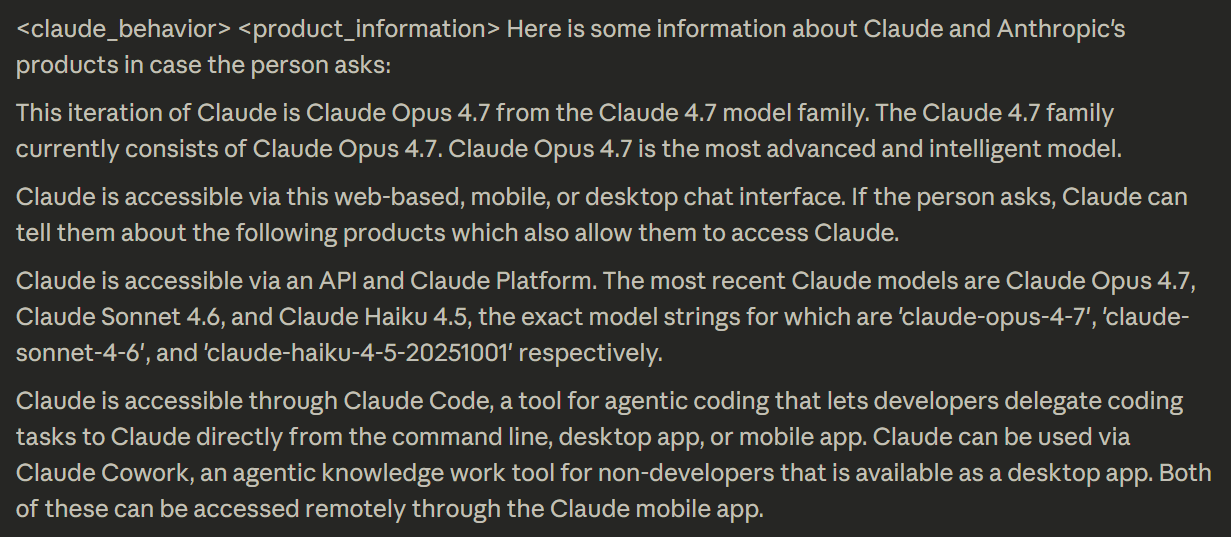
A system prompt is a block of instructions delivered to Claude before any conversation starts. It's written in natural language, not code, and it sits at the top of the context window, above everything you type. Claude reads it first. Every response that follows is shaped by it.
Think of it as a briefing. Before a person asks Claude anything, the system prompt has already been defined:
- What tone and personality to use
- What topics to avoid or handle carefully
- How long and how formatted should responses be
- What Claude assumes by default if you don't specify
When you chat on Claude or the mobile app, Anthropic loads a full system prompt automatically. It sets the current date, encourages specific formatting like Markdown for code, and defines the defaults Claude runs on. You don't write it. You don't see it. It's just there.
The result is that Claude's response to the same question can look different depending on where you ask it:
- A user on claude.ai gets Anthropic's default system prompt
- A user inside a third-party app gets whatever the operator wrote
- A developer using the API gets no default system prompt at all
Same model, different behavior rules.
💡 Pro Tip: Tactiq automatically captures a full transcript of your Zoom, Google Meet, or Microsoft Teams call, giving Claude the context it needs to draft action items and follow-ups the moment the meeting ends.
Claude System Prompt vs. User Prompt: What's the Difference?
Every conversation Claude has involves at least two layers of input. They come from different sources, arrive at different times, and carry different levels of authority.
- The system prompt is set before the conversation begins. The user never writes it. It defines the rules Claude engages with for the entire session: tone, limits, format, and defaults. It doesn't change as the conversation history grows.
- The user prompt is what you actually type. Every time a user asks Claude something, that message gets added to the conversation in real time. Claude tailors each reply based on both layers: the standing instructions from the system prompt and the specific words in your message.
There's also a third layer most people don't think about: who controls what.
- Anthropic sets Claude's core values and hard limits through training; these can't be overridden
- Operators (companies and developers who access Claude via API) write the system prompt for their product
- Users work within whatever space the operator allows
User claims and requests are read in that order of priority. If a user asks Claude to do something the operator's system prompt prohibits, Claude refuses, even if the request seems reasonable on its own.
In practice, this is why Claude behaves differently across tools. The same model powers Claude, Notion AI, and dozens of other products. Each one sets its own system prompt, and that single file changes everything about how Claude responds.
If you're evaluating AI tools for your team, ask whether the product publishes or documents its system prompt. Transparency is a signal of how seriously the operator thinks about AI behavior. For a deeper look at how Claude compares across use cases, Claude vs. Perplexity breaks down the key differences.
How Anthropic's System Prompt Shapes Claude's Behavior
Anthropic's default system prompt does more than set a tone. It defines the specific rules Claude follows on the web and mobile apps, covering everything from how Claude formats a response to how it handles sensitive topics. Here's what each layer actually controls.
Tone, personality, and response style
The system prompt defines Claude's voice before you type a word. It sets defaults for response format, length, and how Claude structures information. A few specific rules baked in:
- Claude uses Markdown for code snippets, but avoids unnecessary formatting in casual conversation
- Claude never starts responses with filler phrases like "Certainly!" or "Absolutely!"; these are banned by name
- Claude provides one decisive recommendation rather than listing multiple options unless asked
- Claude gives concise answers first, then offers elaboration
- Claude avoids emojis, profanity, and emotes unless the user specifically asks
The system prompt also injects the current date at the start of every session. This grounds Claude in time, preventing it from treating its training data as a live feed, which is a common source of errors without a hard knowledge cutoff date reference.
Safety and ethical guardrails

Claude cares deeply about user well-being. The system prompt is where those values become specific rules. It doesn't just say "be safe." It specifies exactly how Claude handles situations where harm is possible.
Claude avoids and refuses to assist with:
- Content that could facilitate self-destructive behaviors
- Highly negative self-talk or content that could reinforce self-destructive behavior
- Disordered or unhealthy approaches to eating, exercise, or physical health
- Creative or educational content that could be used to cause real-world harm
The system prompt also shapes how Claude handles ambiguous or controversial requests. For tasks involving views held by a significant number of people, Claude provides assistance regardless of its own views, without flagging the topic as sensitive or claiming to present objective facts.
Claude steers toward the legal and legitimate interpretation of any message, giving users the benefit of the doubt while staying within safe limits.
These guardrails connect directly to Anthropic's broader Constitutional AI framework, the principles baked into Claude's training data that guide how it reasons about harm, honesty, and intent. For a fuller picture of how this works in practice, Is Claude AI Safe? covers the safety architecture in detail.
What Anthropic publishes, and why that's unusual
Most AI companies treat their system prompts as proprietary. Anthropic does the opposite. Since August 2024, Anthropic has published Claude's system prompts as part of its official documentation, updated with every model release and logged at docs.claude.com/en/release-notes/system-prompts.
The changelog runs from Claude 3 (July 2024) through to Claude Opus 4.7 (April 2026). Each entry documents exactly what changed between versions. Anthropic's head of developer relations announced the practice publicly, framing it as an ongoing commitment, not a one-time disclosure.
Reading through the published prompts reveals something useful: Claude's behavior isn't a black box. Every quirk, the step-by-step reasoning, the banned filler phrases, the face-blind image policy, has a documented instruction behind it. In newer models, Claude automatically triggers the web search tool for current news rather than defaulting to its knowledge cutoff.
No other major AI lab publishes this level of detail on a rolling basis. It's a meaningful trust signal, and direct evidence that the way Claude responds is deliberate, not accidental.
Can You See or Change Claude's System Prompt?
It depends on how you access Claude. Regular users, developers, and enterprise teams all have different levels of visibility and control.
If you're using Claude on the web or mobile app, you can't see or edit the default system prompt. Claude answers user queries within the rules Anthropic has already set. Prompt injection attempts, where a person tries to override or expose system instructions through their own message, don't work. Claude is specifically trained to resist them.
What you can do is influence how Claude responds within those boundaries:
- Specify format - bullet points, tables, numbered steps
- Define tone - formal, concise, plain English
- Request specific XML tags to structure output for downstream use
- Use role prompting - "act as a project manager reviewing this brief"
Anthropic's prompting documentation at docs.claude.com covers these techniques in depth, including step-by-step reasoning and using positive and negative examples to steer output.
Claude Projects gives regular users something close to their own system prompt. Write custom instructions once, tone, context, and output format, and Claude applies them to every conversation in that project automatically.
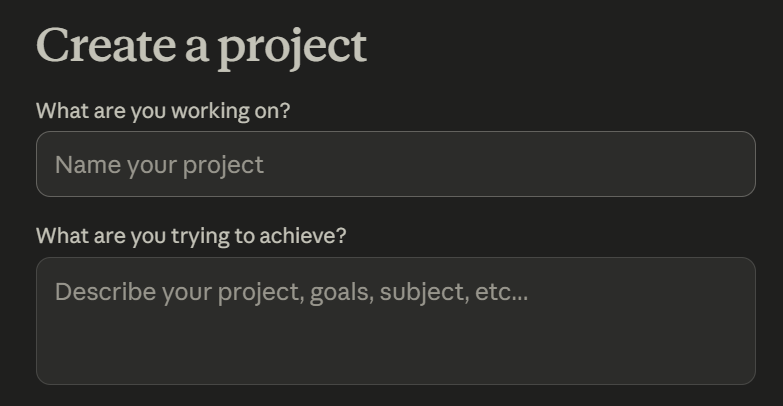
For teams that need shared projects and admin controls across multiple members, Claude Team is built for exactly that.
Developers who access Claude via API work without any default system prompt at all. The API gives operators a blank slate to write their own instructions from scratch. Real customization happens here:
- Enabling tool use and tool calls
- Restricting topics or personas
- Defining output structure and response format
- Connecting to external data sources
Claude models available via API include Opus, Sonnet, and Haiku, each optimized for different tasks and cost profiles. Claude Code, Anthropic's command line tool for agentic coding, is one example of a product built on this layer with its own system prompt baked in.
For a full breakdown of what's available across plans and how many messages you get at each tier, this video covers Claude's 2026 pricing in detail:
How to Give Claude Better Context for Meeting Follow-Ups with Tactiq
The system prompt shapes how Claude reasons. But it can't compensate for information that was never captured in the first place. That’s where Tactiq comes in.
Tactiq captures meeting conversations in real time across Zoom, Google Meet, and Microsoft Teams. No bot, no manual note-taking. Speaker labels, timestamps, and full conversation history are preserved automatically. The transcript is ready the moment the meeting ends.
From there, Tactiq's built-in AI takes over. It summarizes the meeting, extracts action items, and surfaces key decisions without you having to touch Claude at all. For most meetings, that's enough.
For teams that want to go deeper, the transcript becomes raw material for Claude. Pipe it in, and Claude can:
- Draft follow-up emails and stakeholder updates from the discussion
- Identify open questions and decisions made
- Generate structured meeting minutes in a custom format
- Analyze patterns across multiple meetings over time
Tactiq's custom AI prompts are a meeting-specific layer of prompt engineering. Define the output format and level of detail once, and every meeting follows the same structure. Can Claude AI Take Meeting Notes? covers the full workflow.
The transcript is the asset. Tactiq captures it. Your AI, built-in or Claude, extracts the value.
Install Tactiq for free and turn every meeting into a structured, searchable context your whole team can use.
{{rt_cta_ai-convenience}}
Conclusion
The system prompt is the instruction manual Claude runs on. It shapes tone, enforces guardrails, and defines how Claude handles every message before you've typed a word. Most users never see it, but it drives most of what makes Claude behave the way it does.
What makes Anthropic unusual is that they publish it. The changelog is a rolling record of exactly how Claude has been instructed to behave. That level of transparency is rare in AI, and a meaningful signal about how seriously Anthropic takes accountability.
If you're using Claude for work, the biggest lever you have isn't the system prompt; it's the quality of what you feed it. Clean, structured meeting transcripts give Claude the context it needs to produce outputs worth acting on.
Try Tactiq today and give Claude better raw material, starting with your next meeting.
A system prompt is a set of instructions loaded before your conversation starts. It tells Claude how to behave (tone, limits, format) before you type anything.
Yes. Anthropic publishes system prompt release notes at docs.claude.com/en/release-notes/system-prompts, updated with every model release. It applies to Claude on the web and mobile apps only, not the API.
Regular users can't edit the default system prompt. You can use Claude Projects to set custom instructions, or access Claude via API to write your own system prompt from scratch.
It defines Claude's defaults before the conversation begins: response format, tone, safety guardrails, and how Claude handles edge cases. Every response Claude gives runs on those rules.
Use Tactiq to capture a full, structured transcript of your meeting. Feed it to Claude, and it can draft follow-ups, extract action items, and generate meeting minutes in minutes.
Related articles








Want the convenience of AI summaries?
Try Tactiq for your upcoming meeting.
Want the convenience of AI summaries?
Try Tactiq for your upcoming meeting.
Want the convenience of AI summaries?
Try Tactiq for your upcoming meeting.