
Claude Team: Pricing, Features & Benefits for Remote Teams
- Published:
- February 18, 2026
- Updated:
- September 15, 2026

Your team's expertise is scattered across different people, projects, and tools. Getting everyone aligned and moving in the same direction takes constant effort.
Claude Team (opens in a new tab) is Anthropic's collaboration plan. It gives your whole team shared Claude Projects, workplace connectors, and admin controls that keep institutional knowledge accessible instead of siloed.
Here's what we'll cover:
- What Claude Team offers and how it works for collaboration
- Pricing for standard and premium seats
- Key benefits that make remote teamwork smoother
- How to connect Tactiq to Claude Team through the Connectors Directory
TL;DR
Claude Team now starts at just two members and scales up to 150 seats. Standard seats run $20 to $25 per month, and premium seats run $100 to $125 per month.
Tactiq is now listed directly in Claude's Connectors Directory. Your team can pull meeting transcripts and summaries into Claude Team projects in a couple of clicks, instead of pasting transcripts in manually.
What is Claude Team?
Claude Team is Anthropic's collaboration plan for teams that need to work with AI together. It supports groups of 2 to 150 members and sits between Claude Pro (for individual users) and Claude Enterprise (for large organizations).
Instead of each person working with Claude individually, your whole team gets shared Claude Projects, connected workplace tools, and centralized management that keeps everyone aligned.
Claude Team Pricing
Claude Team requires a minimum of two members. You can choose between two seat types depending on how much usage your team needs.
Standard vs premium seats
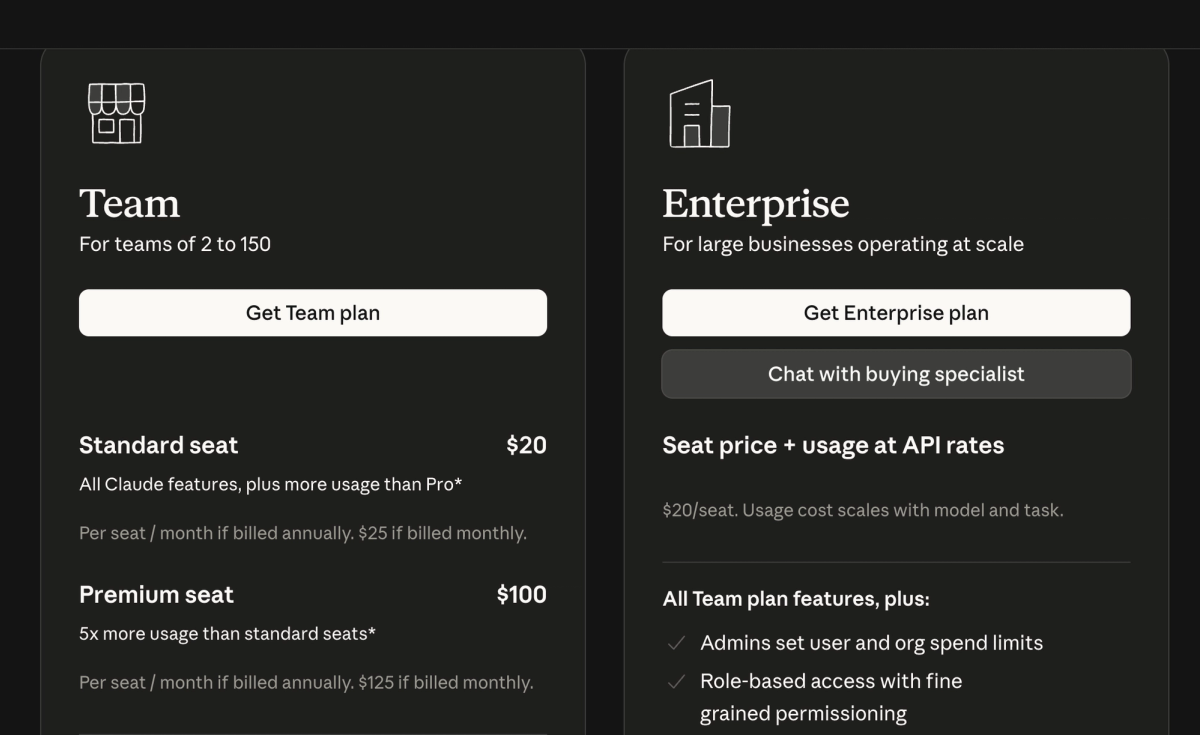
Standard seats:
- $25 per member per month, billed monthly
- $20 per member per month, billed annually
Premium seats:
- $125 per member per month, billed monthly
- $100 per member per month, billed annually
Premium pricing suits teams running heavier workloads across multiple teammates.
Pricing varies by region and excludes applicable taxes. Check Anthropic's Team plan pricing page (opens in a new tab) for current rates in your location.
What's included in standard seats:
- Access to all available Claude AI models
- Access to Claude Code to delegate complex coding tasks, write tests, and work across existing code, all from your terminal or IDE
- Shared projects where you can add documents and files as context
- Workplace connectors (opens in a new tab) for Google Drive, Gmail, Google Calendar, GitHub, Microsoft 365, and Slack
- A 200K context window for long documents and complex work
- Admin tools for billing and access management
- Single sign-on and domain capture for security
- 1.25 times more usage per session than Claude Pro
What premium seats add:
- Everything in standard seats
- More usage for team members with heavier Claude Code workloads
- 6.25 times more usage per session than Claude Pro
- Two weekly usage limits: one across all models, one specifically for Sonnet models
A note on Claude Fable 5: Fable 5 (opens in a new tab) is available on all paid plans, but access works differently by seat. On premium seats, Fable 5 draws from your existing weekly limit, up to 50% of it, at no extra cost. On standard seats, Fable 5 runs on pay-as-you-go usage credits from the start.
Claude Team Benefits for Remote Teams
Claude Team addresses the core challenges that slow distributed teams down. Here's how the features translate into real efficiency gains.
Centralized collaboration and shared projects
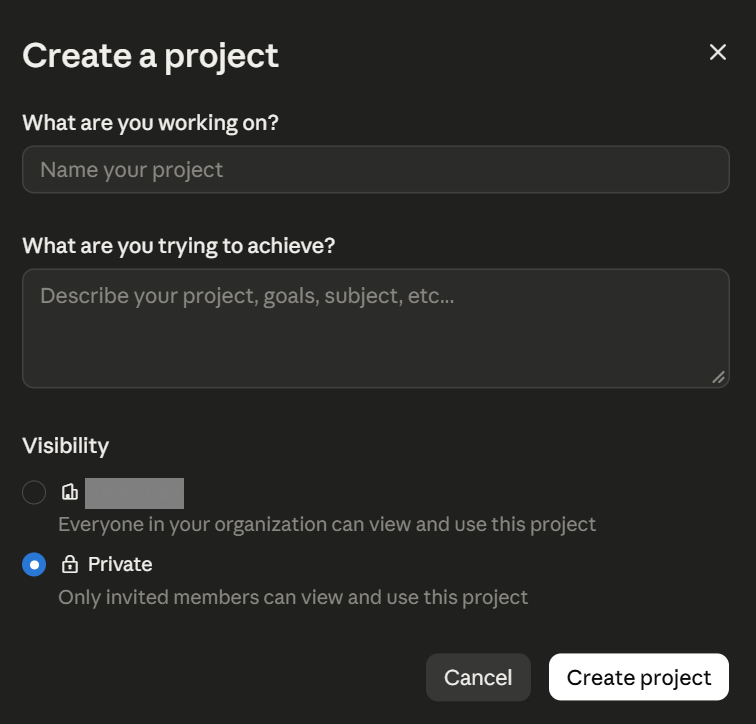
Projects (opens in a new tab) in Claude Team act as shared workspaces where your entire team can access the same context. Add product specs, customer research, or brand guidelines once. Every team member who opens that project has the full background they need.
How teams use shared projects:
- Sales teams create projects with customer personas and pitch templates
- Engineering teams (opens in a new tab) share existing code so any developer can jump in with full context
- Marketing teams maintain brand assets so everyone creates on-brand content
- HR teams organize employee resources and policies in one place
Administrative controls
Team admins get centralized tools to manage the organization:
- Single sign-on and domain capture streamline how your team logs in
- Role-based permissions control who accesses specific features or projects
- Spending caps at the organization and individual user levels keep costs predictable
- Centralized billing management in one dashboard
Workplace connectors
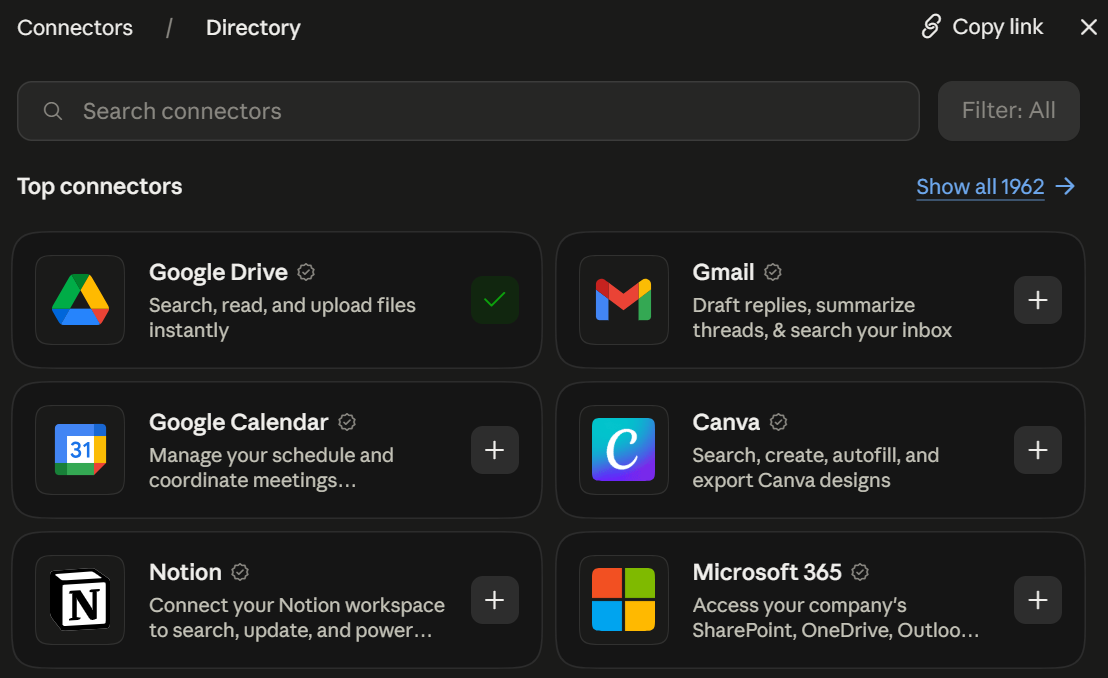
Claude Team connects directly to the tools your team already uses: Google Drive, Gmail, Google Calendar, Microsoft 365, Slack, and GitHub. Claude searches and retrieves information from your existing documents, emails, calendars, and team communications, so your team stops switching between apps to gather context.
The plan also includes enterprise search across Slack, Microsoft 365, and custom connectors, giving every team member one place to find information. Usage limits apply per person rather than to the whole team, so one member reaching their cap never blocks anyone else's work.
💡 Pro Tip: Tactiq is now listed in Claude's Connectors Directory. Connect it once (opens in a new tab), then ask Claude about any meeting directly from your Claude Team projects; no exporting or uploading required.
Using Meeting Transcripts With Claude Team and Tactiq
Claude Team works well for complex projects and content creation. For meeting workflows specifically, Tactiq now connects directly through Claude's Connectors Directory, so your team never has to leave the chat to bring meeting context in.
Tactiq (opens in a new tab) transcribes your Google Meet, Zoom, and Microsoft Teams meetings in real time. It captures speaker labels, timestamps, and full conversation context, with no bots and no recordings.
Connect Tactiq from the Claude directory
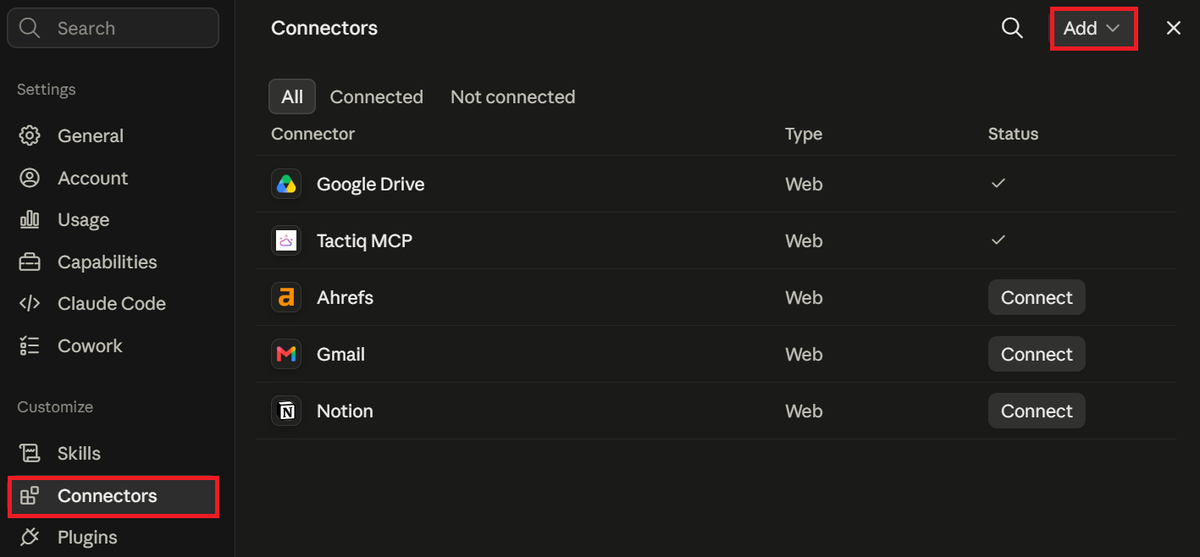
Tactiq is listed in Claude's connector directory, so setup takes under a minute:
- Go to Customize > Connectors in Claude, click Add > Browse connectors, and search for Tactiq (or open the Tactiq listing directly).
- Click Connect.
- On the Tactiq screen, click Allow to authorize the connection.
Once connected, you can ask Claude things like:
- "Summarize my last Tactiq meeting."
- "What were the key decisions from yesterday's call with the design team?"
- "Draft a follow-up email based on this week's customer call."
What Claude can access depends on your Tactiq plan. Free and Pro accounts let Claude search and list meetings. Team accounts and above unlock meeting details, summaries, and full transcription.
Setting it up for your whole team
On Team and Enterprise plans, a Claude Owner can add Tactiq once at the organization level, so members don't need to connect it individually first:
- Go to Organization settings > Connectors in Claude.
- Click Add > Custom > Web.
- Enter https://mcp.tactiq.io and click Add.
Each member then goes to Customize > Connectors and clicks Connect to link their own Tactiq account.
When Zapier still makes sense
If you're routing meeting transcripts into workflows beyond Claude entirely, Tactiq's Zapier integration (opens in a new tab) still works well for automating that handoff without an in-chat prompt.
Want the convenience of AI summaries?
Try Tactiq for your upcoming meeting.
Work Smarter With Claude Team
Claude Team gives your team the tools to work faster and stay aligned. Shared projects keep institutional knowledge accessible instead of siloed. Workplace connectors bring information from your existing tools into one place. Admin controls let you manage access and costs from a central dashboard.
For meeting workflows specifically, Tactiq now connects directly through Claude's Connectors Directory. Transcribe, summarize, and search your entire meeting history from inside any Claude conversation. No exporting required.
FAQ
Your questions, answered.
If you have any further questions, Get in touch (opens in a new tab) with our friendly team
What is the Claude Team plan?
How much does Claude Team cost?
Does Claude Team have usage limits?
Can you share Claude projects with team members?
Does Tactiq work with Claude Team's Connectors Directory?
Related articles
Context Engineering vs Prompt Engineering: What Your AI Agents Are Missing

Claude Memory: How to Import and Manage Your AI Context

Claude Cowork Connectors: Automate Recurring Work

Google Gemini MCP Support: Where It Works and Setup Tips

Best Claude Skills: Top Picks for Meetings, Content, and Code

5 Best AI Scheduling Assistants

Microsoft Teams MCP: How to Access Meeting Content With AI

How Do I Turn Off Google Gemini?
Want the convenience of AI summaries?
Try Tactiq for your upcoming meeting.
Bringing AI into your meetings has never been so easy.
Add to Chrome - It's free!(opens in a new tab)Try Tactiq in your upcoming meeting!
Sign up now