
Automated Meeting Workflows: How to Save Hours Every Week
- Published:
- May 29, 2026
- Updated:
- July 17, 2026

Most teams spend more time managing meetings than they realize. Scheduling takes rounds of back-and-forth. Note-taking pulls focus away from the conversation. Follow-ups get written hours after the call, if they get written at all. Every manual step is a gap where context gets lost.
Automated meeting workflows close those gaps. They handle the repetitive work before, during, and after the meeting, so your team can focus on the conversation and act on it faster.
This article covers:
- What automated meeting workflows are and how they work
- The key stages where automation delivers the most value
- How to set up automated workflows with Tactiq
- Use cases by team type
- The best tools for building an end-to-end meeting automation stack
Can Meeting Tools Actually Run The Post-Meeting Process for You?
Yes. Tactiq (opens in a new tab) transcribes your call in real time, then automatically routes summaries, action items, and follow-ups to your CRM, Slack, or Notion without manual input. Install the Tactiq Chrome extension (opens in a new tab), sign into your account, and you're ready to transcribe your next meeting.
What Is An Automated Meeting Workflow?
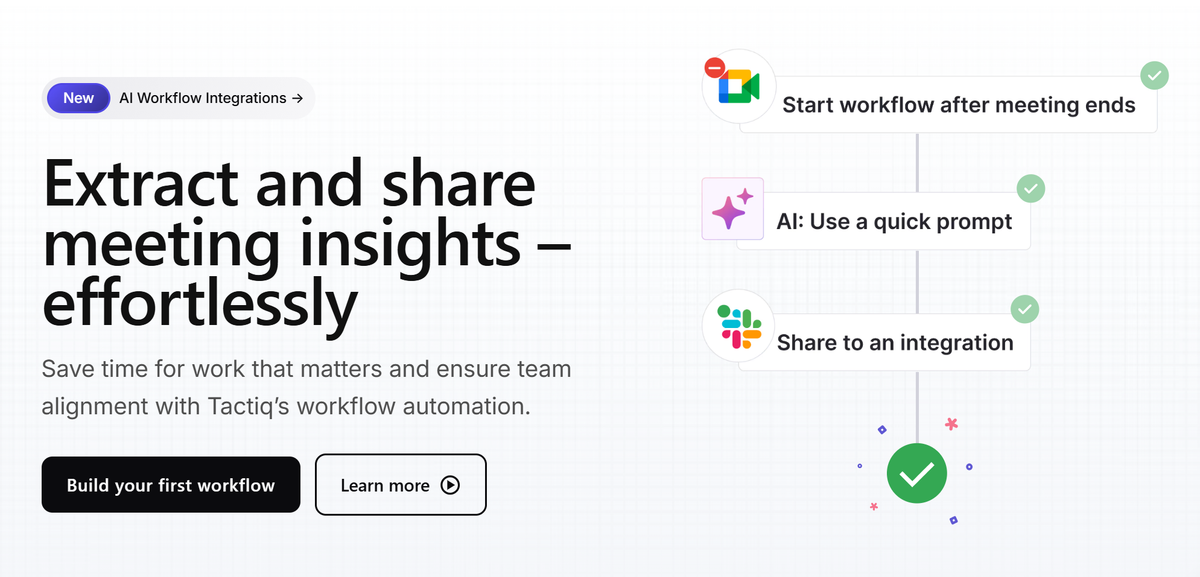
An automated meeting workflow handles:
- Tasks before, during, and after meetings
- Routing between your calendar, your notes app, and your CRM without manual input
The goal is to eliminate the administrative layer that surrounds the meeting.
Most teams have solved one stage in isolation. They use a scheduling tool for booking or a note taker (opens in a new tab) for transcription. But disconnected tools create disconnected outputs: notes that never reach the CRM, action items that never become tasks, meeting insights that never leave the chat window.
Automated workflows connect those stages into a single pipeline. Every meeting produces consistent, routable outputs your team can actually use.
💡 Pro tip: Tactiq (opens in a new tab) transcribes and summarizes your calls in real time across Google Meet, Zoom, and Microsoft Teams, so action items and decisions are ready to share the moment the call ends. No manual notes required.
3 Key Stages of an Automated Meeting Workflow
Meeting automation doesn't happen in one place. It spans three distinct stages (before, during, and after the call), and each one has its own set of tasks that can run without manual input. Here's what each stage looks like in practice.
Pre-meeting automation
Before anyone joins the call, there's a surprising amount of work that can run on autopilot. Scheduling alone can eat up 30 minutes of back-and-forth for a single meeting. Multiply that across a full week, and it becomes a real drain on focus time.
Pre-meeting automation typically covers:
- Scheduling: Tools like Calendly eliminate the back-and-forth by letting participants book directly into available slots
- Calendar syncing: Connecting your video conferencing platform to Google Calendar or Outlook ensures meeting links, agendas, and reminders go out automatically
- Recurring meeting setup: For standing syncs, recurring Zoom meetings (opens in a new tab) generate a single reusable link that works for every session in the series
- Agenda prep: Some teams use AI to draft agendas from calendar context; connecting Google Calendar to ChatGPT (opens in a new tab) is one way to do this without a custom integration
In-meeting automation
Once the meeting starts, automation shifts to capture. The best in-meeting AI tools transcribe in real time, identify speakers, and surface live summaries, so participants stay present instead of taking notes.
Google Meet, Zoom, and Microsoft Teams all offer native transcription. But native tools vary in accuracy, don't work across platforms, and rarely connect to your post-meeting workflow.
Third-party tools fill that gap. Tactiq, for example, runs directly in your browser across Google Meet, Zoom, and Microsoft Teams. No bots joining the call, and no recording required.
Post-meeting automation
After a meeting ends, someone has to take notes, pull out the action items, update the CRM, send the follow-up email, and post a summary to Slack. On a busy week, that's hours of manual work that doesn't move the project forward.
Post-meeting automation handles all of it:
- Action item extraction: AI identifies tasks and owners directly from the meeting transcript
- CRM updates: Call outcomes, next steps, and deal updates sync to your CRM without manual data entry
- Follow-up emails: Summaries and next steps route to clients or teammates automatically
- Slack summaries: Meeting recaps post to the right channel the moment the call ends
- Ticket creation: Decisions from product or engineering meetings automatically create tasks in Linear or Jira
The teams that automate this stage don't just save time. They build a searchable record of every meeting, one that becomes more useful over time.
How to Set Up Automated Meeting Workflows with Tactiq
Knowing the three stages is useful. Connecting them without manual input is where Tactiq comes in. Tactiq handles the in-meeting and post-meeting layers, transcribing your call in real time, then automatically routing summaries, action items, and follow-ups to your tools.
Step 1: Transcribe your meeting
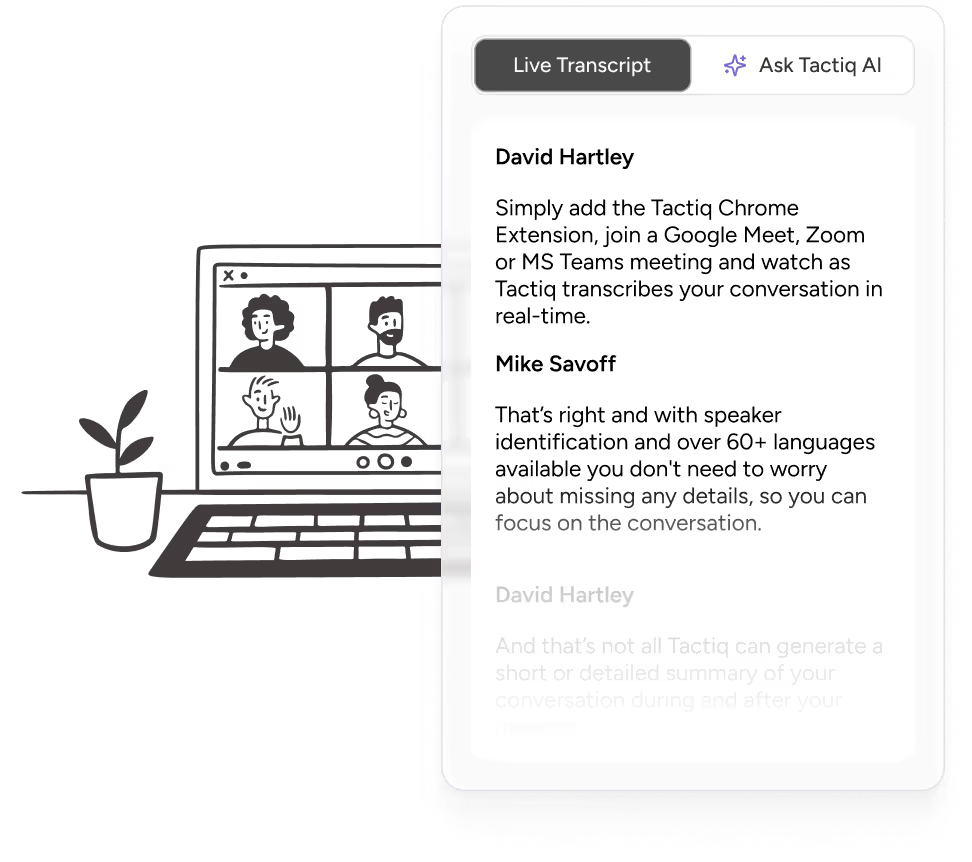
Install the Tactiq Chrome extension (opens in a new tab) and join your meeting on Google Meet, Zoom, or Microsoft Teams. Tactiq transcribes in real time directly in your browser. When the meeting ends, your full transcript is waiting in your Tactiq dashboard.
Step 2: Use the AI Workflow Builder to create conditional triggers
After your meeting, visit AI Workflows (opens in a new tab) from the Tactiq dashboard. From there, you can choose a pre-built template or start with a blank workflow.
Pre-built templates cover the most common use cases (Slack summaries, follow-up emails, and meeting recaps) and are ready to run with minimal configuration. Custom workflows let you define your own triggers, outputs, and destinations for more specific team needs. For example, you could build a workflow that automatically creates a Linear ticket in your exact ticket format every time a meeting with a specific title ends.
Step 3: Route insights to your tools
Once your workflow is configured, Tactiq can send your meeting outputs to the tools your team already uses:
- CRM: Sync call outcomes, pipeline data, and next steps directly to your CRM fields
- Slack: Post a structured meeting summary to the right channel the moment the call ends
- Notion: Route meeting notes and decisions to your knowledge base automatically
- Linear or Jira: Automatically create tickets from decisions made in the meeting
- Email: Send follow-ups to clients or teammates without writing a single word manually
Automated Meeting Workflow Use Cases by Team
Automated workflows look different depending on what your team does with meeting outputs. Here's how three common team types put them to work.
Sales teams
For sales teams, every client call is a data entry opportunity and a missed one. After a discovery call or demo, someone has to update the CRM, log the next steps, and send a follow-up email. That manual work adds up fast across a full pipeline.
With automated workflows, sales teams can:
- Automatically update CRM fields with call outcomes, objections, and deal updates
- Route pipeline data to the right contact or opportunity without switching tabs
- Send follow-up emails to clients immediately after the call ends
- Keep a searchable record of every sales call for coaching and handoffs
Tactiq captures the full transcript of every sales call and routes the relevant details to your CRM.
Want the convenience of AI summaries?
Try Tactiq for your upcoming meeting.
Product & engineering teams
Product and engineering meetings generate decisions. Those decisions need to become tickets. Without automation, that translation happens slowly or not at all.
With automated workflows, product and engineering teams can:
- Automatically create Linear or Jira tickets from decisions made in the meeting
- Route action items to the right project without leaving the transcript
- Keep meeting notes connected to the projects they relate to
- Build a running knowledge base of product decisions across every sprint
Operations & leadership
For operations and leadership teams, the challenge is making sure those decisions reach the right people. Meeting summaries that stay in someone's inbox don't keep an organization aligned.
With automated workflows, operations, and leadership teams can:
- Automatically post meeting summaries to Slack channels (opens in a new tab) so every teammate stays informed
- Keep knowledge bases updated with decisions from leadership meetings
- Give teammates full meeting context without requiring them to attend every call
Best Tools for Automated Meeting Workflows
No single tool handles every stage of the meeting lifecycle equally well. Most teams end up combining two or three tools to cover scheduling, capture, and post-meeting automation. Here's how the most common options stack up.
Zapier is a general-purpose automation platform that connects thousands of apps. It's useful for building custom triggers between your calendar, CRM, and communication tools, but it doesn't transcribe meetings or generate AI meeting notes. You need a separate transcription source to feed it.
Calendly handles pre-meeting scheduling. It eliminates back-and-forth by letting participants book directly into available slots and syncs with Google Calendar and Outlook automatically. But it stops at the calendar invite. There's no transcription, no AI, and no post-meeting workflow.
Where Zapier and Calendly each handle one part of the meeting lifecycle, Tactiq covers the full post-meeting layer. It captures live transcripts across Google Meet, Zoom, and Microsoft Teams, then routes outputs to your CRM, Slack, Notion, Linear, or inbox automatically.
For most teams, the practical stack looks like this: Calendly or Google Calendar for scheduling, Tactiq for transcription and post-meeting automation, and your existing CRM or project tool as the destination. That covers the full meeting lifecycle without adding unnecessary tools to your tech stack.
Start Automating Your Entire Meeting Workflow
Most teams fix one part of the meeting problem and leave the rest manual. They get a transcription tool but still write follow-ups by hand. They set up a Slack integration, but still copy-paste action items into their CRM. Partial automation still leaves gaps.
The teams that get the most out of their meetings automate the full lifecycle (scheduling, capture, and post-meeting routing), so every conversation produces consistent, usable outputs without additional manual work.
Tactiq is built for that entire post-meeting layer. It transcribes your meetings in real time across Google Meet, Zoom, and Microsoft Teams, then routes your AI meeting notes, action items, and summaries to the tools your team already uses.
Try Tactiq today for free (opens in a new tab) and start turning every meeting into a workflow that runs itself.
FAQ
Your questions, answered.
If you have any further questions, Get in touch (opens in a new tab) with our friendly team
What is an automated meeting workflow?
How do I automate meeting follow-ups?
What is the best tool for automating meeting notes and action items?
Can AI automatically update my CRM after a meeting?
How do I set up post-meeting automation without a bot?
Related articles

Gemini 3.5 Transcribe: Google Transcript Model Explained
Context Engineering vs Prompt Engineering: What Your AI Agents Are Missing

Google Gemini MCP Support: Where It Works and Setup Tips

5 Best AI Scheduling Assistants

Microsoft Teams MCP: How to Access Meeting Content With AI

How Do I Turn Off Google Gemini?

Best Free Dictation App Options

6 Best Wispr Flow Alternatives
Want the convenience of AI summaries?
Try Tactiq for your upcoming meeting.
Bringing AI into your meetings has never been so easy.
Add to Chrome - It's free!(opens in a new tab)Try Tactiq in your upcoming meeting!
Sign up now