
Best Practices for Using MCPs with Your Meeting Notes
- Published:
- August 7, 2026
- Updated:
- September 30, 2026

Years ago, I used to treat my meeting transcripts the same way most people do: generate the summary, skim it for action items, then never open it again. The transcript did its job the moment the meeting ended.
That changed once I connected my meeting notes to Claude via MCP. Suddenly the transcript wasn't the end of the workflow; it was the start of a new one. The same call I just sat through could draft my follow-up email, tell me if it was even worth having, or turn into next week's LinkedIn post, all without me retyping a single thing.
I've written before about why your meeting transcripts are basically their own LLM once you start treating them as a knowledge source instead of a record.
Connecting them to Claude via MCP is where that idea actually becomes a daily habit. Here's how I use it, and what I'd watch out for before you connect everything by default.
TL;DR: How can I get the most out of my meeting transcripts when I connect them with MCPs?
The quality of what Claude can do with your meeting transcripts depends entirely on how detailed your Tactiq summary is, so ask for (and automate) detailed summaries rather than settling for a three-bullet recap.
Also be deliberate about security: pause transcription on any call with sensitive information before it ever gets connected to Claude or anywhere else.
Why connect meeting notes with MCPs?
MCP (Model Context Protocol) is what lets Claude read your Tactiq’s meeting data directly, instead of you copying and pasting a transcript into a chat window every time you want to do something with it.
Once it's connected, your meeting history becomes something Claude can actually work with. Here are reasons why you should start using your meeting notes with MCPs.
1. Writing quick responses
You know that feeling right after a call where someone asks you to "just send a quick follow-up," and your brain has absolutely nothing left to give?
That's not you being lazy. A meeting is cognitively expensive. This tracks with the research on decision fatigue. A study published in the Journal of Neuroscience used fMRI to show that cognitive fatigue changes how the dorsolateral prefrontal cortex signals the value of putting in more effort.
After a call full of decisions, you're running on fumes before you've even opened your inbox.
This is where connecting your meeting notes to Claude (or whichever LLM you use) becomes genuinely useful. Instead of trying to reconstruct what was said from memory, you just ask:
"Draft a follow-up email to [client] based on our call this morning." Claude already has the context, so you're not starting from a blank page while your brain is recovering from the meeting.
💡 Pro tip: The more detailed the meeting summary Tactiq generates, the better the email Claude drafts. Vague summaries produce vague content.
2. Analyze meeting data
Auditing your meetings matters more than most people give it credit for. If you don't know how you're actually spending your time, you can't make a case for cutting anything.
According to Zoom's own meeting statistics roundup, the average employee spends around 392 hours a year in meetings.
Plus, 80% of workers believe most of their meetings could be wrapped up in half the time. Some of that time is genuinely useful. A lot of it, unfortunately, isn't.
With your transcripts connected via MCP, you can ask Claude to look across weeks or months of meetings and tell you where your time is actually going. Some things worth analyzing:
- How much of your week goes to one client or project versus everything else?
- What are the most common meeting types that I spent time with in the past three months?
- Which meetings do you talk in the most versus the ones where you're mostly listening?
Here’s an example of what I analyzed:
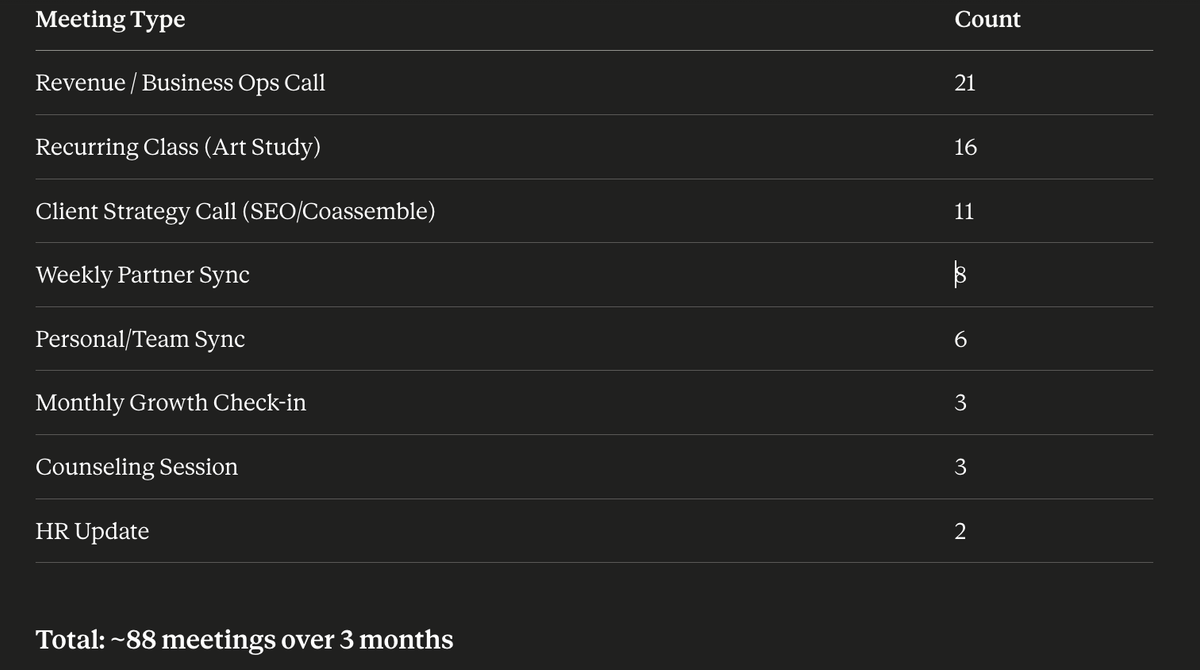
I wanted to know how many meetings I had in the past three months and the type of meetings. I’m pretty happy with the result. I can see that I spend a lot of time talking about business ops. I might consider cutting the weekly partner sync and making it every other week.
None of this requires you to sit down and re-read transcripts manually. You're asking Claude questions about a body of data it already has access to.
3. Easily repurpose content
Your meeting transcripts are where your original ideas are born. It can be from a retro, a client call, or a brainstorming session. Once those transcripts are connected to Claude, you can turn those insights into pieces of content.
For example, I turn my weekly content call into LinkedIn posts almost every week. Content calls are usually ripe with new ideas or insights based on the data.
Other ways to repurpose meeting transcripts:
- Blog posts, like this one
- Client recap emails
- Case studies pulled from project retros
- Internal SOPs or onboarding docs, built from calls where you explained a process out loud
- Newsletter or Substack content
- Twitter/X threads
- Slack updates for your team
The possibilities are endless when it comes to repurposing your transcripts.
Best Practices for Using MCPs with Your Meeting Notes
Connecting meeting notes to Claude isn't complicated, but there are a few things worth getting right so the whole workflow actually holds up.
1. Get the right transcription tool
This only works if what you're feeding into Claude is actually good. Tactiq is what I use, and it works so well because it connects to Claude, ChatGPT, and other LLMs via MCP.
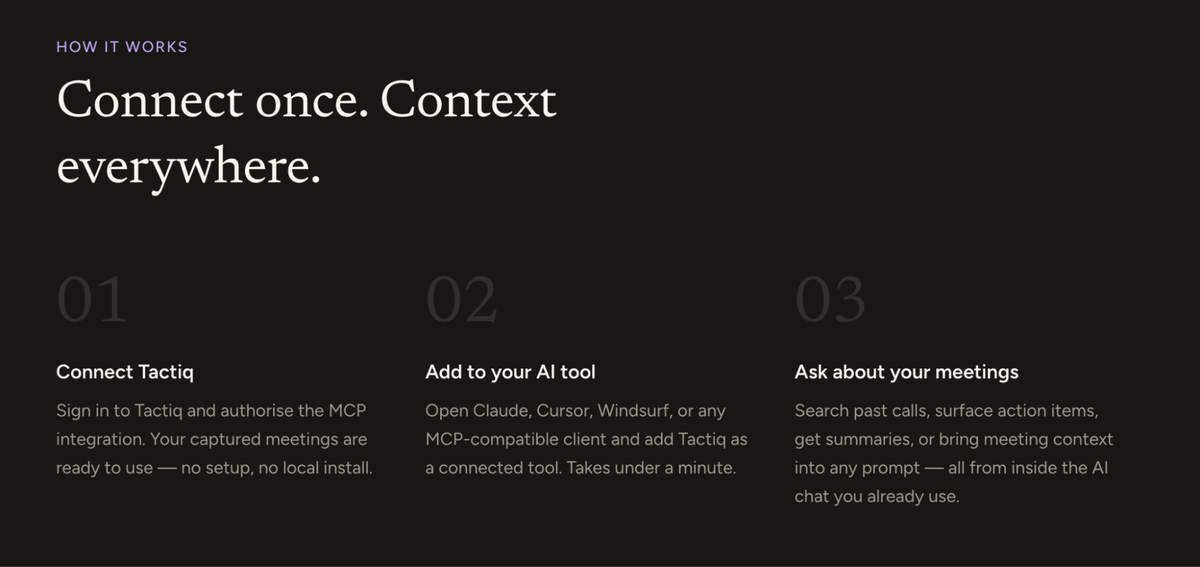
Here's a full walkthrough on how to connect your meeting notes to Claude MCP if you haven't set this up yet.
2. Get detailed summaries
Right now, Claude only accesses your meeting summaries from Tactiq, not the raw transcript. That means the quality of your summary directly determines the quality of every content you create.
You can easily ask Tactiq for more detailed summaries, and you can automate this natively inside the Tactiq interface so it happens after every call without you having to remember to do it.
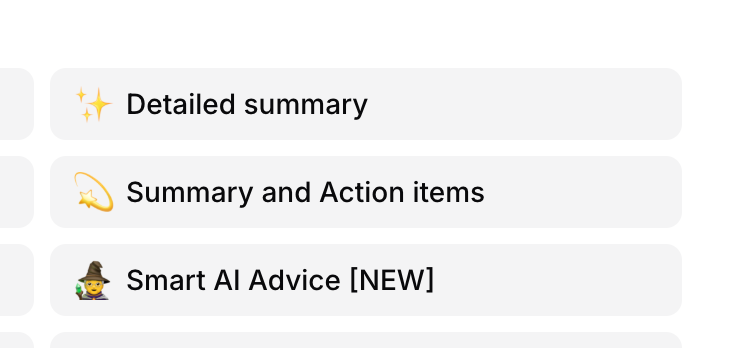
If you're only getting a three-bullet summary, you're leaving Claude with very little to actually work with.
3. Consider security
Not every meeting should be connected to an external tool, and that's worth thinking through before you connect everything by default.
I personally turn off transcription entirely when I know a call has sensitive information in it, whether that's financial details, HR matters, or anything a client would not want sitting in another system.
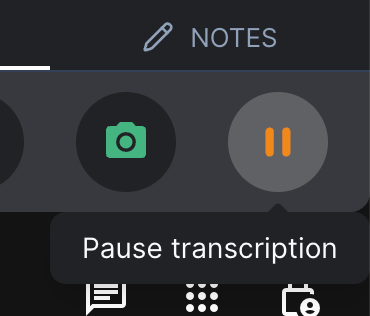
It's very easy to pause the transcript in Tactiq mid-call, and I'd rather do that than have to think about where that data ends up later.
Read Tactiq’s Privacy Center to learn more about how it handles data.
Want the convenience of AI summaries?
Try Tactiq for your upcoming meeting.
4. Set up automations
Once the basic connection is working, you can take it further with automations, so you're not manually prompting Claude after every single call.
For example, I use Claude Cowork or Claude Code to automatically turn a meeting transcript into a set of LinkedIn post drafts after every content call. All I have to do is review and approve them, not write them from scratch.
Other things worth automating:
- A client recap email that drafts itself after every customer call
- A weekly digest that pulls decisions and open questions across all your meetings that week
- Action items automatically flagged and sent to your project management tool
- A running content queue that gets a new draft every time a "content call" transcript comes in
Don’t worry. None of this replaces judgment. You're still the one approving what goes out. But it removes the blank-page problem, which is usually the actual barrier to getting any of this done.
Your Meeting Transcripts Are Doing More Than You Think
For years, the point of a meeting note was just to have a record. Something to point back to if a decision ever got questioned. That's not enough anymore. Once your transcripts are connected to Claude via MCP, every call you take becomes raw material: for the email you don't have the energy to write, the audit that tells you which meetings to cut, the post you were going to have to think up from scratch anyway.
None of this requires more meetings, more tools, or more effort on your part. It just means the work you already did out loud doesn't disappear the moment the call ends.
Tools like Tactiq make it easy to connect your meeting notes to Claude and other AI tools. Once it’s connected, you can do so many things with your meeting notes and data.
FAQ
Your questions, answered.
If you have any further questions, Get in touch (opens in a new tab) with our friendly team
What is the best AI note-taking tool to connect with Claude MCP?
Do I need to manually copy my meeting transcript into Claude every time?
Does Claude read the full transcript or just the summary?
How do I stop a sensitive meeting from being sent to Claude?
Can Claude analyze my meetings across weeks or months, not just one call?
Related articles

Questions to Ask Higher Management During Meetings

How to Use Google Docs for Meeting Minutes

25 Funny Questions to Ask During a Staff Meeting (with AI)

How to See Who Accepted a Meeting in Outlook

How to Reschedule a Meeting in Outlook

Best Way to Schedule a Meeting with Multiple Attendees

How to Use ChatGPT Record Mode to Get Meeting Transcripts

11 Ways to Repurpose Meeting Transcripts into Content
Want the convenience of AI summaries?
Try Tactiq for your upcoming meeting.
Bringing AI into your meetings has never been so easy.
Add to Chrome - It's free!(opens in a new tab)Try Tactiq in your upcoming meeting!
Sign up now