
Zoom Workplace and Zoom Meetings Difference: What You Need to Know
- Published:
- September 3, 2026
- Updated:
- November 3, 2026

Zoom Workplace and Zoom Meetings may sound like the same thing. They're not.
Zoom Meetings is the video conferencing tool: the part where you actually host and join calls. Zoom Workplace is the broader platform Zoom built around it, bundling in chat, phone, docs, and AI tools.
Most people already have Zoom Workplace installed without realizing it, since the rebrand replaced the old app icon automatically.
What Is Zoom Meetings?
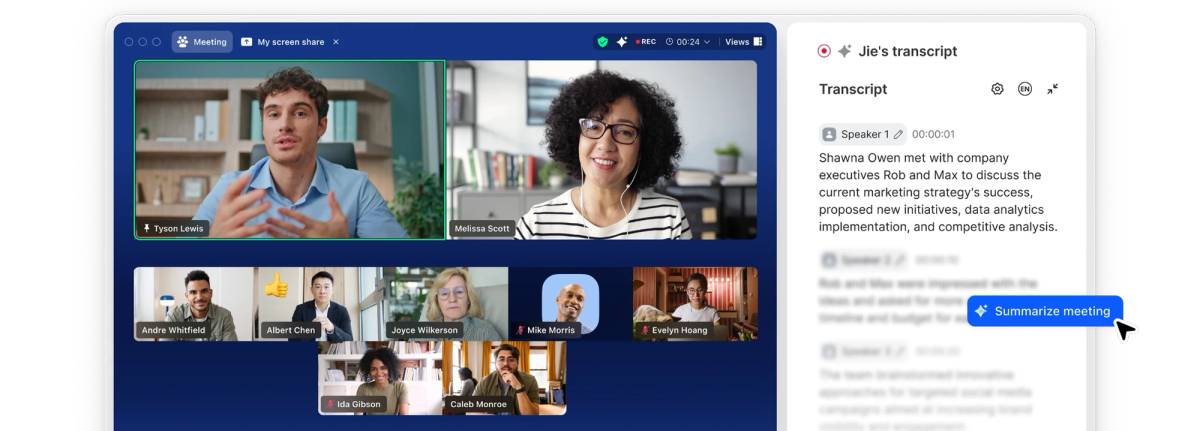
Zoom Meetings (opens in a new tab) is the video conferencing capability inside Zoom Workplace: the feature that handles video, audio, screen sharing, and chat for live calls. It's not a separate app you download or a separate plan you buy. It's one component of the broader platform, alongside chat, phone, and AI tools.
Anyone can join a Zoom meeting from a browser, desktop app, or mobile device, whether they're hosting a client call, a virtual classroom, or a quick team check-in. The host controls who gets in, manages participants, and can record the session for anyone who missed it live.
Zoom Meetings covers the essentials most people actually need:
- One-on-one and group video calls
- Screen sharing across a full screen, app window, or browser tab
- In-meeting chat, both to everyone or one-on-one
- Breakout rooms for splitting a larger call into smaller sessions
- Local or cloud recording, depending on your plan
This is the layer of Zoom most people mean when they say "let's hop on a Zoom." For a deeper look at how the underlying app works, see our guide on what the Zoom Cloud Meeting app actually is (opens in a new tab).
What Is Zoom Workplace?
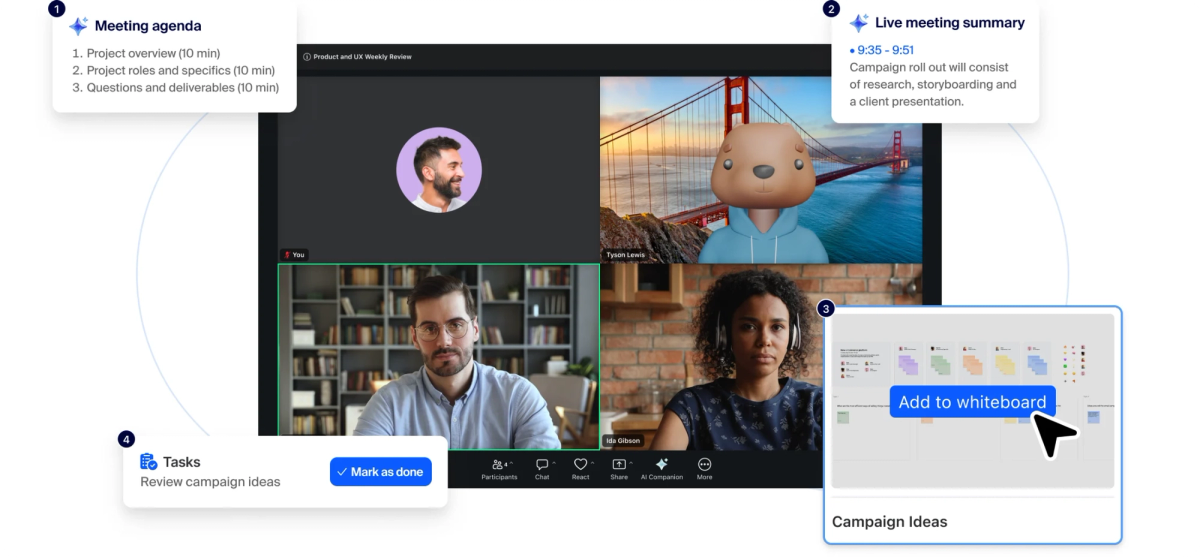
Zoom Workplace (opens in a new tab) is Zoom's broader all-in-one platform, launched on April 15, 2024. It brought Zoom Meetings together with team chat, phone, whiteboard, docs, and AI Companion under one roof. This replaced the standalone Zoom Meetings app most people had used for years.
Zoom Workplace now covers a lot more ground than the original meeting app. Key features include:
- Zoom Meetings for video calls, and Zoom Rooms for turning physical conference rooms into meeting spaces (opens in a new tab)
- Team chat for persistent messaging and channels
- Zoom Phone for cloud-based calling
- Zoom Docs (opens in a new tab) and Whiteboard for document collaboration and file sharing
- Workspace reservation and digital signage for managing shared spaces across hybrid offices
- ZoomMate, Zoom's AI product, for meeting summaries and cross-app follow-ups
Plans scale from Workplace Basic, a free tier for individuals, up through Workplace Business and enterprise plans. Larger teams need higher participant limits and more admin controls. That range is also why Zoom Workplace competes directly with tools like Microsoft Teams.
The idea behind the broader collaboration platform is continuity. Instead of jumping between separate apps, everything lives in one workspace. For a full walkthrough of hosting, joining, and running meetings, see our complete Zoom guide for a perfect meeting (opens in a new tab).
Zoom Workplace Plans: Key Differences
Once you see Zoom Meetings as a feature and Zoom Workplace as the platform around it, the real question becomes what you actually get at each plan level. Zoom offers a range of tiers, and the gap between them shows up in specific capabilities, not just price.
Features Comparison Table
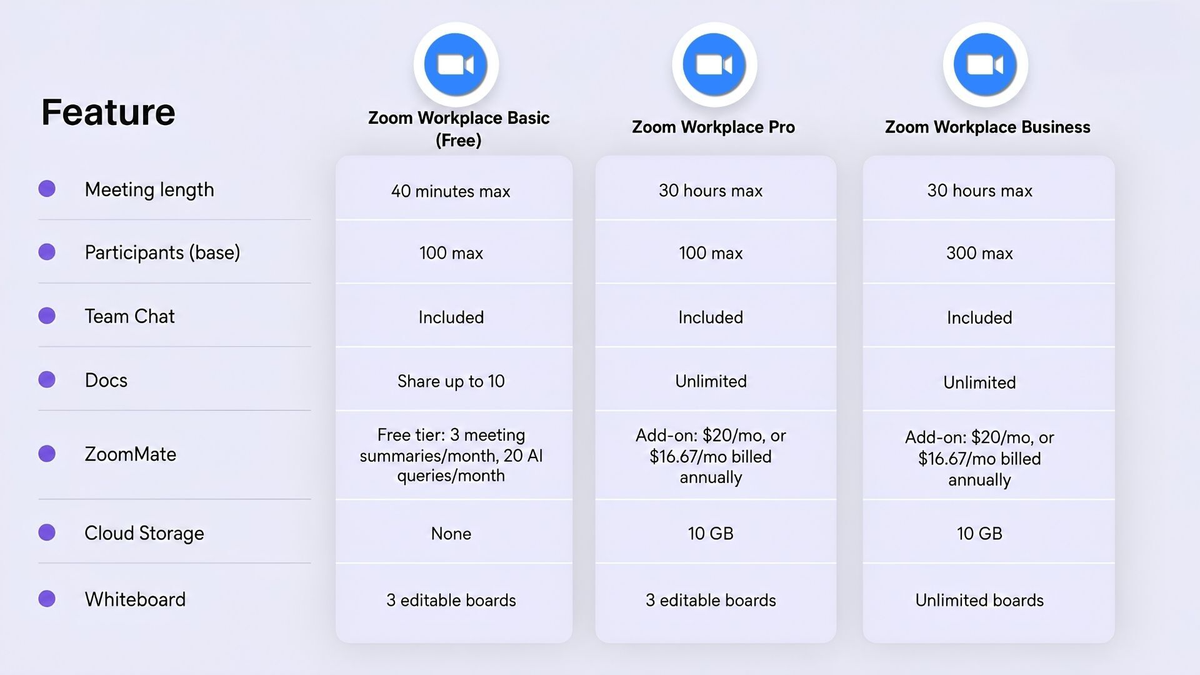
Any paid plan, Pro or Business, can raise its participant cap further with the Large Meeting add-on, which scales a single meeting up to 500, 1,000, 3,000, or 5,000 attendees depending on the tier purchased. A Zoom Workplace Free account gets you real video meetings and basic chat, but with a hard 40-minute cap and no add-on path around it.
Pricing differences
Choosing a Zoom Workplace plan comes down to how much your team needs beyond basic Join Meetings functionality. For a full breakdown of what each tier costs, see our guide on how much Zoom Pro costs (opens in a new tab).
Which Zoom Plan Do You Actually Need?
It depends on how your team actually works, not headcount alone.
Solo freelancers and consultants usually do fine on the free plan. It covers basic Zoom capabilities for client calls, as long as they fit the 40-minute cap.
Small teams sit in a gray zone. Focused discussions without multiple tools or integrations can run on Pro alone. Teams juggling Zoom software alongside other collaboration tools benefit more from Pro or Business's built-in productivity tools.
Growing organizations tend to need the full bundle. Unlike Zoom's original standalone app, Zoom Business adds advanced features like unlimited whiteboards and stronger workplace management controls.
Teams that schedule meetings across time zones, book room solutions for hybrid work environments, or connect business tools and external tools usually outgrow Basic or Pro fast.
Signs it's time to upgrade:
- You're hitting the 40-minute or 100-participant limit regularly
- You need shared meeting rooms or hybrid scheduling
- You want centralized admin controls
- You're already paying for separate chat or whiteboard tools Workplace could replace
💡 Pro tip: Whatever plan you land on, Tactiq (opens in a new tab) adds a live transcript and AI summary to every Zoom call, so you're not locked into ZoomMate's pricing just for meeting notes.
How Tactiq Gives You Consistent Meeting Notes
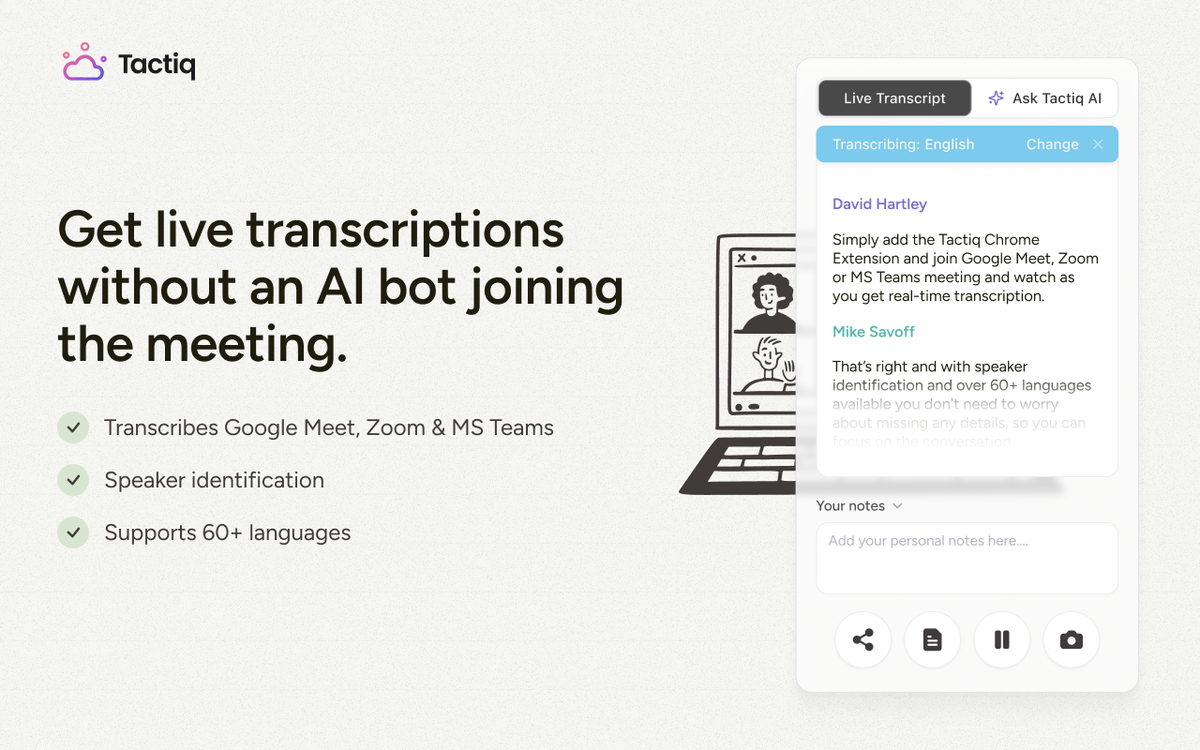
Note-taking shouldn't change depending on which Zoom plan you're using. That's the problem Tactiq solves.
Tactiq (opens in a new tab) is a free Chrome extension that captures a live transcript and AI summary as soon as you join a Zoom meeting in your browser.
No bot joins the call, no paid Zoom plan is required, and nothing needs to be recorded. It picks up speaker labels, key decisions, and action items automatically, on any Zoom tier.
This gives your whole team one consistent transcript and summary format, regardless of which Zoom plan each person is on.
Add Tactiq to Chrome for free (opens in a new tab) and get the same transcript and summary every time you join from your browser.
Want the convenience of AI summaries?
Try Tactiq for your upcoming meeting.
Not Just a Rebrand: Why the Difference Matters
Zoom Meetings and Zoom Workplace aren't interchangeable names for the same thing, even though the confusion is understandable.
Zoom Meetings handles the core job: audio conferencing, video quality, and online meetings that just work.
Zoom Workplace is the advanced version built around it, an all-in-one workspace that adds instant messaging, document creation, and workflow automation on top.
The decision comes down to scope. A solo user hosting online meetings and virtual events doesn't need collaborative documents or workflow automation. A distributed team juggling multiple channels probably does.
Either way, you don't have to solve this naming confusion just to get good meeting notes. Tactiq captures the same transcript and summary regardless of which Zoom plan your team lands on.
FAQ
Your questions, answered.
If you have any further questions, Get in touch (opens in a new tab) with our friendly team
Is Zoom Workplace the same as Zoom Meetings?
Did Zoom Workplace replace Zoom Meetings?
What happened to Zoom AI Companion?
Does Tactiq work with both Zoom Meetings and Zoom Workplace?
Related articles

Zoom ChatGPT: How to Connect and Access Meetings

Zoom MCP: Features, Setup, and Limitations (Full Guide)

What Is Zoom Cloud Meeting App?

Zoom Cloud Meetings for Mac: Full Guide

Zoom Meeting Statistics 2026: Usage, Revenue & Data

How to Edit Zoom Recording: A Complete Guide

How to Record Yourself on Zoom

How to Embed a Zoom Meeting on Your Website
Want the convenience of AI summaries?
Try Tactiq for your upcoming meeting.
Bringing AI into your meetings has never been so easy.
Add to Chrome - It's free!(opens in a new tab)Try Tactiq in your upcoming meeting!
Sign up now