
Zoom Room vs Teams Room
February 6, 2026
February 6, 2026
June 27, 2026
June 27, 2026

Meeting rooms now play a crucial role in how teams collaborate across locations. As hybrid work becomes the norm, the technology inside those rooms shapes meeting quality. It affects how meetings start, how participants join, and how ideas move between in-room and remote teams.
Zoom Room vs Microsoft Teams Room is a common comparison for organizations setting up or upgrading conference rooms. Both support video conferencing and shared meeting spaces, but they differ in how they integrate with tools, hardware, and daily workflows.
This guide breaks down Zoom Rooms vs Teams Rooms in practical terms, so you can understand how each option supports modern meetings and hybrid work.
Here’s what we’ll cover:
- How Zoom Rooms works in shared meeting spaces
- How Microsoft Teams Rooms fits into the Microsoft 365 ecosystem
- Key differences between Teams vs Zoom room setups
- How meetings from both room systems can be captured and documented
What Is Zoom Rooms?
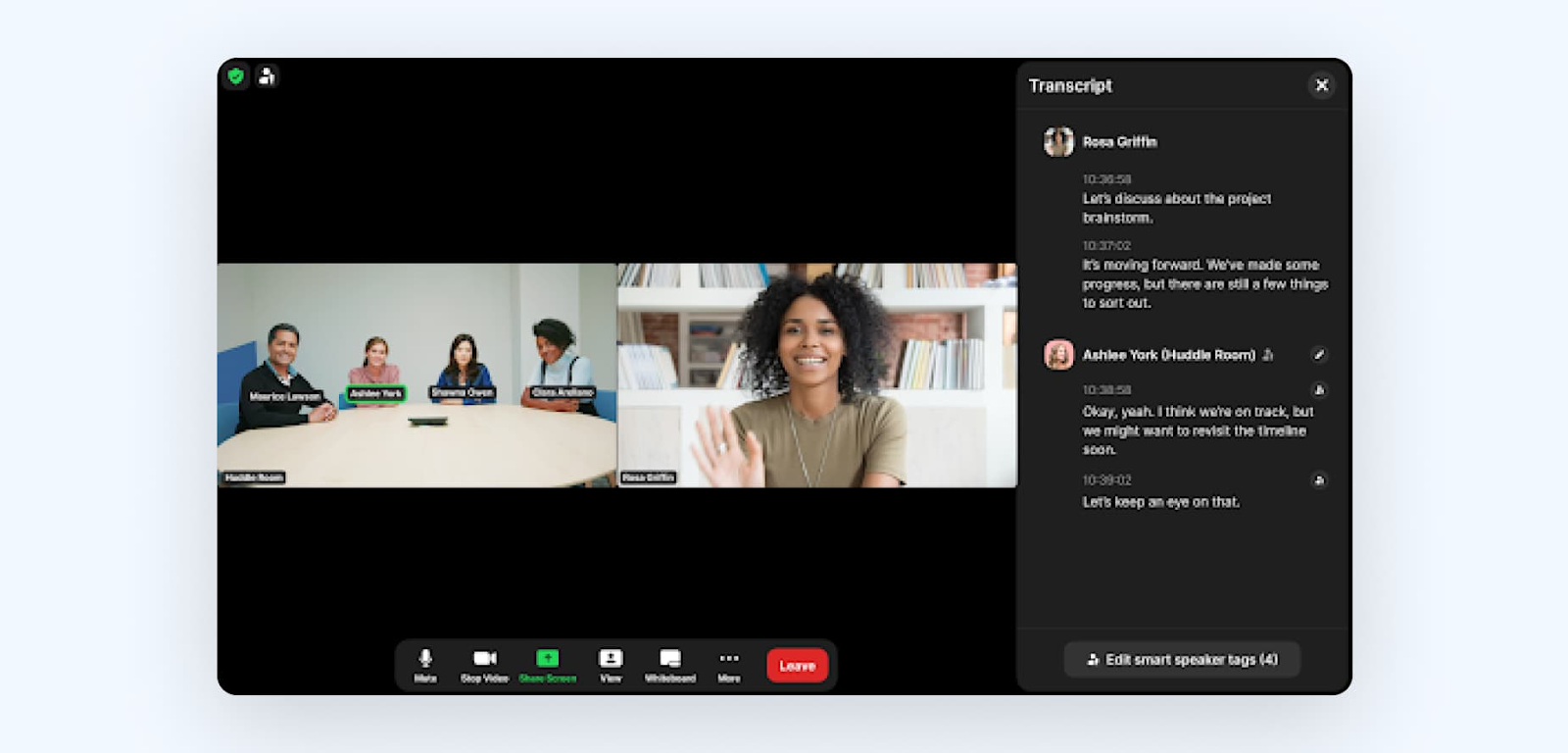
Zoom Rooms is a software-based room system that turns conference rooms into dedicated video conferencing spaces. It supports hybrid meetings, so in-room and remote participants can join the same meeting and interact in real time.
Definition and key features
Zoom Rooms is built around simple room controls, high-quality video, and flexible room setups. Key features include:
- One-touch to join scheduled meetings from the room controller
- HD video and audio across desktop, mobile, and room systems
- Wireless content sharing from a laptop or mobile device
- Scheduling display to support room booking, including room status and upcoming meetings
- Digital signage included with the license for announcements, images, videos, and URL
Zoom Rooms also includes advanced features for modern meeting spaces:

- Smart Gallery that can create separate video streams for in-room participants, so remote attendees can see people more clearly
- Intelligent Director that uses multiple cameras and AI to improve how in-room participants appear to remote attendees
- Smart name tags that identify people in the Zoom Room video or highlight the speaker, which can support captions, transcripts, and meeting summaries
- Mobile device control so you can start and control meetings from your phone or laptop, without touching the in-room controller
- Conference Room Connector (SIP/H.323 interop) so standards-based video conferencing endpoints can join meetings
Hardware requirements
A basic Zoom Rooms setup usually includes:
- A Zoom Rooms appliance or a Windows/macOS computer running Zoom Rooms software
- A controller device, such as an iPad, Android tablet, or dedicated room controller
Depending on the meeting space, teams often add:
- Displays, cameras, microphones, and speakers
- An optional scheduling display outside the meeting room
Pricing overview
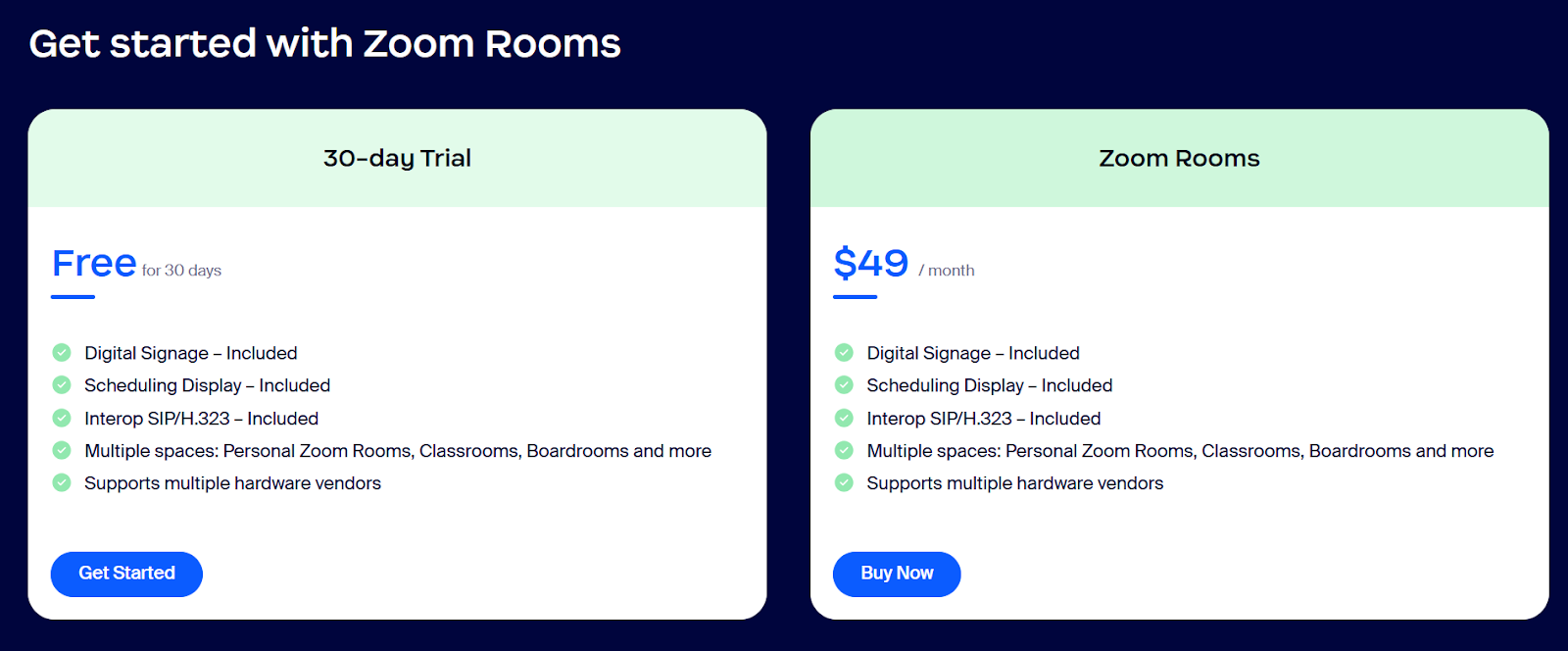
Zoom Rooms uses a per-room pricing model:
- $49 per room per month
- One license is needed for each meeting room
- A 30-day free trial option for new deployments
💡 Pro Tip: Looking for a free way to capture transcripts and summarize meetings? Use Tactiq to transcribe and turn discussions into action items across Zoom, Teams, and Google Meet.
What Is Microsoft Teams Rooms?
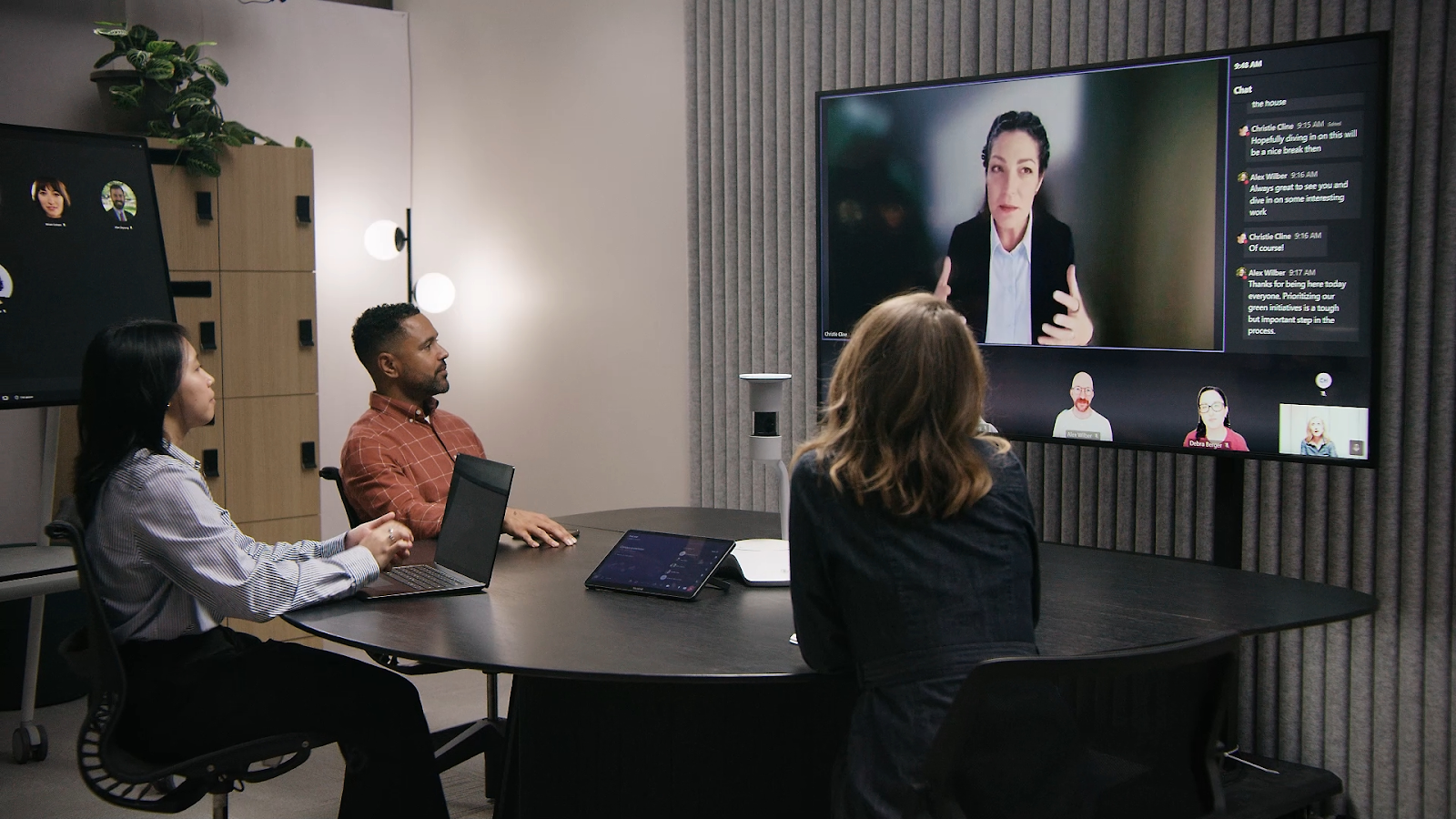
After looking at how Zoom Rooms supports shared meeting rooms, it’s useful to see how Microsoft Teams Rooms handles the same meeting space through Teams.
Microsoft Teams Rooms is another room-based meeting solution built to run directly on the Microsoft Teams platform. It connects in-room and remote participants and is designed to work closely with Microsoft 365 tools used across the organization.
Definition and key features
Microsoft Teams Rooms focuses on inclusive meetings and consistent collaboration in shared meeting rooms. Core features include:
- One-touch join for scheduled Teams meetings
- High-quality video and audio optimized for conference rooms
- Wireless content sharing from personal and room devices
- Live captions to support accessibility
- Persistent chat so meeting participants can follow conversations before and after meetings
Teams Rooms also includes advanced collaboration features:
.png)
- Multi-camera views that let remote participants choose camera angles
- Live reactions and raised hands for structured participation
- Microsoft Whiteboard for shared brainstorming
- PowerPoint Live and Excel Live for in-meeting content sharing
Hardware requirements
Microsoft Teams Rooms runs on certified Teams Rooms devices designed for meeting spaces. A typical setup includes:
- A Teams Rooms device running the Teams Rooms app
- Certified cameras, microphones, speakers, and displays
- Optional touch screens or companion devices for in-room controls
Different device configurations support small rooms, large conference rooms, and flexible meeting spaces.
These certified setups make it easier for IT teams to deploy Teams Rooms consistently.
Licensing options and pricing
Microsoft Teams Rooms uses a per-room licensing model:
- Teams Rooms Basic: Free, limited to up to 25 rooms, includes core meeting features
- Teams Rooms Pro: $40 per room per month, billed annually
The Pro plan adds advanced meeting experiences, room management tools, analytics, and enterprise-grade security features.
Zoom Rooms vs Teams Rooms: Key Differences
Teams Rooms and Zoom Rooms are built for the same meeting rooms, but they differ in how they connect with tools, support collaboration, and handle hardware. These differences affect how meetings run day-to-day.
Integration ecosystem
Zoom Rooms works well in environments that use a mix of tools. It supports both Google Calendar and Microsoft 365, which gives teams more flexibility when scheduling meetings and managing rooms.
Microsoft Teams Rooms is tightly integrated with Microsoft and the broader Microsoft ecosystem. It connects directly with Microsoft 365 apps, which can simplify workflows for teams already relying on Teams, Outlook, and OneDrive.
- Zoom Rooms suits mixed tool environments
- Teams Rooms fits best inside Microsoft’s suite
Unique features comparison
Zoom Rooms focuses on improving how people appear and interact in shared meeting spaces. Features like Smart Gallery and Intelligent Director help remote participants see in-room attendees more clearly, while wireless content sharing keeps meetings moving without extra setup.
Microsoft Teams Rooms puts more emphasis on collaboration before and after meetings. Persistent chat, Microsoft Whiteboard, and basic file sharing support ongoing work beyond the call itself.
- Zoom Rooms prioritizes room experience and visibility
- Teams Rooms emphasizes collaboration tools and continuity
Hardware compatibility
Zoom Rooms supports a wide range of certified hardware vendors. This makes it easier to deploy Zoom Rooms across different conference rooms or reuse existing equipment.
Microsoft Teams Rooms requires certified Teams Rooms devices. These devices offer consistent performance, but they can limit flexibility when mixing hardware vendors.
Zoom Rooms vs Teams Rooms at a glance

How To Capture And Document Zoom And Teams Meetings With Tactiq
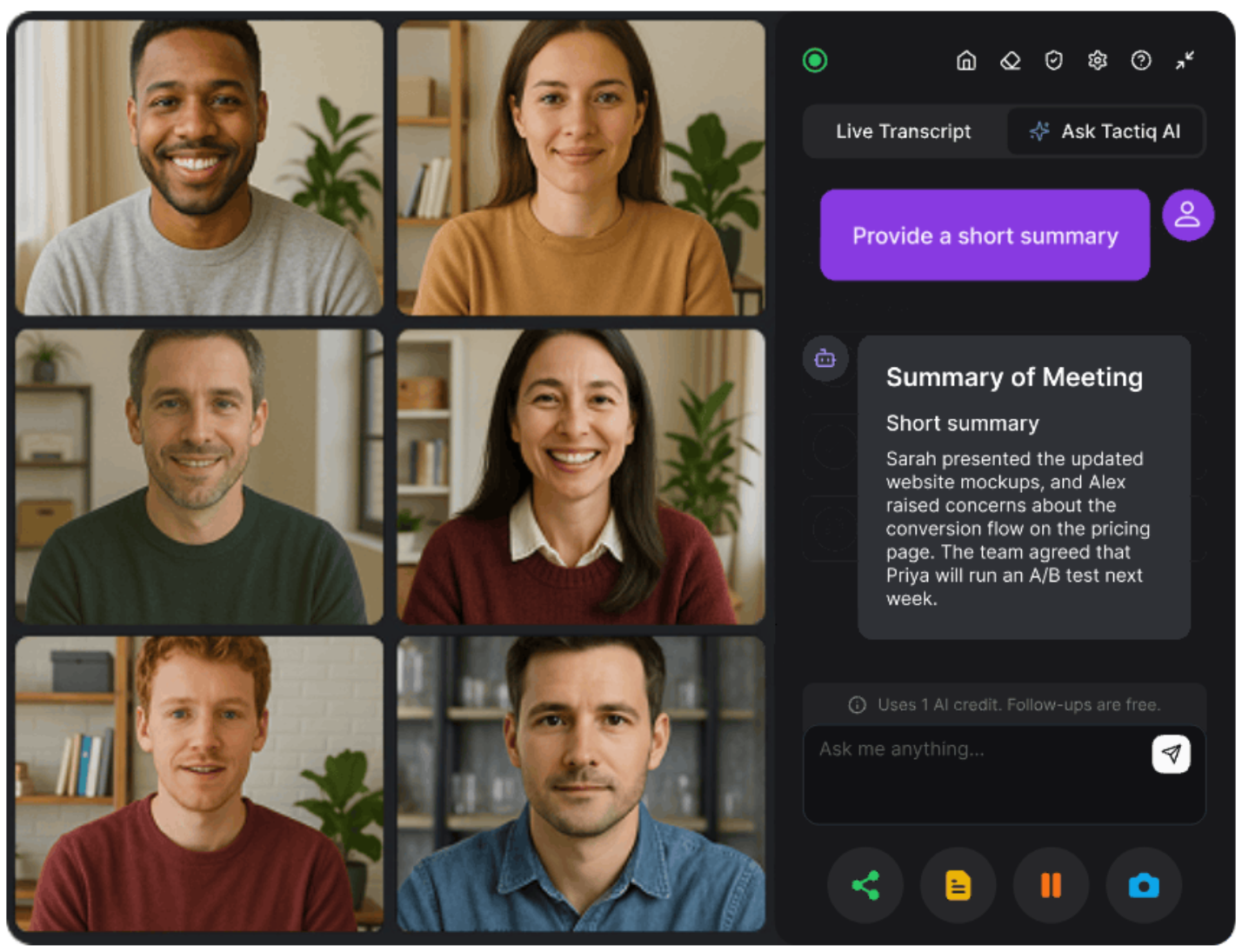
Zoom Rooms and Teams Rooms are designed to support modern meetings, but capturing discussions and decisions often falls outside the room system itself. This becomes more noticeable in hybrid meetings where several people speak from the same room, and others join remotely.
Tactiq integrates with Zoom, Microsoft Teams, and Google Meet to help teams document meetings without changing their conference room setup.
Tactiq provides live transcription and captions during meetings, with speaker identification to clarify who said what. After the meeting, transcripts stay searchable, making it easier to review discussions, confirm decisions, and share notes with meeting participants.
Teams use Tactiq to:
- Capture meeting notes without manual note-taking
- Track speakers and key discussion points
- Turn transcripts into summaries and follow-ups
- Keep meeting documentation consistent across different room systems
Try the free Tactiq Chrome Extension to start capturing meetings across Zoom, Microsoft Teams, and Google Meet.
{{rt_cta_ai-convenience}}
Pricing Comparison
Both Zoom Rooms and Microsoft Teams Rooms use a per-room pricing model, which makes costs easier to predict as meeting rooms scale.
- Zoom Rooms is priced at $49 per room per month, with one license required for each meeting room and a 30-day free trial available.
- Microsoft Teams Rooms offers a free Basic plan for up to 25 rooms and a Pro plan at $40 per room per month, billed annually.
The main difference comes down to structure. Zoom Rooms keeps pricing simple with a single license, while Teams Rooms uses tiered licensing for organizations that want more advanced room management and seamless integration with Microsoft 365.
Note: Pricing and plan details may change over time, so it’s best to check the latest information directly on Zoom’s and Microsoft’s websites before making a decision.
Choosing Between Zoom Rooms And Teams Rooms
Zoom Rooms and Microsoft Teams Rooms are both designed for shared meeting rooms, but the right choice depends on how meetings are run and which tools teams rely on day to day.
Zoom Rooms tends to suit organizations that want flexibility across their meeting spaces. It works well when conference rooms vary in size or setup, and when teams use a mix of tools alongside video conferencing.
Zoom Rooms may be a good fit if:
- Your meeting rooms use different calendars or tools
- You want flexibility across hardware vendors
- You support different room types across offices
Microsoft Teams Rooms is a stronger fit for teams already working inside Microsoft products. It connects meeting rooms directly to Microsoft 365, keeping chat, files, and collaboration tools tied to the meeting.
Microsoft Teams Rooms may be a good fit if:
- Your organization relies on Microsoft Teams daily
- You use Microsoft 365 for messaging and file sharing
- You prefer standardized, certified room devices
Rather than choosing one system as the best solution, the focus is on how each supports your meeting spaces, collaboration needs, and existing workflows.
Wrapping Up
Zoom Rooms and Microsoft Teams Rooms both play a crucial role in modern meeting rooms. Each supports video conferencing, shared spaces, and hybrid meetings, but they are built around different ecosystems and collaboration styles.
Zoom Rooms offers flexibility across hardware, tools, and room setups. Microsoft Teams Rooms focuses on tight integration with Microsoft 365 and consistent workflows across the organization. Neither option is a universal best solution. The right choice depends on how your meeting rooms are used and which tools teams already rely on.
What matters most is how meetings are captured and shared after they end. Pairing either room system with a tool like Tactiq helps teams document discussions, track decisions, and keep meetings useful beyond the call.
The best meeting setup is one that supports clear collaboration before, during, and after every meeting.
FAQs About Zoom Room vs Teams Room
What is the difference between Zoom Rooms and Microsoft Teams Rooms?
Zoom Rooms is a standalone video conferencing room system that works across different tools and hardware vendors. Microsoft Teams Rooms is built directly into Microsoft Teams and Microsoft 365, with deeper integration into chat, files, and collaboration tools.
Can you use Zoom in a Microsoft Teams Room?
Microsoft Teams Rooms is designed to run Teams meetings natively. Joining Zoom meetings usually requires additional configurations or supported interoperability features, and the experience may be more limited than using Zoom Rooms directly.
Which is better for business: Zoom Rooms or Teams Rooms?
Neither is universally better. Zoom Rooms suits teams that want flexibility across tools and hardware. Teams Rooms fits organizations already committed to Microsoft Teams and Microsoft 365.
How much do Zoom Rooms cost?
Zoom Rooms is priced at $49 per room per month, with one license required for each meeting room and a 30-day free trial available.
How do I capture meeting notes from both Zoom Rooms and Teams Rooms?
Tools like Tactiq can capture live transcripts, meeting notes, and summaries across Zoom, Microsoft Teams, and Google Meet without changing your room setup
Related articles
_Main.jpg)







Want the convenience of AI summaries?
Try Tactiq for your upcoming meeting.
Want the convenience of AI summaries?
Try Tactiq for your upcoming meeting.
Want the convenience of AI summaries?
Try Tactiq for your upcoming meeting.