
How to Use ChatGPT Agent
September 19, 2025
September 19, 2025
February 23, 2026
February 23, 2026

AI is evolving from answering questions to actually getting work done.
With ChatGPT Agent Mode, you can hand off multi-step tasks like research, scheduling, or data analysis and let the AI manage them from start to finish. Instead of juggling tabs or switching apps, the agent can browse the web, edit files, and connect to your tools.
In this guide, we’ll break down the following:
- What Agent Mode is
- How to access it
- Features that make it powerful for knowledge work
What is ChatGPT Agent Mode?

ChatGPT Agent Mode is OpenAI’s new AI agent, giving the model its own virtual computer to complete multi-step tasks instead of only answering prompts. An AI agent is software designed to act on your behalf: combining reasoning, decision-making, and tools to carry out tasks with minimal supervision.
Unlike standard ChatGPT, which responds with text, Agent Mode can:
- Browse websites
- Fill forms
- Edit spreadsheets
- Analyze data
- Connect to approved sources like Gmail, Google Drive, or GitHub.
It blends earlier tools like deep research and Operator into a unified system. This means it can both synthesize information and directly interact with the web, producing editable outputs such as slideshows, reports, or updated spreadsheets. Most tasks finish within 5-30 minutes.
Here’s what sets it apart:
- Toolbox of actions: Visual browser for site navigation, code interpreter for data analysis, connectors for read-only app access (e.g., Gmail, Canva, Google Calendar, Google Drive, GitHub), and a terminal for supported commands.
- Task scheduling: Completed tasks can repeat daily, weekly, or monthly, managed through the clock icon or your schedules dashboard.
- Live narration: A running log shows each step so you know exactly what the agent is doing.
- Full user control: You can pause, stop, or take over the virtual browser window at any time. The agent also asks for confirmation before important actions.
- Cross-platform use: Available on web, desktop apps for Mac/Windows, and mobile apps for iOS/Android.
- Enhanced safety: Multi-layered protections against prompt injection, plus privacy measures like secure login takeover mode.
This combination of reasoning, research, and direct action helps Agent Mode carry out the work under your guidance.
💡 Pro tip: If you’re looking for a simpler AI agent built for meetings, try Tactiq. It transcribes calls in real time and turns them into workflows, summaries, and updates in your favorite tools.
Limitations, pricing, and availability
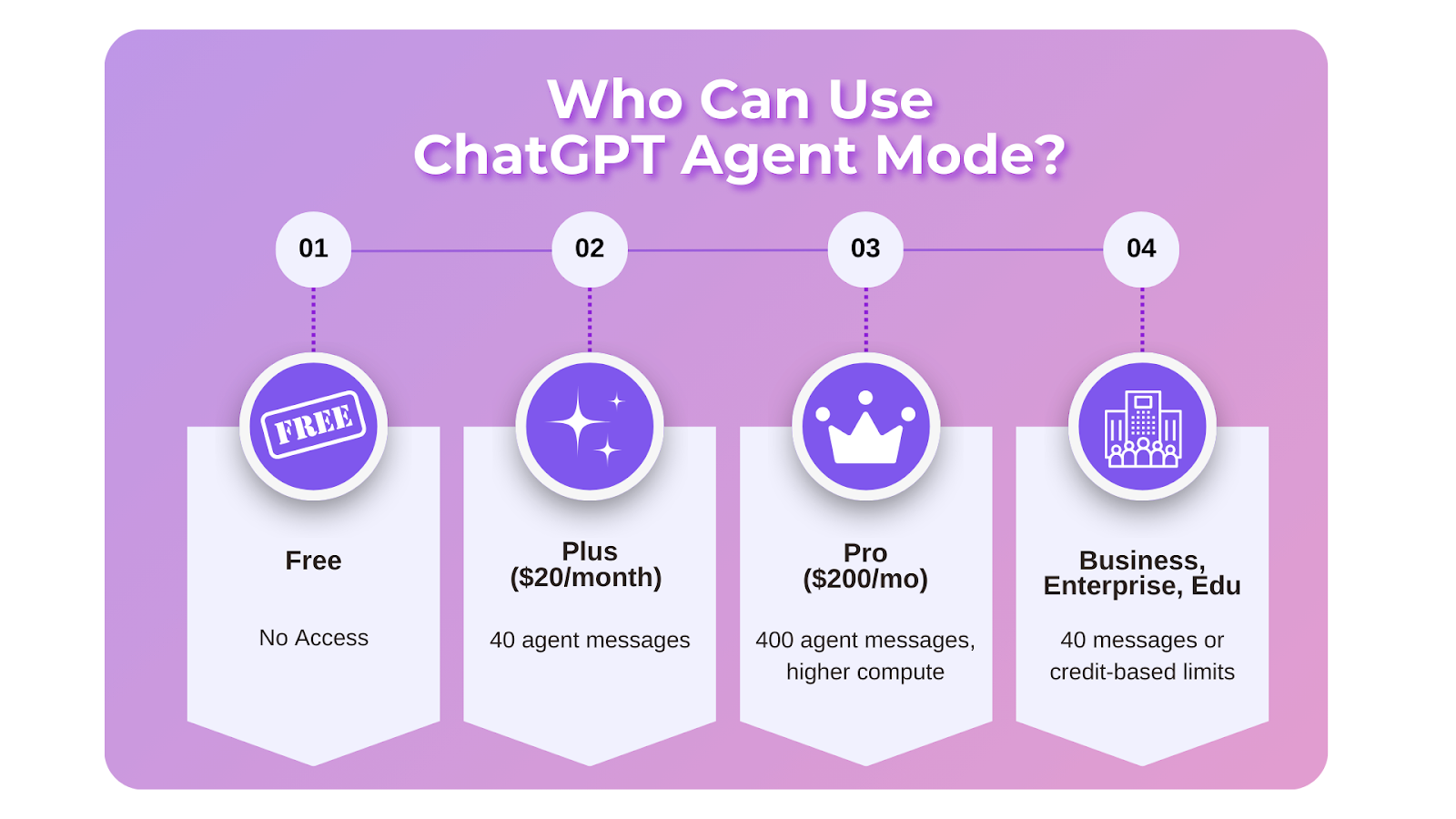
Agent Mode isn’t open to everyone yet. It’s only available on paid ChatGPT plans:
- Free plan: Access on the free plan is extremely limited and doesn’t include Agent Mode.
- Plus ($20/month): Includes Agent Mode with 40 agent messages per month.
- Pro ($200/month): Expands usage with 400 agent messages each month, plus higher compute for faster, more complex tasks.
- Business, Enterprise, and Edu: Provide access with the same 40-message limit, or credit-based usage depending on your plan.
You can use Agent Mode on the web, desktop apps (Mac/Windows), and mobile apps (iOS/Android).
At the time of writing, there are still restrictions. Some websites are blocked for compliance and safety. Output formats like slideshow creation are still in beta, meaning results may need polishing. And while the agent can log in through your browser when needed, it won’t store your passwords or sensitive data.
How to Access ChatGPT Agent Mode
Here’s how to turn on Agent Mode on ChatGPT:
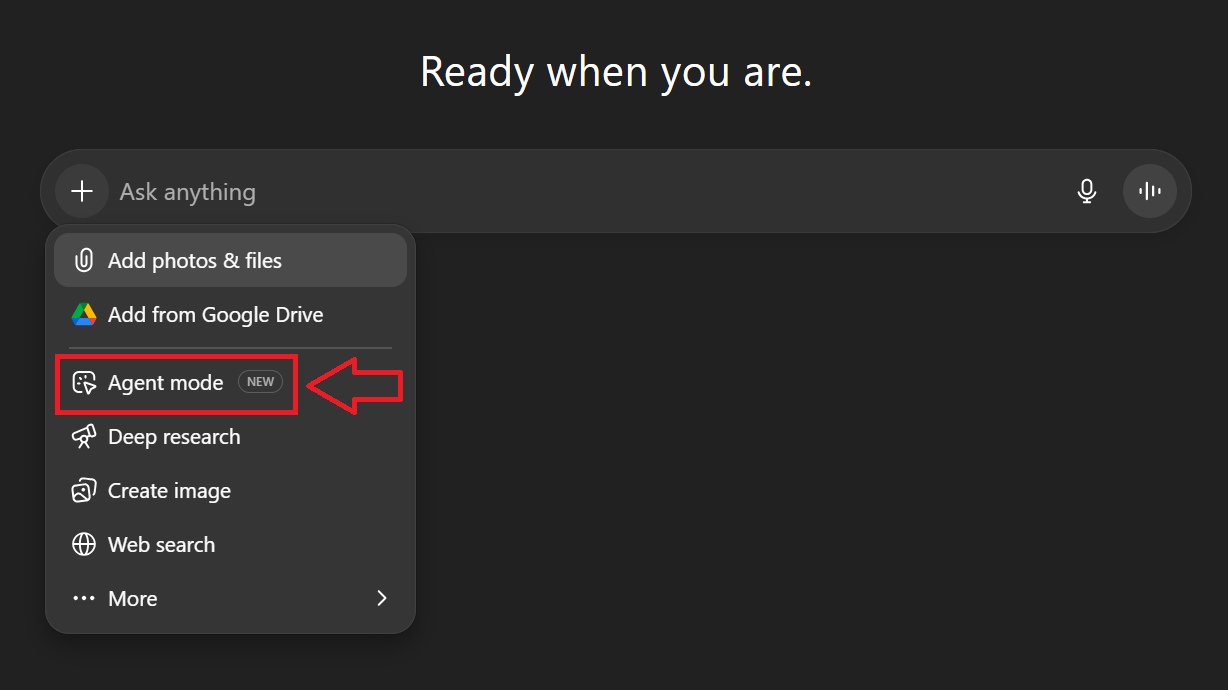
- Open ChatGPT on web, desktop, or mobile.
- Tap the plus button in the composer.
- Select “Agent Mode” from the dropdown. Alternatively, type /agent in the message box.
- Describe your task in plain language.
- The agent begins working, showing a step-by-step log of its actions.
- You can pause, stop, or take over the browser at any time.
Key Features and Capabilities of ChatGPT Agent
Agent Mode comes with a set of tools that go far beyond text responses. Here are the core capabilities that make it powerful for everyday and professional use:
Autonomous web browsing
The agent can open websites, click through pages, fill out forms, and gather information on its own. Unlike standard ChatGPT, it actively navigates the web to complete tasks like research, booking, or gathering data.
App integration

Through connectors, the agent can pull information from approved apps such as Gmail, Google Drive, GitHub, and more. These integrations are read-only, but they help the agent access context like emails, schedules, or stored documents to make its outputs more relevant.
Data analysis
With its built-in code interpreter, the agent can run calculations, process large files, and generate charts or summaries. This is especially useful for analyzing spreadsheets, updating financial models, or running simulations without manual effort.
File manipulation
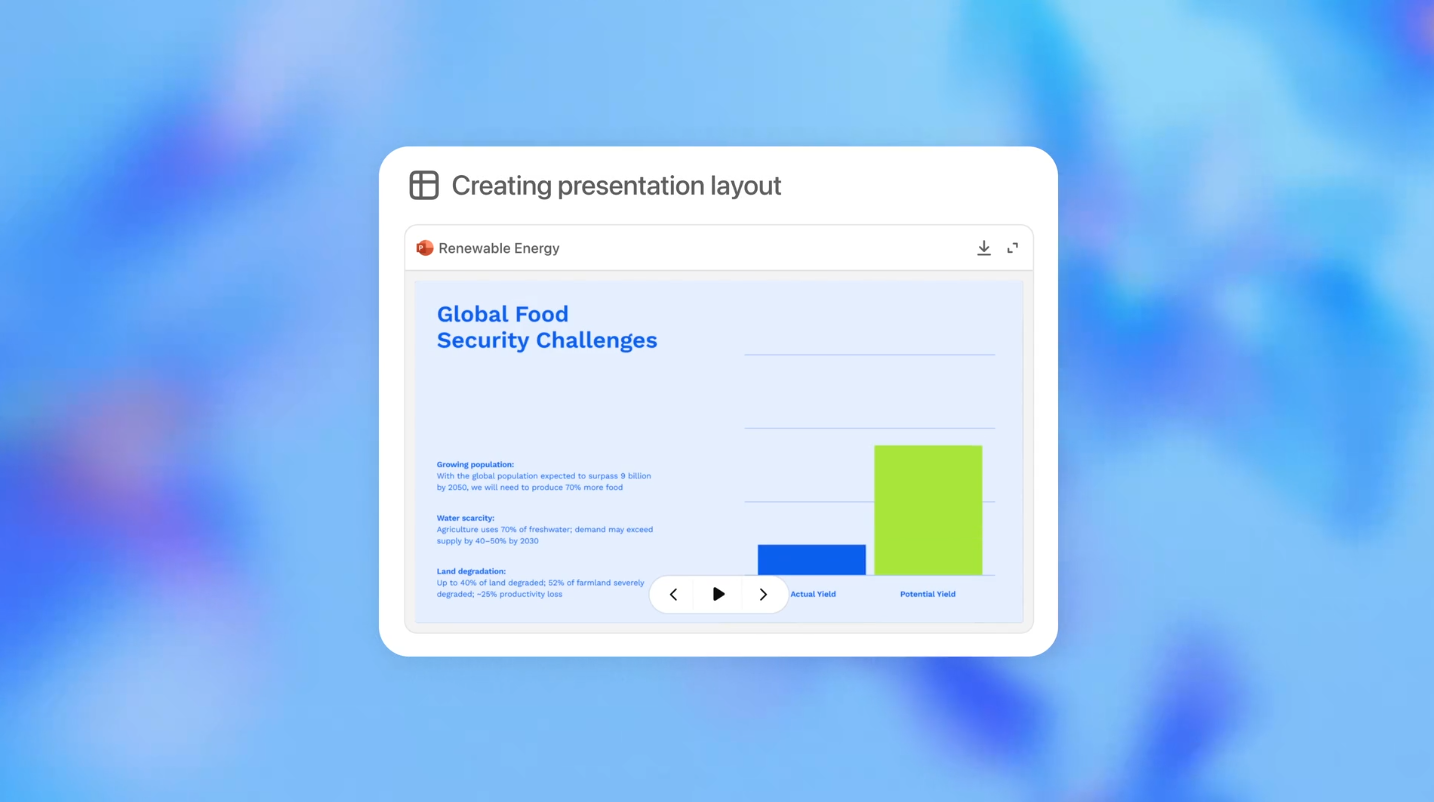
You can upload documents or spreadsheets, and the agent can edit, reformat, or extract key insights. It can also create new artifacts like editable presentations or updated spreadsheets based on your instructions.
Scheduling

After completing a task, you can set it to repeat automatically. Daily, weekly, or monthly schedules can be managed through the clock icon in ChatGPT to automate and schedule recurring tasks, reports, or reminders easily.
User Control, Safety, and Monitoring
Agent Mode includes built-in safeguards so you can see what’s happening, approve important actions, and step in whenever necessary.
- Action log: A real-time feed shows exactly what the agent is doing, from opening a site to editing a file.
- Pause or stop anytime: You can interrupt tasks if they’re taking too long or heading in the wrong direction.
- Take over the browser: For sensitive actions, such as logging in, you can switch to takeover mode so the agent never sees your credentials.
- Confirmation prompts: The agent asks for your approval before major steps like purchases or data changes.
- Data safety: Cookies and browsing history can be cleared, and you can review or remove connector permissions in settings.
These safeguards reduce risks like prompt injection (malicious instructions hidden on websites) and ensure that the agent’s actions remain transparent and reversible.
Use Cases: How People Use ChatGPT Agent Mode
These examples from Reddit highlight the most productive ways people are saving time and effort using Agent Mode.
Automating work deliverables
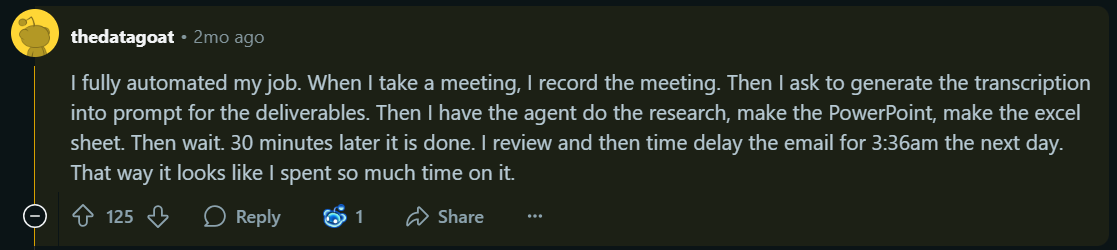
One of the most striking stories came from a user who recorded a meeting, uploaded the transcript, and let Agent handle the rest. It researched, created a PowerPoint, built an Excel sheet, and even drafted a follow-up email. The biggest benefit? It eliminated hours of admin work—like sorting files, sending updates, and managing next steps; freeing up time for high-impact tasks. Tools like this can be especially helpful when paired with a virtual administrative assistant to help streamline operations even further. What would have taken hours was done in under 30 minutes.
Document organization
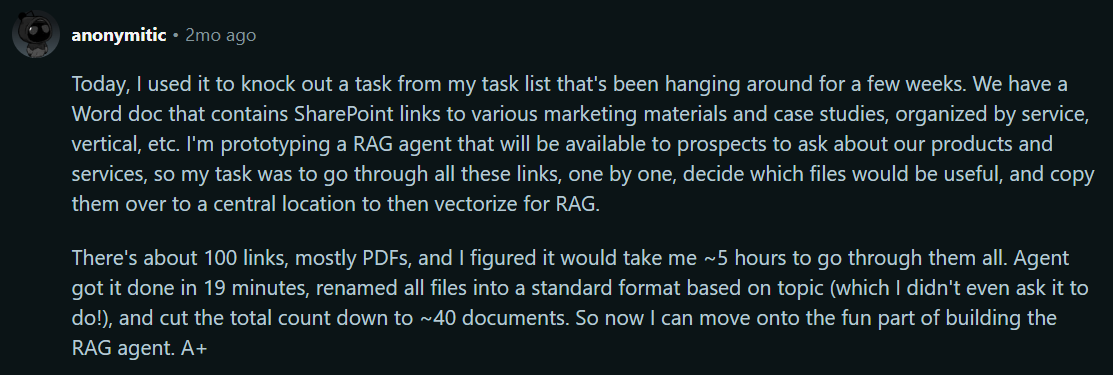
Instead of manually sorting through dozens of files, one user had Agent Mode process over 100 SharePoint links, filter them for relevance, rename them, and organize them into a central folder. This cut a five-hour task down to under 20 minutes.
Data and report generation

Complex reports are another standout. One IT consultant shared how Agent processed over 4,000 findings into a clean, client-ready document in two hours. Tasks like parsing PDFs, analyzing spreadsheets, and exporting summaries are where the tool shines.
Research and planning
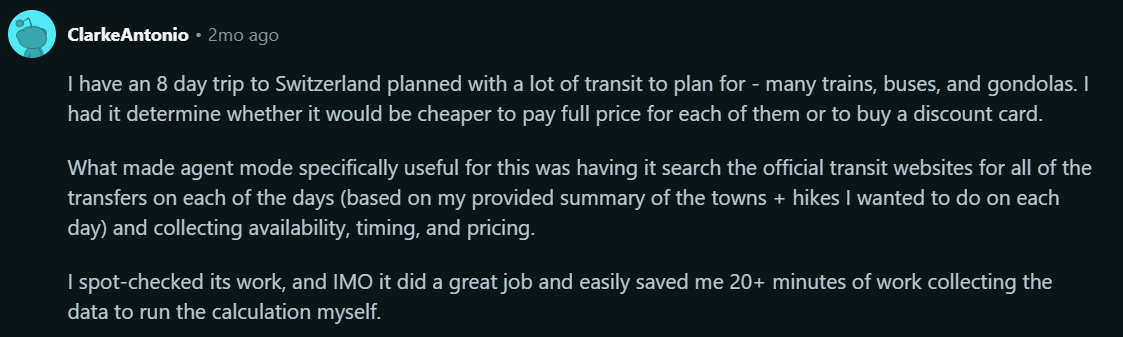
Agent proves useful for structured research. Examples include comparing train and bus tickets in a specific country, screening financial stocks with custom rules, and pulling from paywalled sources for academic projects. By chaining steps together, it produces more actionable results than a single query.
Content and documents
From transcribing YouTube talks to drafting PRDs from messy notes, Agent handles multi-step content work. Some users even had it generate worksheets from TV subtitles or summarize long videos, saving hours of manual effort.
Everyday productivity

On the lighter side, people use Agent to unsubscribe from dozens of promotional emails, clip grocery coupons, or plan meals through Instacart. These may sound small, but they show how Agent can take on chores and free up time for bigger priorities.
How Tactiq and ChatGPT Agent Work Together for Remote Productivity
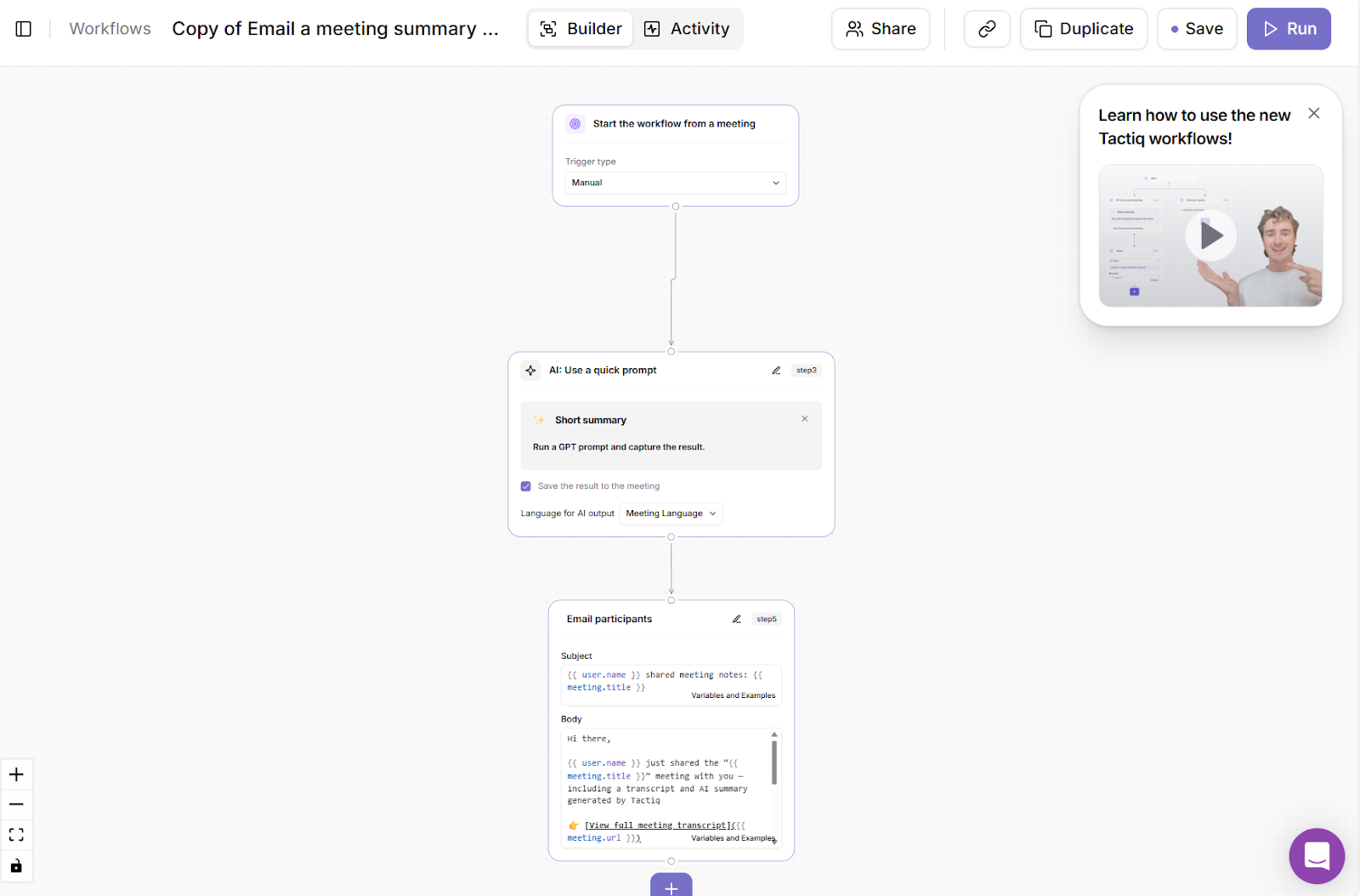
ChatGPT Agent Mode is powerful, but it can feel overwhelming if your main goal is to manage meeting insights.
Tactiq acts as a simpler AI agent, focused only on meeting workflows. Instead of juggling connectors, logins, and multi-step prompts, you get an out-of-the-box automation built for remote teams.
Here’s one task that Tactiq can automate: After every meeting, Tactiq can automatically generate a summary and email it to all participants. Everyone walks away with the same notes and next steps, without any manual copy-pasting. You can also learn more about AI Workflows in this article: Creating AI Workflow Generators for Meetings.
This simple setup gives you reliable, repeatable results right away. You don’t need to design complex task chains or monitor logs like you do with ChatGPT Agent. Tactiq handles the most common meeting pain points:
- Capturing conversations
- Summarizing them
- Delivering insights where your team already works
When you’re ready to go further, you can start combining both tools. For example, Tactiq can send all transcripts to Google Drive. From there, ChatGPT Agent can pick them up, run deeper research, create detailed reports, or even build slide decks.
👉 Download the free Tactiq Chrome Extension today.
{{rt_cta_ai-convenience}}
Wrapping Up
ChatGPT Agent Mode is powerful for handling complex, multi-step tasks online. It can research, analyze, and even take action across different platforms. But for meetings, you don’t need to build those workflows from scratch.
By combining Agent Mode with Tactiq, you get the best of both worlds: broad automation for research and projects, plus specialized AI workflows that turn every meeting into clear transcripts, summaries, and next steps. This means less time managing tasks and more time moving work forward.
Ready to see the difference? Try Tactiq today to unlock smarter, faster workflows.
FAQs About ChatGPT Agent
What does Agent Mode on ChatGPT do?
Agent Mode lets ChatGPT take actions online. It can browse web pages, log in securely, analyze files, and complete tasks step-by-step while keeping you in control.
How do you use the ChatGPT research agent?
Enable Agent Mode from the tools menu or by typing /agent. Then describe your task. The agent will research, analyze, or act online, pausing for clarification when needed.
How does Agent Mode work?
It runs on a virtual computer, switching between tools like a browser, code interpreter, or connectors. You guide the task, and it asks for confirmation on sensitive steps.
Is Agent GPT free?
No. Agent Mode is available on Plus, Pro, Business, Enterprise, and Edu plans. Team users also have access, though message limits may vary by plan.
How can I use ChatGPT Agent on my phone?
Agent Mode works on ChatGPT’s mobile apps for iOS and Android. Just enable it from the tools menu in your app to start creating tasks on the go.
Related articles





Want the convenience of AI summaries?
Try Tactiq for your upcoming meeting.
Want the convenience of AI summaries?
Try Tactiq for your upcoming meeting.
Want the convenience of AI summaries?
Try Tactiq for your upcoming meeting.