
Can ChatGPT Summarize In-Person Work Meetings?
August 13, 2025
August 13, 2025
January 8, 2026
January 8, 2026

Most people use ChatGPT to summarize virtual calls, but what about face-to-face meetings? Can you still turn those conversations into clear, useful notes?
The answer is yes, with a few extra steps.
In this guide, we’ll walk through how ChatGPT handles meeting summaries, what’s different about in-person meetings, and how AI tools can make the process easier. If you run regular team discussions, this can help you save time and stay organized.
How ChatGPT Summarizes Meetings: What’s Possible in 2025?
ChatGPT can now record conversations, convert them to text, and generate summaries all in the same chat. This allows faster follow-ups, better documentation, and fewer missed details after a meeting.
The biggest change? You no longer need to copy and paste long transcripts manually. With ChatGPT record mode, you can capture audio in real time and instantly turn it into a summary. It’s a helpful option for online meetings, but it also works if you treat your in-person discussion like a recorded call.
Let’s break down the key features and how they compare across meeting types.
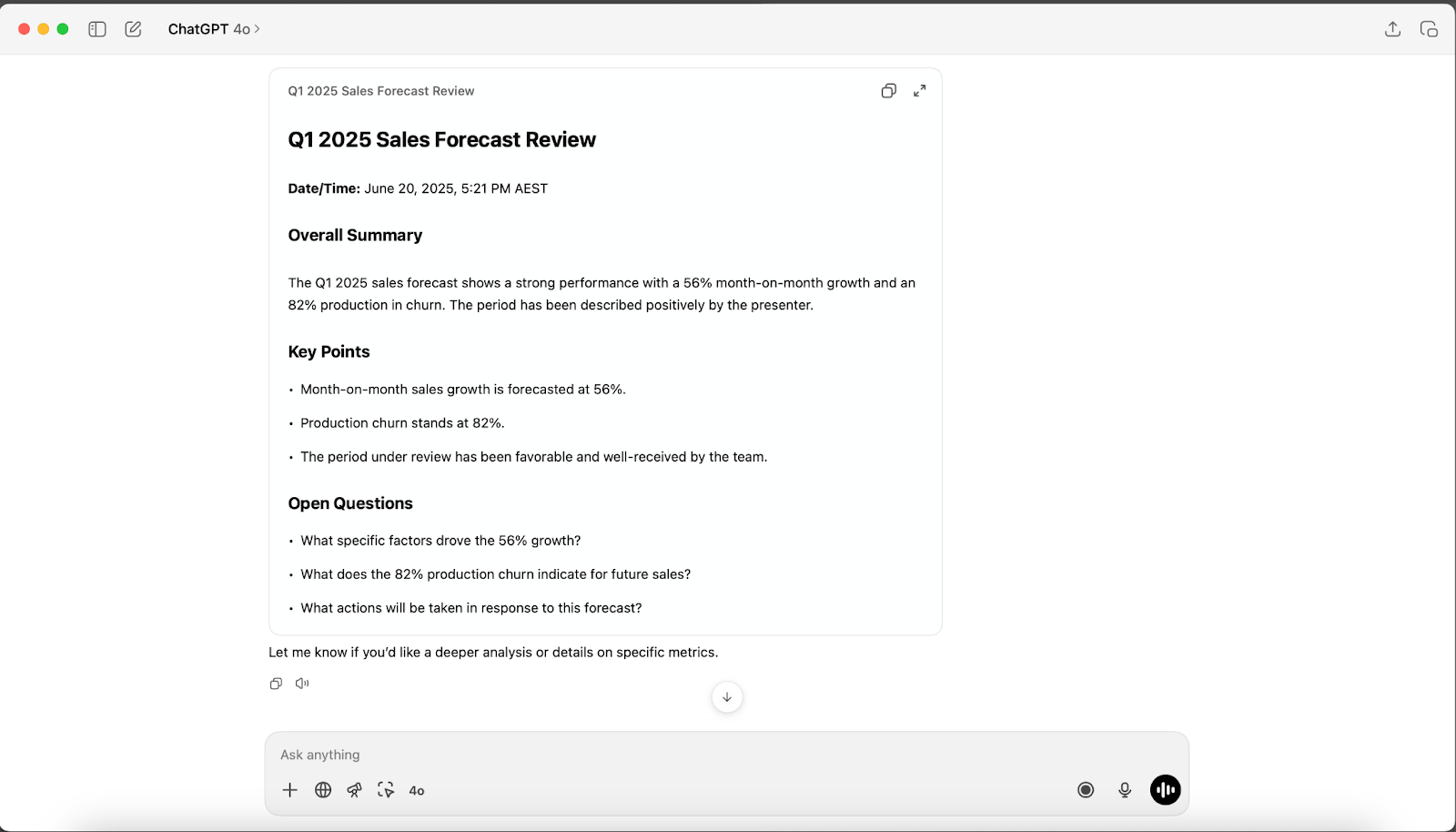
ChatGPT’s meeting summarization features
ChatGPT now offers several ways to turn spoken conversations into summaries. The most direct method is using ChatGPT record mode, which lets you capture audio right inside the chat. As you speak, it automatically converts speech to text and starts building a transcript. From there, ChatGPT can summarize the key points with just a prompt.
You can also paste in a transcript or upload an audio file. ChatGPT will process the text and generate action items, highlights, or full summaries, depending on your request.
This makes it useful for both live meetings and recordings you’ve captured elsewhere.
Online vs. in-person meetings: what’s different?
Capturing online meetings is usually straightforward since ChatGPT can plug into the call or use existing transcripts. But in-person meetings need a bit more setup.
You’ll need to record the conversation in the room. That could mean using your phone, a laptop, or activating ChatGPT’s record mode to capture everything as it’s happening. Once recorded, you can convert the audio to text and move on to summarizing.
While the tools are the same, the workflow shifts a little depending on how and where your meeting happens.
Pro tip: You can also upload your in-person meeting video or audio file to Tactiq to get an instant transcript. From there, use AI prompts to summarize key points or turn your notes into follow-up tasks in one place.
How to Use ChatGPT to Summarize In-Person Meetings
Here’s how you can turn in-person conversations into summaries.
1. Capture the audio.

To start, you’ll need a clear recording of the meeting. There are a few ways to do this:
- Use the speech-to-text on ChatGPT by turning on voice input in the chat window.
- Try ChatGPT’s record mode and treat your in-person meeting like a call.
- Use your phone or laptop’s voice recorder app to capture the discussion.
No matter which method you choose, make sure the recording is clear and the speakers are close to the mic for the best results.
Keep in mind: While ChatGPT provides the full text, it doesn’t label who’s speaking. Tactiq includes speaker identification, so you can see who said what throughout the meeting.
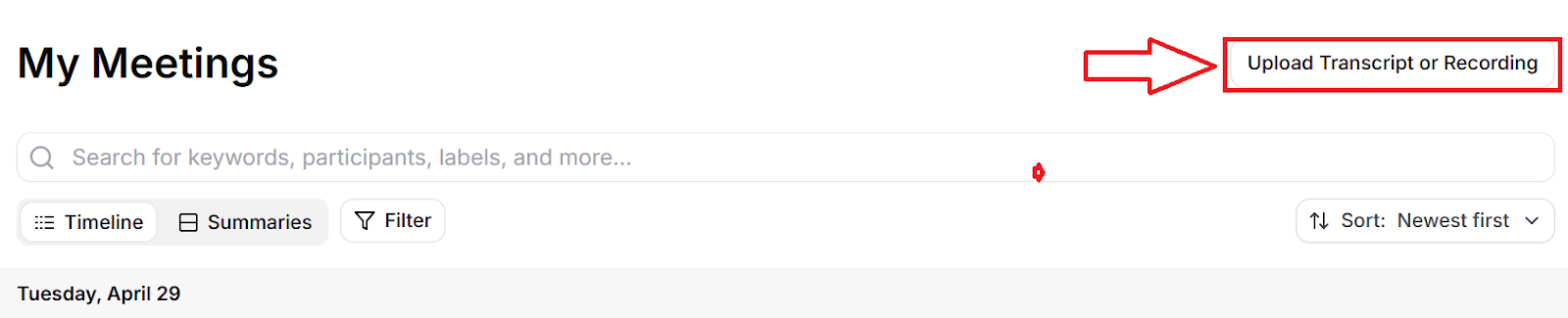
2. Get the transcription or audio file.
If you used ChatGPT’s recording feature or another speech-to-text tool, you may already have a transcript ready to go. If you recorded the audio separately, you can upload the file to Tactiq and get a fast, accurate transcription.
3. Summarizing with ChatGPT
Once you have the transcript, it’s time to turn it into useful notes. Here are a few ways to do that:
- Paste the text directly into ChatGPT and ask for a summary.
- Upload the transcript via a connected app like Google Drive. 🎥
- Use prompts like “Summarize this into action items” or “Give me the top 5 takeaways.”
Learn how to connect Google Drive to ChatGPT here.
Or skip the extra steps. If you’re already using Tactiq, you can summarize directly inside your transcript without needing to switch over to ChatGPT.
Privacy, Compliance, and Best Practices
Using AI to capture and summarize meetings can be a big time-saver, but it’s important to stay transparent and responsible. Here’s what to keep in mind when using AI tools for in-person meetings.
Let people know that you are transcribing the meeting
Before you hit record, let everyone in the room know you’re transcribing or recording. It’s not just polite; it’s often required by law or company policy. A quick heads-up ensures everyone is informed and gives them a chance to ask questions or opt out if needed.
Keep in mind that different industries and locations may have specific laws about recording conversations and how those recordings can be stored, shared, or used. Always check local regulations and your organization’s guidelines before proceeding.
Company policies & disclosure
Different companies have different rules about AI tools. Some may allow ChatGPT for meeting notes, others might limit it or require approval first. Always check your internal policies before using tools to summarize transcripts. When in doubt, disclose it.
Transparency builds trust and keeps you compliant.
Data security & confidentiality
When working with sensitive information, choose tools that prioritize security. Use password-protected files, avoid storing data in personal accounts, and make sure any app you use follows strict privacy guidelines. Using a VPN is also recommended to encrypt your connection and keep data safe from unauthorized access. For readers evaluating different VPN providers, this detailed NordVPN vs Surfshark review by Cybernews offers helpful insights into their privacy and security features.
Wrapping Up
Summarizing in-person meetings with ChatGPT is completely doable. You just need the right steps. Start by recording your meeting, convert the audio to text, then use ChatGPT to generate a summary. Or better yet, use Tactiq to handle transcription and summarization all in one place.
Here’s what to remember:
- You can treat in-person meetings like calls using ChatGPT record mode.
- Tools like Tactiq help you transcribe and summarize without switching apps.
- Always let others know you’re recording, and follow your company’s policies.
- Keep your data secure and choose tools that protect confidentiality.
With a smart setup, you can turn any online or in-person conversation into clear, actionable notes that move work forward.
Ready to try it? Get started with Tactiq and simplify your meeting workflow today.
{{rt_cta_ai-convenience}}
Yes, ChatGPT can summarize both virtual and in-person meetings as long as you provide a transcript or use voice input to capture the discussion.
That depends on your company’s policies and how your tools are monitored. Always check your internal guidelines and be transparent when using AI at work.
Absolutely. You can upload text or summarize Google Docs in ChatGPT using connected apps like Google Drive.
Tactiq is a strong alternative. It lets you upload audio or transcripts and generate summaries, action items, or follow-up messages with built-in AI prompts. It’s a great option if you want everything in one place.
Not directly. While ChatGPT can’t create events in your calendar, you can use features like Tasks and Connectors to manage reminders and view upcoming meetings.
Related articles





Want the convenience of AI summaries?
Try Tactiq for your upcoming meeting.
Want the convenience of AI summaries?
Try Tactiq for your upcoming meeting.
Want the convenience of AI summaries?
Try Tactiq for your upcoming meeting.