
Google Meet Pricing: How Much Does It Cost
July 11, 2024
July 11, 2024
May 12, 2026
May 12, 2026

Google Meet pricing has evolved alongside Google’s push toward AI-driven collaboration. Gemini AI has become part of every Google Workspace plan, bringing smarter meeting summaries, automatic action items, and instant insights to every Google Meet session.
Comparing Google Meet’s free and paid plans? This guide covers pricing, features, and the latest AI updates that make it one of today’s top video conferencing tools.
In this guide, you’ll learn:
- What’s new in Google Meet
- The latest Google Meet pricing plans
- Key AI features powered by Gemini in Meet
What’s New in Google Meet
Google Meet has evolved into an AI-powered collaboration hub within Google Workspace, combining smarter meeting tools, dynamic layouts, and stronger security.
AI features (Gemini in Meet)
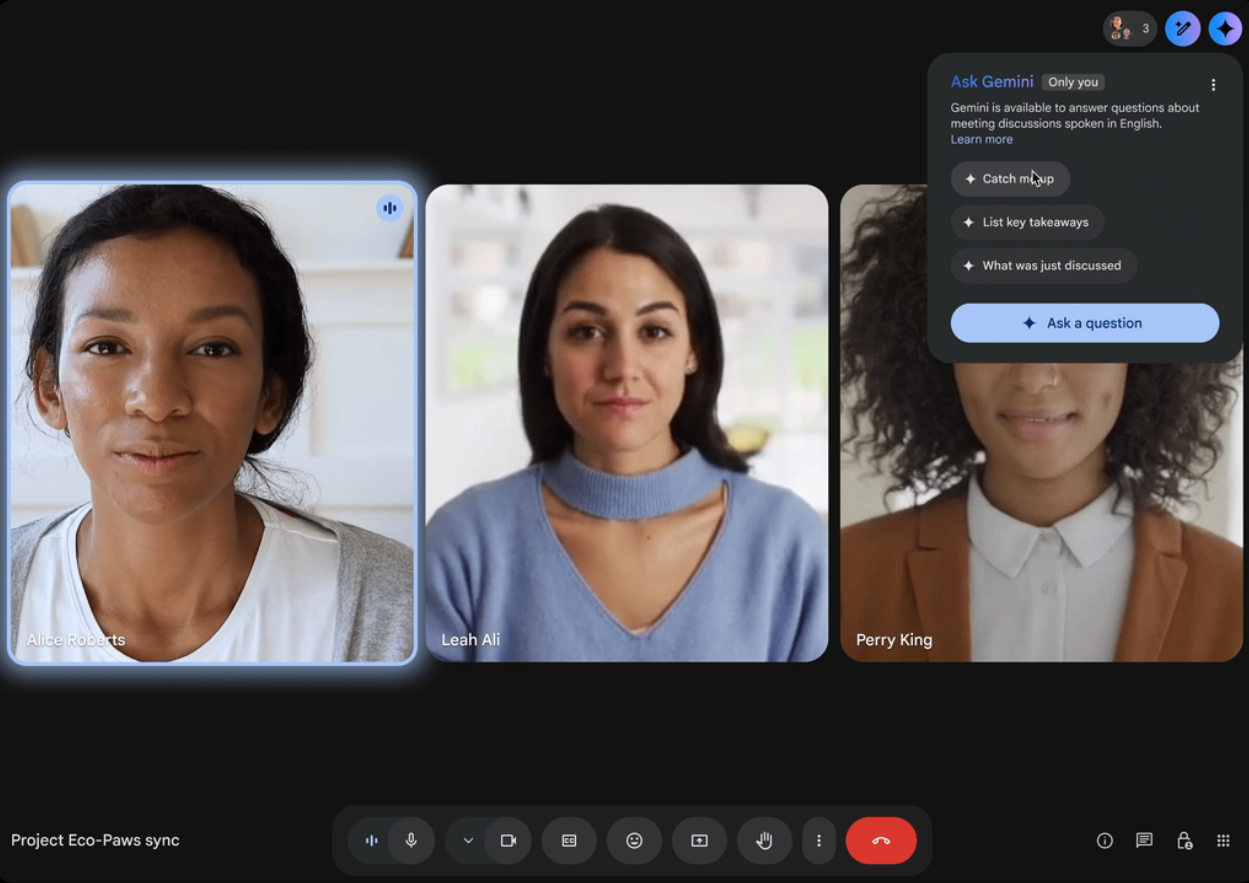
Image from Google
Gemini is now available across paid Google Workspace plans, enhancing every Google Meet video meeting with intelligent assistance.
- Ask Gemini in Meet: Summarize discussions, track key decisions, and ask questions directly in-meeting.
- AI Meeting Recaps: Receive automatic summaries and highlights after each call.
- Smart Note Sync: Meeting insights automatically connect to other Google Workspace apps like Docs, Chat, and Drive.
Dynamic layouts & smart video framing

Image from Google
Gemini also improves how participants appear during Google Meet sessions.
- Dynamic Layouts: AI adjusts screen views dynamically to show more faces and reactions.
- Enhanced Lighting & Noise Cancellation: Automatically balances brightness and reduces background noise for clearer video calls.
- Virtual Backgrounds: AI renders smoother virtual backgrounds even on lower-end devices.
Enhanced security & integration
Security and integration upgrades continue to make Google Workspace one of the safest video conferencing tools.
- Encryption: All Google Meet meetings are encrypted in transit and at rest. End-to-end encryption is currently available only for personal 1:1 and small group calls, while Enterprise users can enable Client-Side Encryption for full key control and regulatory compliance.
- Deeper Integration: Google Meet integrates seamlessly with Google Calendar, Docs, and Chat for scheduling and collaboration.
- Advanced Endpoint Management: Keeps company data protected across devices.
💡 Pro tip: Want real-time meeting transcripts with AI summaries? Use Tactiq to capture discussions and create actionable meeting notes across all major platforms, not just Google Meet.
Is Google Meet Really Free?
Yes. Google Meet’s free plan is still available for anyone with a Google Account, offering the essential video conferencing features most individuals and small teams need. It’s ideal for casual video meetings, quick check-ins, and one-on-one calls, but it has limits compared to paid Google Workspace plans.
Features included in Google Meet’s free plan
- Up to 100 participants: You can host video meetings with as many as 100 Google Meet users.
- 1-hour meeting limit: Group meetings automatically end after 60 minutes.
- Screen sharing: Present slides, documents, or apps from your desktop app or browser window.
- Live captions: AI-generated captions improve accessibility for participants.
- Google Calendar integration: Schedule or join meetings directly through Google Calendar with an automatic Google Meet link.
- Virtual backgrounds: Choose from a limited set of virtual backgrounds to personalize your call. You can also explore different Google Meet backgrounds to create a more fun meeting environment.
While the free plan covers most basic features, teams running frequent or long group meetings will benefit from a paid Google Meet plan for longer calls, higher participant limits, more storage, and AI meeting summaries.
💡 Pro tip: Need real-time transcripts or AI summaries in the free version? Try Tactiq. It works directly in Google Meet to capture discussions, summarize insights, and create action items automatically.
How Much Does Google Meet Cost?
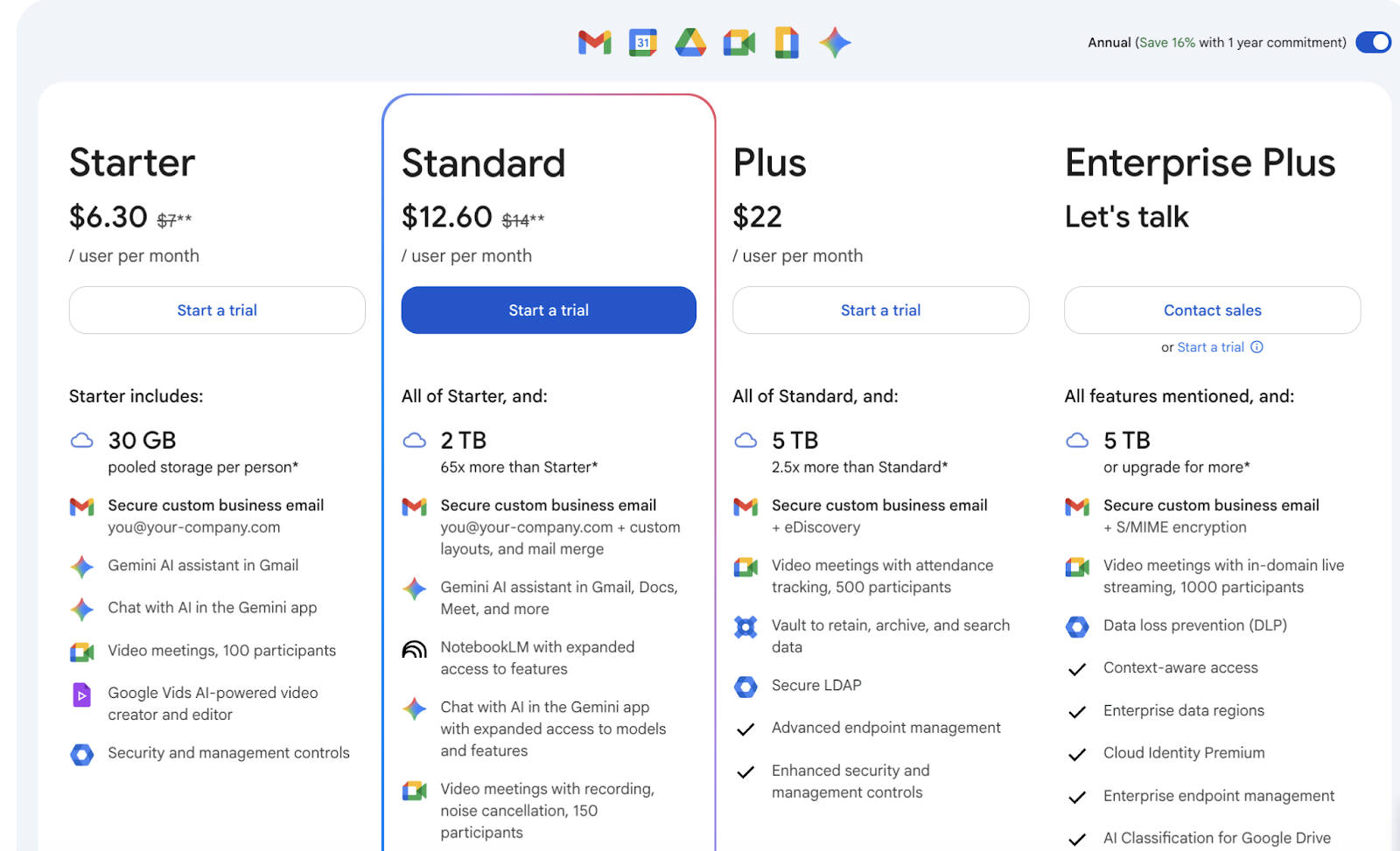
Google Meet pricing is part of Google Workspace, which now includes built-in AI through Gemini in Meet. As of 2025, Google slightly increased prices by around $2 per user per month to support the new AI rollout across Workspace apps.
Pricing plans
Plan: Free Plan
- Price (USD): $0
- Participants: 100
- Meeting Length: 60 minutes
- Key Features: Screen sharing, live captions, video meetings, Google Meet link from Google Calendar
Plan: Business Starter
- Price (USD): $6.30 / user per month
- Participants: 100
- Meeting Length: 24 hours
- Key Features: Secure email, basic security, Gemini in Gmail and Chat, 30 GB cloud storage
Plan: Business Standard
- Price (USD): $12.60 / user per month
- Participants: 150
- Meeting Length: 24 hours
- Key Features: Gemini in Meet and Docs, meeting recordings saved to Google Drive, Studio Sound noise cancellation, polling & Q&A, breakout rooms
Plan: Business Plus
- Price (USD): $22 / user per month
- Participants: 500
- Meeting Length: 224 hours
- Key Features: All Standard features plus attendance tracking, Vault, advanced endpoint management, enhanced security
Plan: Enterprise Plus
- Price (USD): Custom pricing
- Participants: 1,000
- Meeting Length: 24 hours
- Key Features: All Plus features, plus in-domain live streaming, data loss prevention (DLP), data regions, enterprise management, client-side encryption
Key updates
- AI in Every Paid Plan: Gemini now powers meeting summaries, follow-up suggestions, and recaps for late joiners.
- Longer Meetings: All paid Google Meet plans allow up to 24-hour sessions.
- Higher Participant Limits: Business Plus and Enterprise Plus tiers host up to 1,000 people per meeting.
- Recording & Collaboration: Meeting recordings automatically save to Google Drive, and Google Meet integrates seamlessly with Docs, Chat, and Calendar.
- Improved Audio & Controls: Studio Sound and Adaptive Audio deliver clearer conversations, while moderators gain better control with polls, Q&A, and hand raising.
Google Meet’s AI-powered enhancements, such as noise cancellation, meeting recordings, and AI assistants, improve productivity and collaboration across all plans.
Note: This list reflects the latest Google Meet pricing and Workspace features as of October 2025.
How to Choose the Right Google Meet Plan
The right Google Meet plan depends on your team size, meeting habits, and the level of collaboration you need.
For small teams or startups
The Business Starter plan is ideal for smaller teams that need reliable video conferencing without the extras. It includes 24-hour meetings for up to 100 participants, Gemini AI in Gmail and Chat, and 30 GB of cloud storage per user. It covers essential Google Meet features like screen sharing, chat, and Google Calendar integration.
For growing businesses
The Business Standard plan fits teams with daily client calls or internal video meetings. It includes Gemini in Meet, meeting recordings, and tools like breakout rooms, polling, and noise cancellation. It’s a balanced choice for improving collaboration and keeping records of important discussions.
For large teams and enterprises
Choose Business Plus or Enterprise Plus if your organization needs higher participant limits, compliance tools, and more administrative control. These tiers include attendance tracking, advanced endpoint management, Vault, and optional client-side encryption. The Enterprise plan supports up to 1,000 participants and adds live streaming for large events.
Every plan keeps meetings encrypted in transit and at rest, integrates with other Google Workspace apps, and includes built-in Gemini AI to help summarize, follow up, and enhance team productivity.
While Google Meet now includes AI features, it still leaves room for tools that offer greater control and cross-platform flexibility.
How Tactiq Enhances Your Google Meet Sessions
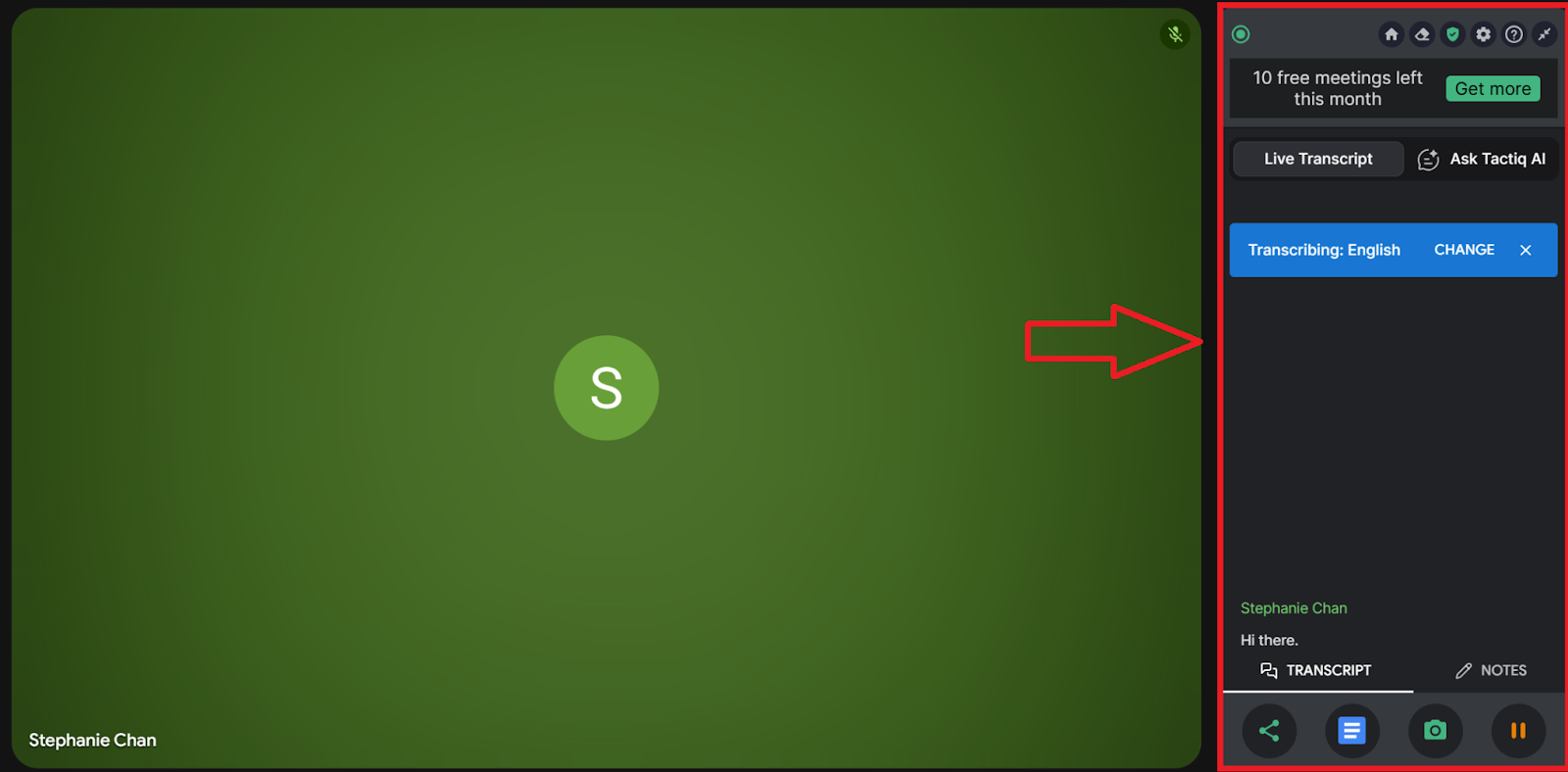
Tactiq is an AI meeting assistant that captures and organizes your Google Meet sessions in real time. It transcribes conversations, summarizes discussions, and automates next steps so you can stay focused on the conversation. Beyond Google Meet, it also works with Zoom and Microsoft Teams, perfect for teams using multiple video conferencing tools.
Key features of Tactiq
- In-Meeting AI: Ask questions about your meeting as it happens. Tactiq’s AI can clarify points, summarize ongoing discussions, and surface key decisions directly during the meeting.
- Real-Time Transcription: Capture every word during your Google Meet, MS Teams, or Zoom meeting with accurate live transcription.
- AI Meeting Summaries: Instantly generate summaries that highlight key decisions, next steps, and main discussion points.
- AI Workflows: Automate post-meeting tasks by turning notes into project updates, follow-up emails, or tickets in tools like Notion, HubSpot, and more.
Tactiq goes beyond transcription. It’s a complete workspace for capturing, summarizing, and sharing meeting insights across platforms.
👉 Install the Tactiq Chrome Extension for free and turn your next meeting into clear, actionable notes in seconds.
{{rt_cta_ai-convenience}}
Wrapping Up
With Gemini AI now part of every Google Workspace plan, Google Meet meetings are smarter, more connected, and more accessible than before. Google continues to refine how teams meet and collaborate.
For teams that need greater flexibility and deeper control over their meeting content, Tactiq adds another layer of power. Its in-meeting AI, transcription, and workflows help teams turn discussions into actions across Google Meet, Zoom, and Microsoft Teams.
Try Tactiq for free and experience how interactive AI note-taking turns every meeting into actionable insights.
FAQs About Google Meet Pricing
Does Google Meet now include AI summaries?
Yes. All paid Google Workspace plans include Gemini in Meet, which generates AI summaries, recaps, and follow-up suggestions during and after meetings.
Has Google Meet pricing changed in 2025?
Yes. Google increased Workspace pricing by about $2 per user per month to include built-in Gemini AI features across all paid tiers.
How much does Google Meet cost?
Google Meet pricing starts at $6.30 per user per month for Business Starter and goes up to $22 per user per month for Business Plus. The Enterprise plan offers custom pricing.
Is Google Meet free of cost?
Yes. Google Meet’s free plan lets you host up to 100 participants for 60 minutes with core features like screen sharing, captions, and Google Calendar integration.
What tools offer real-time AI meeting transcription?
Tools like Tactiq provide real-time AI transcription, summaries, and in-meeting insights across Google Meet, Zoom, and Microsoft Teams.
Google Meet offers a free plan with 60-minute meetings for up to 100 participants. Paid plans start at $7.20 per user per month, providing extended meeting durations, AI-powered tools, and advanced security features.
The free plan allows group meetings for up to 60 minutes, while one-on-one meetings can last up to 24 hours. Paid plans remove these time limits, making them ideal for longer business meetings and events.
Small teams can use Business Starter for basic video calls, while growing teams benefit from Business Standard with meeting recordings. Large organizations should choose Business Plus or Enterprise for higher security, compliance, and up to 1,000 participants.
Yes, all paid plans include AI tools. Business Starter has Gemini AI in Gmail, while Business Standard and above offer NotebookLM Plus, noise cancellation, and AI transcription for smarter meetings and workflows.
Yes, Google Meet’s Business Starter plan costs $6.30 per user per month, while Zoom’s Pro plan starts at $14.99 per user per month. Google Meet is a better choice for teams using Google Workspace.
Related articles


_Main.jpg)




Want the convenience of AI summaries?
Try Tactiq for your upcoming meeting.
Want the convenience of AI summaries?
Try Tactiq for your upcoming meeting.
Want the convenience of AI summaries?
Try Tactiq for your upcoming meeting.