
Can ChatGPT Schedule Meetings?
August 25, 2023
August 25, 2023
August 27, 2025
August 27, 2025

If you’ve used ChatGPT to write emails or manage daily tasks, you might be wondering: Can ChatGPT schedule meetings too? With so much time spent in meetings, finding ways to save time matters more than ever.
In this article, we’ll explore what ChatGPT can and can’t do for meetings, how to use ChatGPT for meeting minutes, meeting agendas, and other important tasks, and how similar AI tools can help you stay organized.
Can ChatGPT Schedule a Meeting?
No. Currently, ChatGPT can’t schedule meetings for you.
But it can still support your meeting workflow in helpful ways. Here are two things you can do using ChatGPT for meeting-related tasks:
Use ChatGPT Tasks to create reminders for meetings
While ChatGPT can’t access your calendar or book meetings directly, you can use ChatGPT Tasks to set recurring reminders. Tasks help you stay on top of follow-ups, preparation, and scheduling prompts, like a lightweight to-do list that syncs across devices.
To create a task, just tell ChatGPT what to remember. Tasks work with models o3 and o4-mini.
Example prompt:
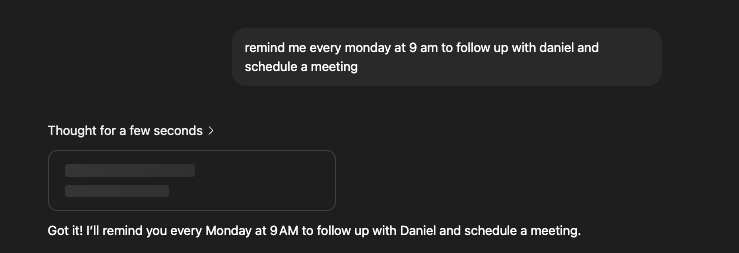
"Remind me every Monday at 9 AM to follow up with [client name] to schedule a meeting."
You can find your tasks by clicking on your profile picture, then Tasks. You’ll receive notifications based on your device settings, on your phone, desktop, or even smartwatch.
Once you get the reminder, you can open your calendar and manually create the event. It’s a simple way to stay on top of scheduling without switching tools.
💡 Pro tip: Want to skip the manual copy-paste? Use Tactiq to capture real-time transcripts and instantly generate summaries, follow-ups, or action items with built-in AI.
Use ChatGPT Connectors to read your calendar

ChatGPT also supports Connectors, which allow it to connect to external apps like Google Calendar. By adding your calendar as a connector, ChatGPT can access your upcoming events and provide helpful context when answering questions or planning tasks.
For example, you can ask:
"What meetings do I have this week?"
Or
"Summarize my calendar for Friday."
However, ChatGPT can only read your calendar. It still can’t create, modify, or delete events. You can access connectors by clicking your profile picture > Settings > Connectors.
Ways to Use ChatGPT for Meetings
Here’s how to use ChatGPT to stay organized, assign tasks, and save time throughout the meeting process.
Before the meeting
You can use ChatGPT to prepare for team meetings by helping you:
- Create a meeting agenda: Share your discussion topics with ChatGPT, and it can organize them into a clear, structured agenda.
- Brainstorm ideas: Feeling stuck? Use ChatGPT to spark creative ideas for your project, campaign, or presentation.
- Organize key points: If you're preparing updates for a team meeting or client call, ChatGPT can help you summarize updates into concise bullet points.
After the meeting
Once the meeting is over, ChatGPT can help you stay productive by:
- Summarizing meeting notes: If you have a meeting transcript, you can paste the transcript into ChatGPT and ask it to summarize the main takeaways. This is one of the easiest ways to use ChatGPT for meeting minutes.
- Writing follow-up emails: Ask ChatGPT to draft a recap email with key decisions, action items, and the next meeting date.
- Turning notes into tasks: ChatGPT can help you assign tasks and build a simple action plan based on your meeting discussions.
Top AI Tool to Help You Streamline Your Meetings
If you're looking to save time and avoid context switching during or after a meeting, Tactiq is one of the best AI tools built specifically for this.
Tactiq is a powerful language model-powered meeting assistant that works with Google Meet, Microsoft Teams, and Zoom. It offers real-time transcription, speaker identification, and AI-powered summaries, without requiring you to copy-paste anything into ChatGPT.

Here’s how Tactiq can help:
- Real-Time Transcription: Automatically transcribes every meeting as it happens.
- AI Workflows: Automate post-meeting tasks like extracting key insights, updating your CRM, generating follow-ups, and sharing structured notes across tools like Slack, Google Drive, and Linear.
- Custom Prompt Library: Use ChatGPT-style prompts to generate meeting summaries, emails, social media posts, and project updates, tailored to the type of meeting you had.
- Translation: Get transcripts in 30+ languages with AI-powered translations.
- Searchable History: Find relevant information from past meetings without digging through notes.
Tactiq helps project managers, content teams, and leaders stay organized, assign tasks, and move faster without toggling between tools.
{{rt_cta_ai-convenience}}
More ChatGPT Tips for Time Management in Meetings
Once you've used ChatGPT to prepare for or wrap up a meeting, you can also rely on it to keep your broader meeting workflow organized and efficient. These tips focus on using ChatGPT as a time-saving assistant beyond just agendas and summaries:
- Automate Recurring Prompts: With ChatGPT Tasks, you can schedule prompts like “summarize meeting transcript” or “draft next week’s team update” so you’re not repeating the same manual tasks each time.
- Batch Your Work: After several meetings, paste multiple transcripts into one conversation and ask ChatGPT to compare themes, extract patterns, or generate a consolidated summary—great for end-of-week reports or content planning.
- Generate Prep Briefings: Before your next meeting, ask ChatGPT to analyze previous notes and surface relevant context, past decisions, or open action items, so you walk in fully prepared.
- Convert Notes Into Deliverables: Use ChatGPT to turn meeting notes into other formats like a blog post, project brief, presentation outline, or client-facing summary.
- Support Weekly Planning: Use ChatGPT to review your past meetings and help prioritize upcoming important tasks, schedule follow-ups, or optimize your to-do list for the week ahead.
ChatGPT helps you save time between meetings, not just during them. But if you're regularly managing transcripts, summaries, and follow-ups, Tactiq is still the faster and more focused option. It removes the need for copying transcripts or crafting custom prompts, giving you ready-to-share insights automatically.
Want to get more out of GPT for meetings? Check out our guide to the best GPTs for meetings.
FAQs About Using ChatGPT for Meetings
How can you use ChatGPT to make your meetings more productive?
Use ChatGPT to create a meeting agenda, brainstorm discussion topics, and summarize transcripts after the call. It also helps assign tasks, draft follow-ups, and prep for your next meeting.
How can ChatGPT help with time management beyond meetings?
ChatGPT can help you analyze data, prioritize your to-do list, and create drafts for writing projects. It acts like a personal assistant for daily tasks and time-sensitive decisions, helping you save time across the board.
Can you schedule ChatGPT Prompts?
Yes. With ChatGPT Tasks, you can schedule ChatGPT to run prompts automatically. For example, you can set a daily reminder to “summarize my meeting notes,” or ask it to brief you on news every morning. These scheduled tasks work across web, mobile, and desktop (except Windows for now) and send you updates via push or email, even if you're offline.
Can ChatGPT schedule appointments?
Not directly. While ChatGPT can help you draft messages to schedule meetings, it cannot schedule appointments in your calendar.
ChatGPT can’t directly schedule meetings because it doesn’t have access to your calendar. However, by connecting ChatGPT with Zapier, you can automate meeting scheduling and save time by staying in your workflow without switching tabs.
You can use ChatGPT before meetings to brainstorm ideas and create detailed agendas, helping you clarify discussion points. After meetings, ChatGPT can summarize transcripts, draft follow-up emails, and turn discussion points into actionable tasks, so you stay organized and efficient.
Tactiq is an AI tool that manages meeting transcripts and offers an AI Meeting Kit, letting you save custom ChatGPT prompts for different meeting types. This means you can quickly extract action items and key decisions from your transcripts, making post-meeting reviews and sharing much easier.
Notion AI helps you turn meeting transcripts into blog posts or reports, while Motion auto-schedules your tasks and combines all your calendars in one view. Using these tools alongside ChatGPT streamlines your workflow and helps you manage meetings and tasks more effectively.
ChatGPT can analyze data you provide, help you spot patterns, and assist in decision-making by running different scenarios. By giving clear instructions, you can use ChatGPT to speed up analysis and choices, freeing up more time for your most important work.
Related articles





Want the convenience of AI summaries?
Try Tactiq for your upcoming meeting.
Want the convenience of AI summaries?
Try Tactiq for your upcoming meeting.
Want the convenience of AI summaries?
Try Tactiq for your upcoming meeting.