

Yes, Google Gemini (新しいタブで開きます) still offers a free tier. Google also added Google AI Plus, a $4.99 monthly plan sitting between the free tier and Google AI Pro, and split its top tier into two Ultra plans.
Understanding the Free Tier in Google Gemini
Google still gives away a real version of Gemini at no cost, and the free plan covers more than a quick chatbot. It runs Gemini 3.6 Flash by default, with varying access to the more powerful Gemini 3.1 Pro model for harder prompts.
The catch shows up in usage limits, which now work differently than they did even a few months ago.
What Google Gemini free includes
The free Gemini app gives you:
- Access to Gemini 3.6 Flash, with varying access to Gemini 3.1 Pro
- Image generation and editing
- Deep Research for multi-source reports
- Gemini Live (新しいタブで開きます) for voice conversations and brainstorming
- Canvas (新しいタブで開きます) for guided, interactive work
- Gems (新しいタブで開きます) to save custom instructions
- 15 GB of cloud storage across Gmail, Drive, and Photos
💡 Pro tip: Want consistent meeting notes without juggling a Google AI plan? Tactiq (新しいタブで開きます) captures real-time transcripts and generates AI summaries on Zoom, Google Meet, and Microsoft Teams, independent of your Gemini usage limits.
What changed in Google Gemini's usage limits
Google dropped fixed daily prompt counts entirely from the Gemini app. Since May 2026 (新しいタブで開きます), the app has run on compute-based limits instead. Your allowance now refreshes every 5 hours, up to a weekly ceiling.
Usage depends on prompt complexity, the features and models you use, and how long your conversation runs. Google no longer publishes exact prompt numbers, only relative multipliers against the free tier. Paid plans scale up from there.
Free tier limitations
The free plan works well for everyday tasks, but it comes with real restrictions:
- 32,000-token context window (~50 pages), versus 128,000 tokens on Google AI Plus and 1 million on Pro and Ultra
- Limited file uploads, since a smaller context window caps how much you can upload and have Gemini read at once
- Video uploads capped at 5 minutes total length, and audio at 10 minutes; Pro and Ultra extend these to 1 hour and 3 hours
- No video generation model access, reserved for Plus, Pro, and Ultra
- No "Redo" with Nano Banana Pro, though standard Nano Banana 2 image generation is included
- Deep Research (新しいタブで開きます) is included, but Google may deprioritize free-tier access during high-demand periods
- No Daily Brief or Gemini Spark, both reserved for paid plans
How to Get More From Gemini's Free Plan With Tactiq
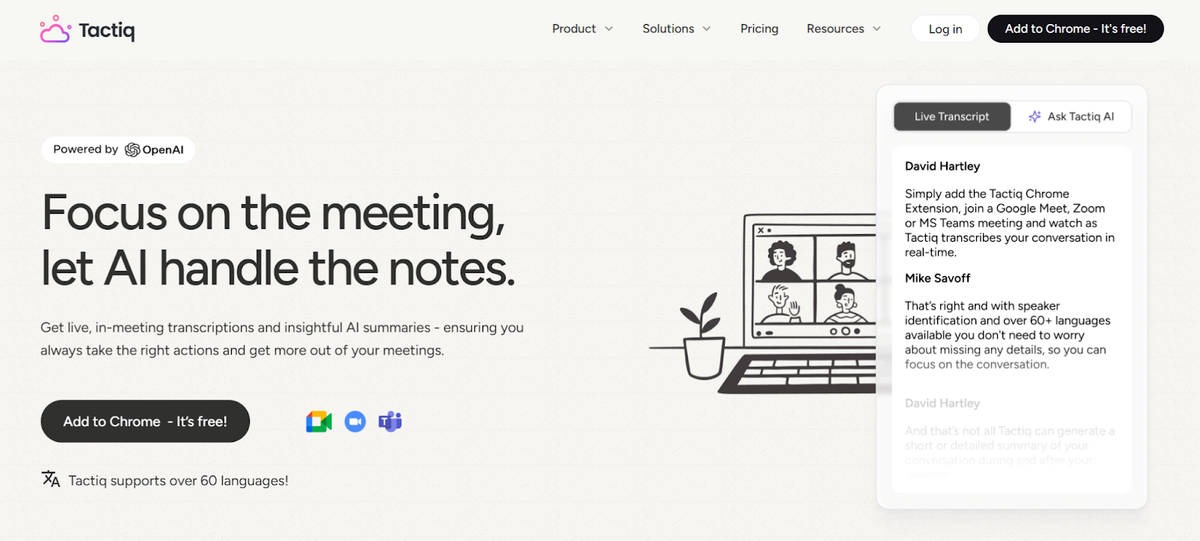
Those limits don't have to get in the way of your meetings. If you want more insight from your calls without upgrading to a paid Gemini plan, pairing Tactiq with the Gemini app is an easy way to get extra value.
Tactiq (新しいタブで開きます) handles everything during the meeting with its own built-in AI: real-time transcription, summaries, action items, and highlights. Gemini picks up afterward for research, brainstorming, or more complex analysis.
Tactiq + Gemini workflow
- Use the free Tactiq Chrome extension to capture a real-time transcript on Zoom, Google Meet, or Microsoft Teams.
- Let Tactiq's AI create instant summaries, key points, and decisions.
- Export your transcript and upload it to the Gemini app when you want extended analysis or help tackling complex topics.
This gives you live transcription from Tactiq's own AI, plus the option to use Gemini for deeper work, all without drawing on your Gemini usage limits.
How Tactiq complements Gemini's native note-taker
Gemini's built-in meeting notes (新しいタブで開きます) in Google Meet require a paid Workspace plan (Business Standard or higher) or a standalone Google AI Pro or Ultra subscription. Free Google accounts get no access to it, and it only works inside Google Meet.
Tactiq works differently:
- Tactiq works across Zoom, Google Meet, and Microsoft Teams
- Tactiq's built-in AI handles your summaries, so you're not limited by Gemini's usage caps
- You can watch the transcript populate live in the Tactiq window as the call happens
- No Workspace plan or Google AI Pro subscription required
- Stronger integrations with Notion, Slack, Google Docs, and Google Drive
- Pull transcripts into Claude or ChatGPT through the Tactiq MCP connector (新しいタブで開きます) for deeper analysis
Install the Tactiq Chrome extension (新しいタブで開きます) to get a live transcript and summary of your next meeting.
便利なAIサマリーが欲しいですか?
次回のミーティングで Tactiq をお試しください。
Gemini Free vs Paid: Feature Comparison Table
Here's how the four tiers stack up on the features that matter most.
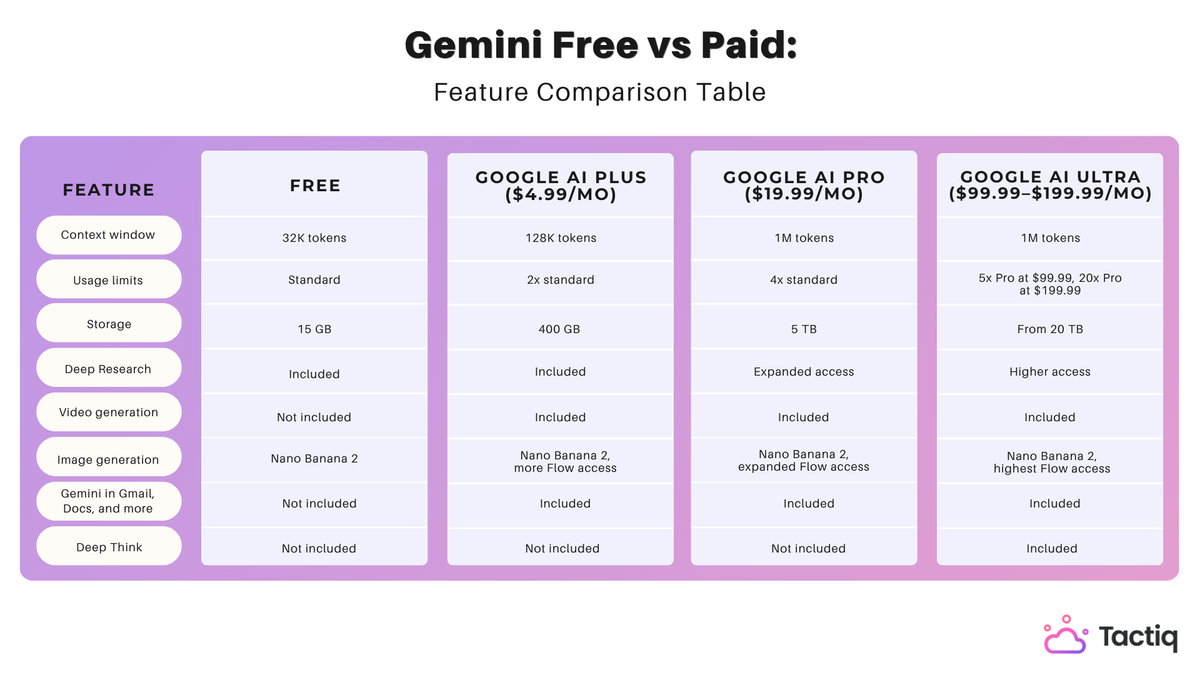
For a broader look at how Gemini stacks up against other assistants, see our comparisons of Perplexity vs Gemini (新しいタブで開きます) and Gemini vs Copilot (新しいタブで開きます).
Is Free Gemini Enough Or Should You Upgrade?
Choosing between Free, Plus, Pro, or Ultra comes down to how often you hit your usage limits and which features you actually need.
When is Google Gemini's free tier enough?
The free tier works well if you:
- Use Gemini for quick prompts, summaries, or everyday writing help
- Want Deep Research, Gemini Live, Canvas, and Gems without paying anything
- Only need standard image generation, not video
- Don't need Gmail, Docs, or Sheets integration
- Are comfortable with a 32,000-token context window
If you mostly send short prompts and don't hit your usage limit often, the free tier covers most casual use.
When you should upgrade to Google AI Plus
Google AI Plus makes sense if you:
- Want 2x higher usage limits without paying for the full Pro tier
- Need video generation or Daily Brief, both missing from Free
- Want a bigger context window (128,000 tokens) for longer documents
- Are looking for the cheapest way to add Gemini into Gmail, Docs, and other Google apps
- Don't need Gemini Spark, Deep Think, or expanded Deep Research access, all reserved for Pro and Ultra
At $4.99 a month, Plus is the lowest-cost way to remove Free's biggest limits without committing to Pro's price.
When you should upgrade to Google AI Pro
Google AI Pro makes sense if you:
- Work with longer documents or need the full 1 million-token context window
- Want expanded Deep Research access for detailed reports
- Plusプランでは利用できない、Googleのエージェント機能「Gemini Spark」が必要
- 仕事でGmail、Docs、SheetsのGeminiを毎日活用している
- Ultraの価格を抑えつつ、標準の4倍の利用制限枠が欲しい
Google AI Ultraはどのような場合に価値があるのか?
Google AI Ultraは、ヘビーユーザー向けに設計されています。以下のような場合はアップグレードをご検討ください:
- Deep Think (新しいタブで開きます)(Ultraの最も高度な推論モード)が必要
- Proの5倍(月額99.99ドル)または20倍(月額199.99ドル)という、最大級の利用制限枠を求めている
- 20TBから始まる大規模なストレージ容量が必要
- さまざまな形式の複雑で負荷の高い業務に、Geminiを日常的に活用している
Geminiの無料版と有料版を最大限に活用する方法
Google Geminiの無料プランは日常的なタスクの多くをカバーしていますが、長文のドキュメント作成、動画生成、詳細なリサーチなどを行うとすぐに制限に達してしまいます。Google AI Plus、Pro、Ultraは、コンテキストウィンドウの拡大からDeep Thinkによる高度な推論まで、プランごとに異なる制限を解除します。
ただし、会議の内容には影響しません。どのGeminiプランをご利用の場合でも、Tactiqがどのようにワークフローに組み込めるかをご確認ください。
FAQ
Your questions, answered.
If you have any further questions, Get in touch (新しいタブで開きます) with our friendly team
Google Geminiは完全に無料ですか?
Geminiの無料版、AI Plus、Gemini Advancedの違いは何ですか?
Google AI Plusの料金はいくらですか?
Google AI Proの料金はいくらですか?
Google Meetは無料でどのくらい使えますか?







便利なAIサマリーが欲しいですか?
次回のミーティングで Tactiq をお試しください。
会議に AI を導入するのがこれまでになく簡単になりました。
Chrome に追加-無料です!(新しいタブで開きます)次の会議でTactiqを試してみましょう!
今すぐ登録