
無料で使えるオンライン音声文字起こしツール ベスト5
February 20, 2025
February 20, 2025
August 20, 2026
August 20, 2026

絶え間なく続く会議や動画コンテンツ、音声ファイルに追われ、重要な詳細をすべて把握し続けることは、多くのプロフェッショナルにとって困難な課題です。音声認識(Speech-to-Text)技術は、この問題を解決します。 話し言葉をテキストに変換することで、 貴重な洞察や重要な情報を見逃すことはありません。
無料で使える音声認識ツールベスト5をご紹介します。対象は以下の通りです:
- リアルタイムの会議文字起こし
- 日常的なタイピングのための迅速な音声入力
- アップロードされた音声ファイルの文字起こし
- 動画の字幕作成
- 文字起こし機能付きのポッドキャストおよび動画編集
無料で使えるオンライン音声認識ツールベスト5
音声認識ツールは大きく進化し、現在では 会議、音声入力、字幕作成、ポッドキャスト編集など、用途に合わせた選択肢が揃っています。以下に、音声をテキスト化するさまざまな目的に適した、試してみる価値のある無料ツールを5つ紹介します。
1. 会議の文字起こしに最適な音声認識ツール:Tactiq Chrome拡張機能

Tactiq Chrome拡張機能 は、Zoom、Google Meet、Microsoft Teamsの通話を検索可能なテキストに変換します。議論に集中している間、Tactiqがアクションアイテムや重要な決定事項を含む詳細を記録するため、会議終了後に内容を整理できます。
主な機能:
- リアルタイム文字起こし: 会議中にボットを参加させることなく、発言をリアルタイムで記録します
- 話者識別: 誰が何を言ったかを識別し、話者ごとにタスクや優先事項を追跡できます
- 高速検索: 必要なトランスクリプトの該当箇所へすぐにジャンプできます
- 柔軟なエクスポート: Googleドキュメント、Notion、Slack、Confluence、またはPDFへトランスクリプトを送信できます
Tactiqは60以上の言語に対応しており、多国籍なチームの会議にも最適です。
💡 プロからのアドバイス: トランスクリプトは始まりに過ぎません。ワンクリックで 要約、アクションアイテム、フォローアップメールを作成し、あらゆる会話から最大限の価値を引き出しましょう。
{{rt_cta_ai-convenience}}
試してみませんか? Tactiq Chrome拡張機能を無料で追加して 、毎月10件の会議トランスクリプトを無料で手に入れましょう。
2. 素早い音声入力に最適な音声テキスト変換ツール:Googleドキュメントの音声入力
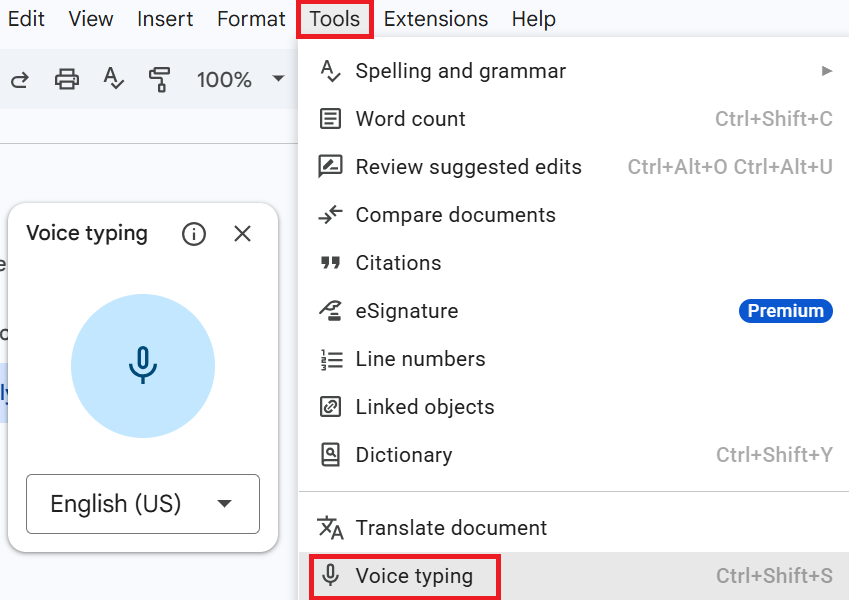
Google ドキュメントの音声入力機能を使えば、特別なソフトウェアや登録なしで、話した言葉をそのままドキュメントに書き起こすことができます。アイデア出しや下書き、タイピングよりも話す方が楽な時のメモ作成に最適です。
主な機能:
- 組み込みの音声入力:拡張機能なしで、Google ドキュメント上で直接音声をテキストに変換します。
- 音声コマンド: 音声コマンドを使って、テキストの書式設定、句読点の追加、ドキュメントの編集が可能です。
- 幅広い言語に対応: さまざまな言語や地域ごとのアクセントに対応しています。
- 無料で利用可能: すべての Google アカウントに含まれており、登録や支払いは不要です。
音声入力は Chrome、Edge、Safari で動作しますが、Firefox には対応していません。ブラウザの音声認識サービスを利用するため、インターネット接続が必要です。
利用方法:
- 対応ブラウザで Google ドキュメントを開きます。
- ツールをクリックし、 音声入力を選択します。マイクのアイコンが表示されます。
- マイクをクリックし、通常のペースで明瞭に話してください。
- もう一度マイクをクリックすると停止します。
3. ファイルアップロードに最適な文字起こしツール:Tactiq

Tactiqは、ライブ会議だけでなく、録音済みの音声ファイルも正確にテキスト化します。インタビューや講義、ボイスメモなど、ライブ通話よりも既存の音声データを扱うことが多い方に最適です。
主な機能:
- 簡単なファイルアップロード: 最大2GBまでの音声・動画ファイルを直接アップロードして文字起こしが可能
- 自動文字起こし: アップロードされた音声コンテンツを、話者ラベル付きで自動的に文字起こし
- 編集可能なトランスクリプト: 文字起こし後の編集や話者名の変更が可能
- 多彩な保存オプション: 文字起こしデータをデバイスに保存したり、お使いのツールへエクスポートしたりできます
Tactiqで音声をテキストに変換する方法:
- サインアップ後、 Tactiqダッシュボード に移動し、 Upload Transcript or Recording を右上のメニューから選択します。
- ファイルをドラッグ&ドロップするか、 Choose file
- 必要に応じて、会議のタイトルと開始時間を入力してください。
- 文字起こしの言語を選択するか、 自動検出 を選択したままにしてください。
- アップロード を選択して処理を開始します。
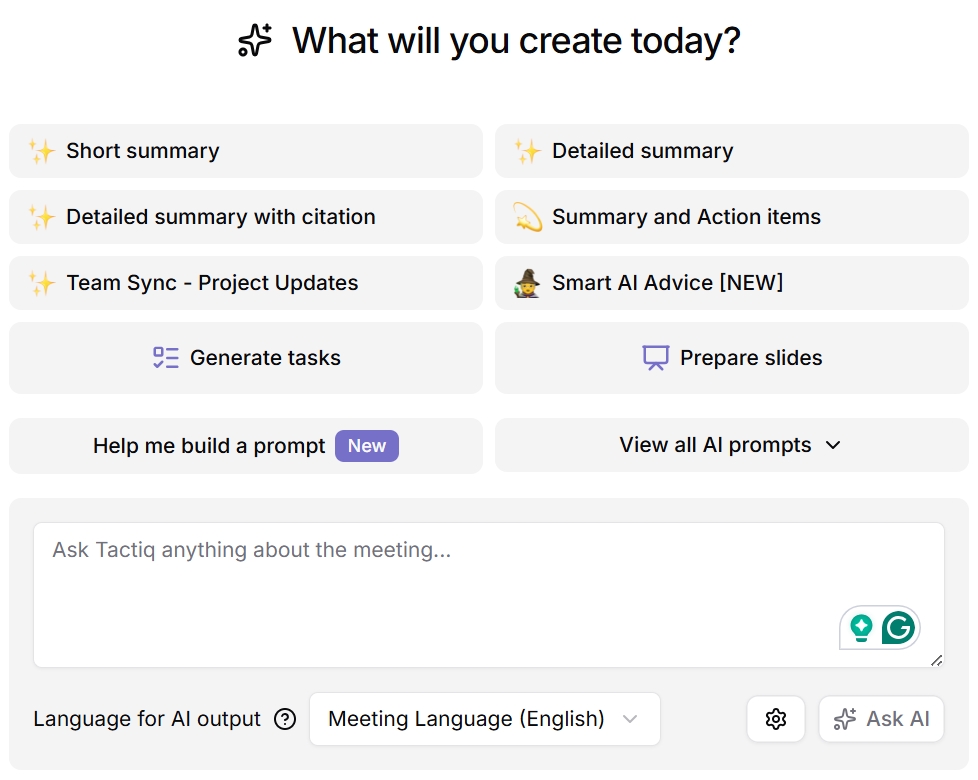
アップロードが完了すると、クイックプロンプトやAIツールを使用して、ファイルから要約やアクションアイテム、その他のインサイトを生成できます。
4. 動画字幕に最適な音声認識ツール:Veed

Veed は、自動音声認識を使用して音声や動画を同期された字幕に変換するため、視聴者は音を出さずに内容を理解できます。字幕を素早く作成して投稿する必要があるクリエイターやマーケター向けに設計されています。
主な機能:
- 自動字幕生成: 音声を文字起こし し、最大99.9%の精度で字幕を作成します。
- 言語サポート:字幕を125以上の言語に翻訳し、各地域に合わせたローカライズ字幕を作成できます。
- 音声入力のみにも対応:動画だけでなく、MP3、WAV、ポッドキャスト、ボイスメモからも字幕を生成できます。
- 柔軟なエクスポート:字幕を動画に焼き付けるか、SRT、VTT、TXT形式のテキストファイルとしてダウンロードできます。
Veedを使って動画や音声を字幕に書き起こす方法:
- 動画または音声ファイルをアップロードし、 字幕 を左側のメニューからクリックします。
- 話されている言語を選択し、 自動字幕を選択すると、AIがキャプションを生成します。
- 字幕のスタイルを編集し、動画に焼き付けるか、ファイルをダウンロードしてください。
Veedの自動字幕生成機能は、月間制限付きの短いクリップであれば無料で利用を開始できます。長尺動画への字幕付けや字幕ファイルのダウンロードには、有料のCreatorプランが必要です。
5. ポッドキャストや動画編集に最適な書き起こしサービス:Descript
Descript は、単なる書き起こしにとどまらず、ポッドキャスターや動画クリエイター向けに構築された充実した音声・動画編集ツールを備えています。書き起こし、編集、共同作業の各機能が、制作プロセス全体を効率化します。
主な機能:
- 高精度な書き起こし: 25言語に対応し、最大95%の精度を実現
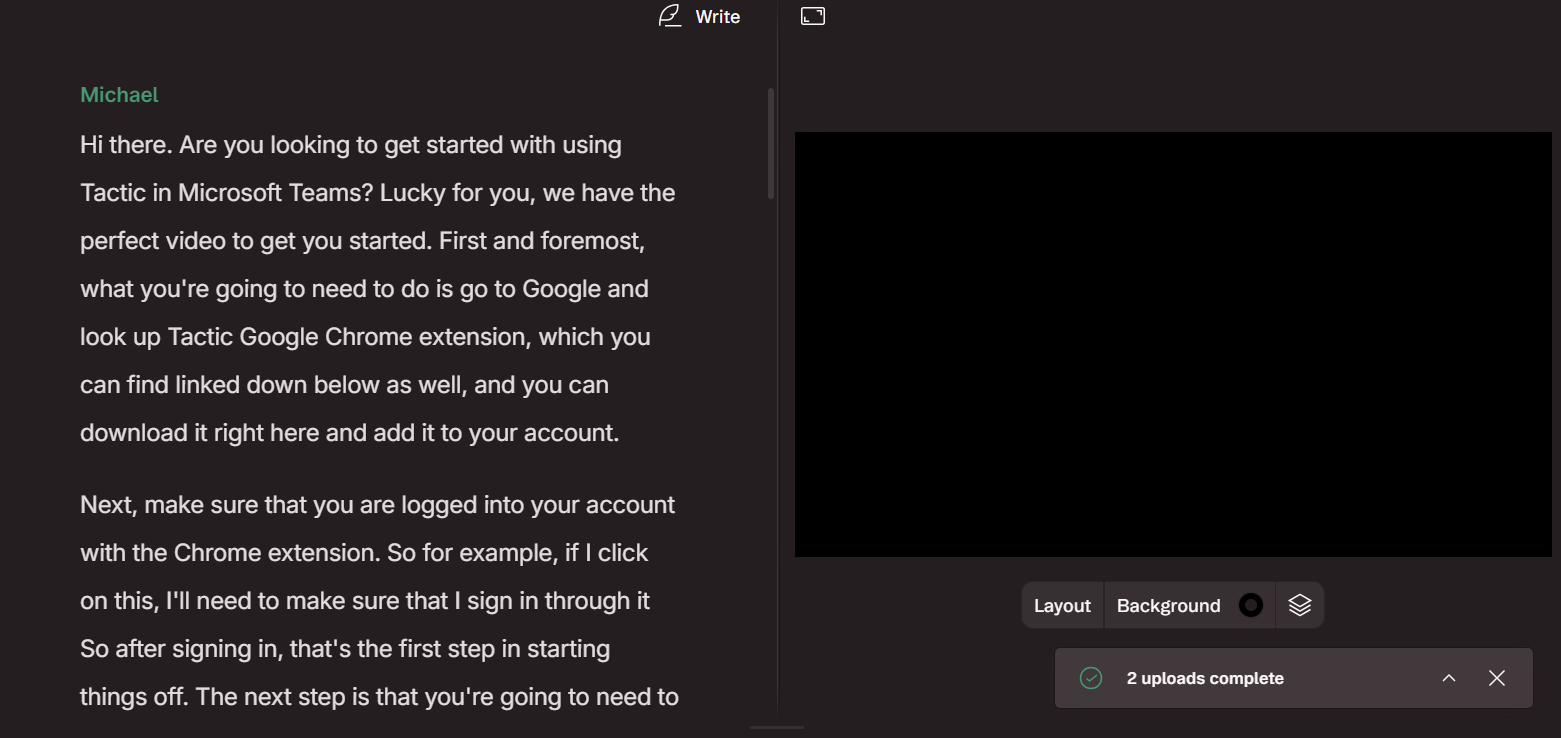
- テキストベースの編集: 書き起こしテキスト内の単語を削除・移動すると、音声や動画も自動的に更新されます
- フィラー(言い淀み)の削除: 「えー」「あの」といった不要な言葉をワンクリックで検出し、削除します
- AIアクション: 文字起こしからブログ記事、SNS用クリップ、要約を作成
Descriptで文字起こしをする方法:
- 新規プロジェクトを作成し、音声または動画ファイルをドラッグ&ドロップするか、以下をクリックしてアップロードします。 ファイルをアップロード
- Descriptが話者数を検出し、自動的に文字起こしを開始します。
- 文字起こしが完了したら、テキストを確認し、誤字や話者のラベルミス、句読点の修正を行います。
Descriptの無料プランには、月間1時間のメディア処理、100 AIクレジット、およびウォーターマーク付きの720pエクスポートが含まれています。
音声認識ツールでワークフローを変革する
音声認識ツールは、単なる文字起こしの域をはるかに超えています。会議中のリアルタイムメモ、素早いディクテーション、動画の字幕作成、あるいはポッドキャストの本格的な編集ワークフローまで、目的に合わせた無料ツールが必ず見つかります。
最適なツールを選ぶコツは、ランディングページに記載された精度数値だけで判断せず、実際の自分の作業スタイルに合っているかどうかを見極めることです。
まずはここで紹介した無料プランから試し、自分の音声でテストした上で、制限を超える場合にのみアップグレードを検討しましょう。
音声認識ツールは、会議のリアルタイム文字起こし、動画・音声コンテンツのアクセシビリティ向上、会話内容の検索可能なテキスト化などを通じて、業務効率を大幅に改善します。
TactiqのようなツールはChrome拡張機能として動作します。一方、Googleドキュメントの音声入力はChrome、Edge、Safariで利用可能ですが、Firefoxには対応していません。日常的にツールを利用する際は、事前にブラウザの互換性を必ず確認してください。
最高の音声認識結果を得るには、クリアな音声を使用し、周囲の雑音を最小限に抑えてください。高度な音声認識技術であっても、名前や専門用語を聞き間違える可能性があるため、文字起こしされた内容は必ず確認しましょう。
Google ドキュメントの音声入力が最も迅速な選択肢です。Chrome、Edge、またはSafariでドキュメントを開き、「ツール」から「音声入力」を選択すれば、登録不要ですぐに話し始めることができます。
アカウント登録後、Tactiqのダッシュボードに移動し、「Upload Transcript or Recording(文字起こしまたは録音をアップロード)」を選択します。ファイルをドラッグ&ドロップし、言語を選択(または自動検出を使用)してから「Upload(アップロード)」をクリックすると処理が開始されます。








便利なAIサマリーが欲しいですか?
次回のミーティングで Tactiq をお試しください。
便利なAIサマリーが欲しいですか?
次回のミーティングで Tactiq をお試しください。
便利なAIサマリーが欲しいですか?
次回のミーティングで Tactiq をお試しください。