
Best Google Calendar Add-Ons (Guide)
August 18, 2025
August 18, 2025
August 5, 2026
August 5, 2026

Google Calendar is a hub for managing work, personal life, and everything in between.
With the right Google Calendar extensions and add-ons, you can boost productivity, stay organized, and manage projects. Some tools help you create new Google Calendar events in seconds. Others offer advanced features like time tracking or duplicate events cleanup.
In this guide, we’ll look at the best Google Calendar add-ons and extensions. You’ll see how they work and their key features.
How To Find And Install Google Calendar Add-Ons
You can explore and install add-ons from the Google Workspace Marketplace, where all verified calendar add-ons are listed.
1. Open Google Calendar in your browser.
2. Click the gear icon in the top-right corner. Select Get add-ons from the menu to open the Google Workspace Marketplace.
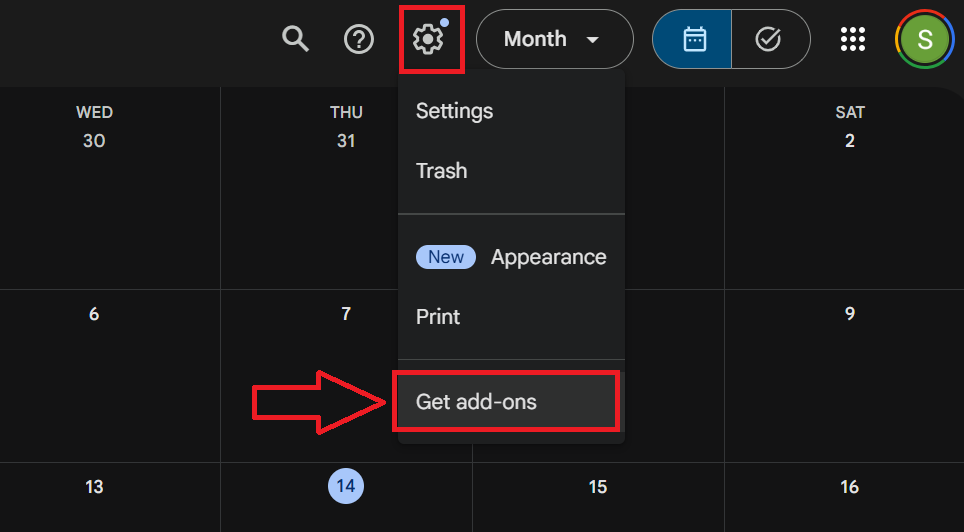
3. Search for the add-on you want.
4. Click it to see details like key features and reviews.
5. Press Install and follow the prompts to connect it to your account.
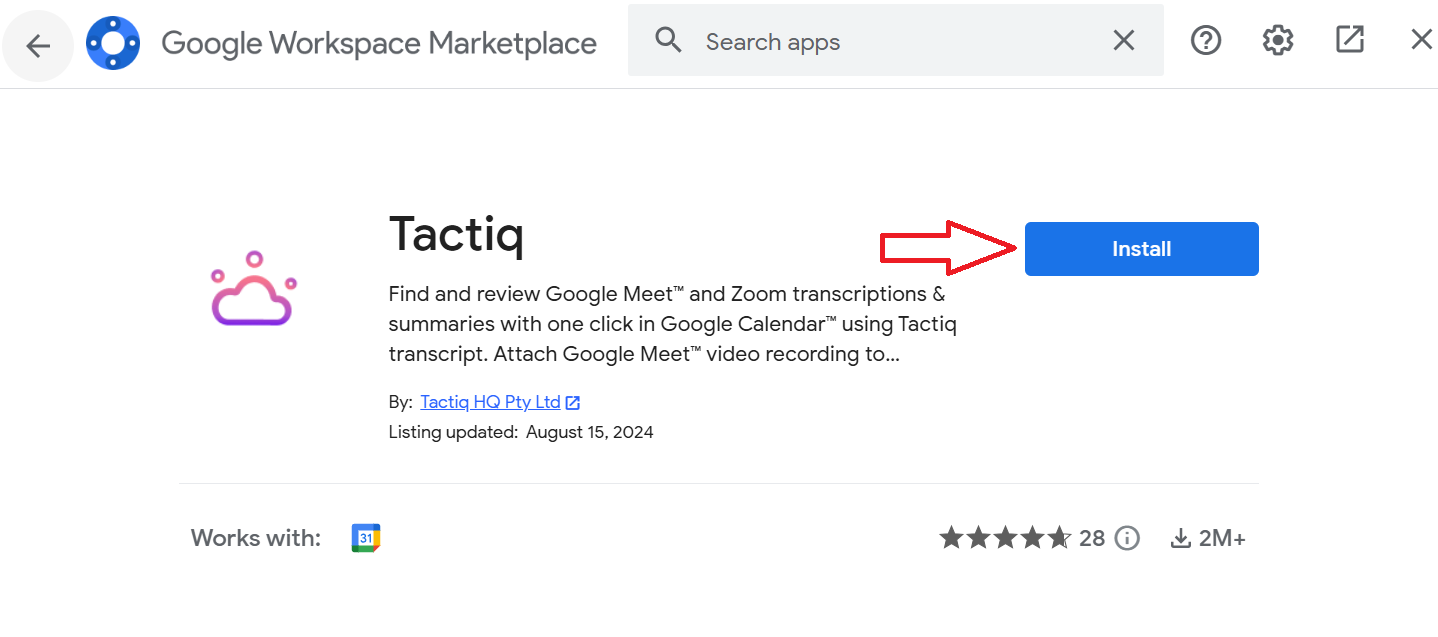
6. Manage installed add-ons by clicking the gear icon in the Google Workspace Marketplace window, then Manage apps.
Pro Tip: Once your calendar is all set, try Tactiq to take your meeting to the next level. Tactiq provides live transcriptions for Google Meet without recording.
Top Google Calendar Add-Ons And Extensions
Below are some of the most popular and trusted calendar add-ons and extensions.
GoTo For Google Calendar

GoTo for Google Calendar lets you schedule, manage, and join upcoming meetings without leaving your calendar. Once installed, you can add GoTo conferencing directly from the “Add conferencing” dropdown when creating a new event.
Use case
Great for professionals who run frequent video meetings or sales demos and want HD video, clear audio, and screen sharing built into their Google Calendar workflow.
Pricing
Free to install. Requires a GoTo account. 14-day free trial available for new users.
Key features
- Add GoTo conferencing links directly from Google Calendar events.
- Join meetings with one click from your calendar event.
- HD video and crystal-clear audio for professional collaboration.
- Built-in screen sharing for presentations and demos.
- Works well for both business and personal virtual meetings.
Pro / Con
+ Fully integrated with Google Calendar for quick access to meetings.
– Requires a separate GoTo account for hosting meetings.
Shared Contacts For Google Calendar

Shared Contacts for Google Calendar makes it easy to view and manage attendee details right from your calendar events. You can update contacts, share them with your team, and sync details across Google Workspace apps.
Use case
Perfect for teams that frequently collaborate and need quick access to contact details for meetings or events, improving overall team communication.
Pricing
Free trial available.
Key features
- View contact details for event attendees, including Google Group members.
- Add or update contacts without leaving Google Calendar.
- Share contact labels or individual contacts with specific users or groups.
- Sync shared contacts across Gmail, Drive, Meet, and other Google tools.
- Compliant with GDPR, HIPAA, and SOC 2 standards.
Pro / Con
+ Keeps contact sharing and updates in one place.
– Advanced features require the web dashboard or companion apps.
SMS Text Reminder For Google Calendar Appointment

SMS Text Reminder sends customizable SMS reminders for your Google Calendar events and supports the new Google Calendar appointment schedule. It’s designed to reduce no-shows by letting invitees confirm, cancel, or get additional event details via text.
Use case
Perfect for professionals, small businesses, or enterprises that rely on timely appointment attendance in person or online.
Pricing
Starts at $9/month with a free trial (no credit card required).
Key features
- Customize message text, sender ID, and send time.
- Include a unique link for clients to confirm or cancel appointments.
- Display event details, join links, or maps for on-site meetings.
- Works Microsoft Teams, Google Meet and Zoom meetings.
- Supports over 80 countries and is GDPR compliant.
Pro / Con
+ Reduces no-shows and keeps attendees informed.
– Paid plans required for continued use beyond the trial.
Checker Plus for Google Calendar
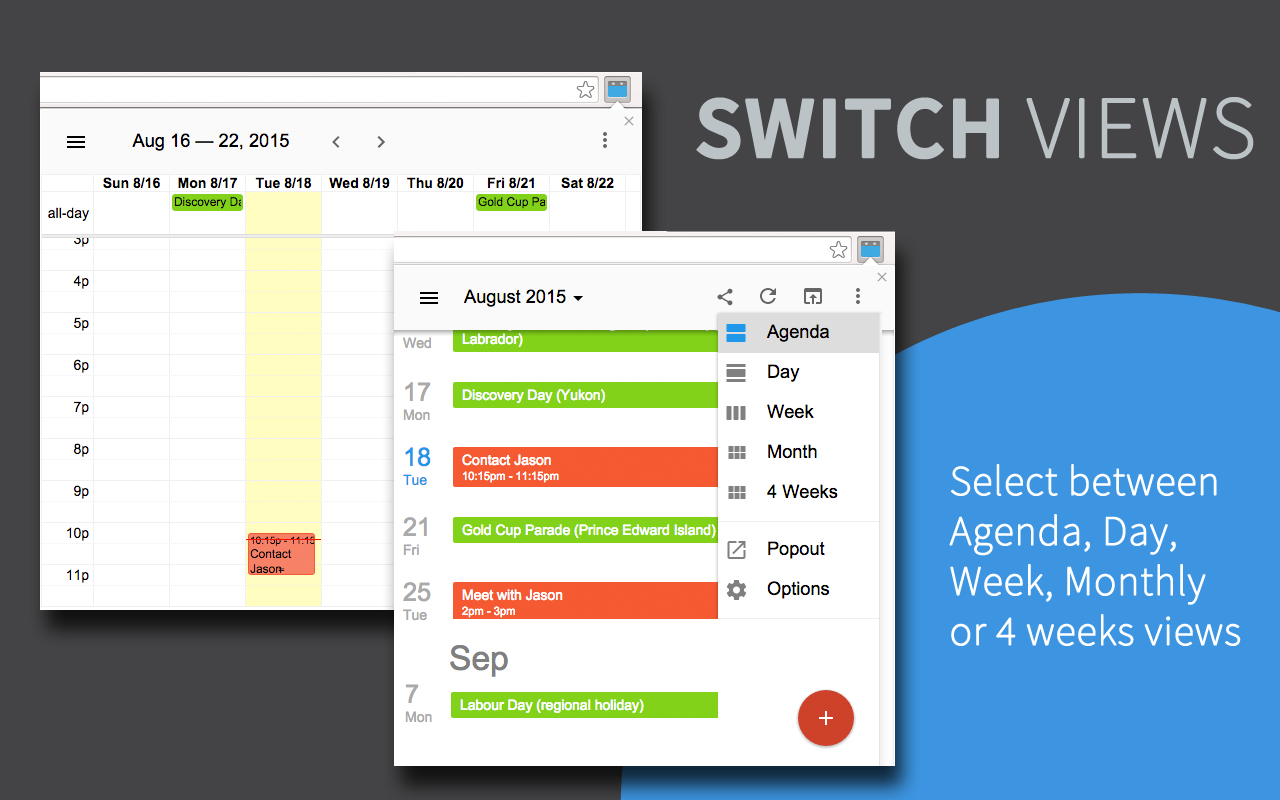
This Chrome Extension lets you preview your schedule, receive meeting reminders, and snooze events without opening the full Google Calendar page. It combines quick event creation, desktop and voice alerts, and deep Google Calendar integration to make scheduling faster and more flexible.
Use case
Best for users who want quick access to their calendar while working in other tabs, plus the ability to add events from Gmail, Facebook, or any website in just a few clicks.
Pricing
Free version available. You can unlock extra new features with a one-time contribution.
Key features
- Add events by typing naturally, like “Lunch with Sam Friday 1pm.”
- Create events from highlighted text, Gmail, or Facebook pages.
- Desktop notifications with snooze options and voice alerts for upcoming meetings.
- Multiple calendar views including day, week, month, agenda, or a custom layout.
- Drag-and-drop events for easy rescheduling, even offline.
- Built-in Google Tasks support and optional color-coded event highlights.
Pro / Con
+ Highly customizable and supports multiple ways to create events.
– Some users report occasional sign-in issues or delayed sync.
Clockify Time Tracker

Clockify is a time tracking tool that works across web, desktop, and mobile, keeping all entries synced in real time. It integrates with Google Calendar so you can see events directly in Clockify, track time from those events, and compare scheduled vs. actual work.
Use case
Perfect for freelancers, project managers, and teams who want a clear view of where time is going and how it aligns with scheduled work.
Pricing
Free plan with unlimited tracking and users. Paid plans start at $3.99 per user/month for features like invoicing, advanced reporting, and custom fields.
Key features
- Integrates with Google Calendar and 50+ popular web apps.
- Idle detection and reminders to improve accuracy.
- Pomodoro timer and automatic start/stop for better focus time.
- Start timers from highlighted text or with a shortcut (Ctrl+Shift+U).
- Assign a default project to new entries for consistent organization.
- Open-source extension code available for transparency.
Pro / Con
+ Flexible tracking options and detailed reporting for time management and project management.
– New users may need time to adjust settings for optimal workflow.
TeamCal
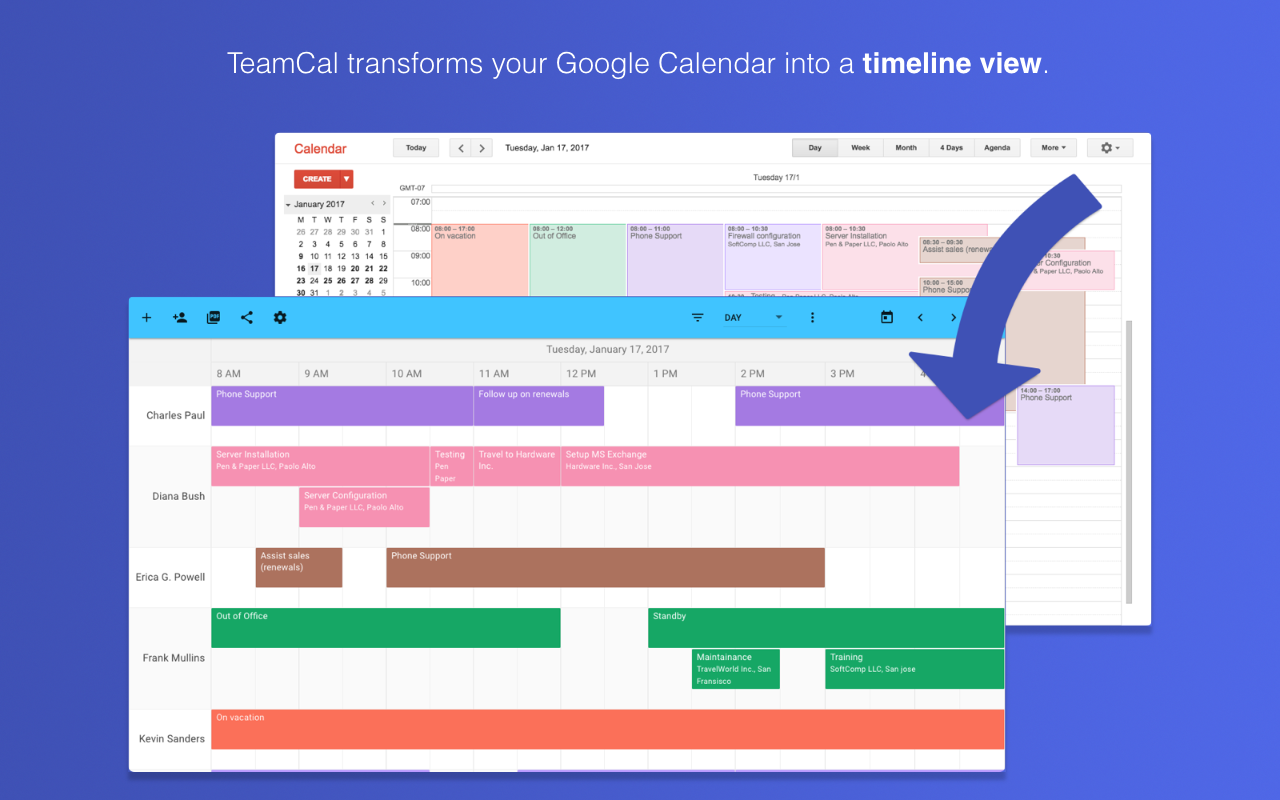
TeamCal turns Google Calendar into a visual scheduling tool for employees, contractors, resources, and even equipment. Instead of the standard stacked view, it shows calendars in a horizontal, Gantt-style layout, making it easier to see availability, avoid overlaps, and spot scheduling gaps.
Use case
Ideal for managing staff rotations, on-call shifts, and vacation planning without flipping between multiple scheduling apps.
Pricing
Free trial available. No credit card required.
Key features
- Displays multiple Google Calendars in a horizontal timeline for quick comparisons.
- Integrated and synced directly with Google Calendar for real-time updates.
- Create or edit events directly inside TeamCal.
- Share schedules with employees or clients, embed them on websites or dashboards, or export as PDF for printing.
- Works on desktop, mobile, and tablets.
- Customizable schedule views for different teams or projects.
Pro / Con
+ Makes team availability easy to understand at a glance.
– Limited to Google Calendar users. No native support for other calendar platforms.
GCalPlus
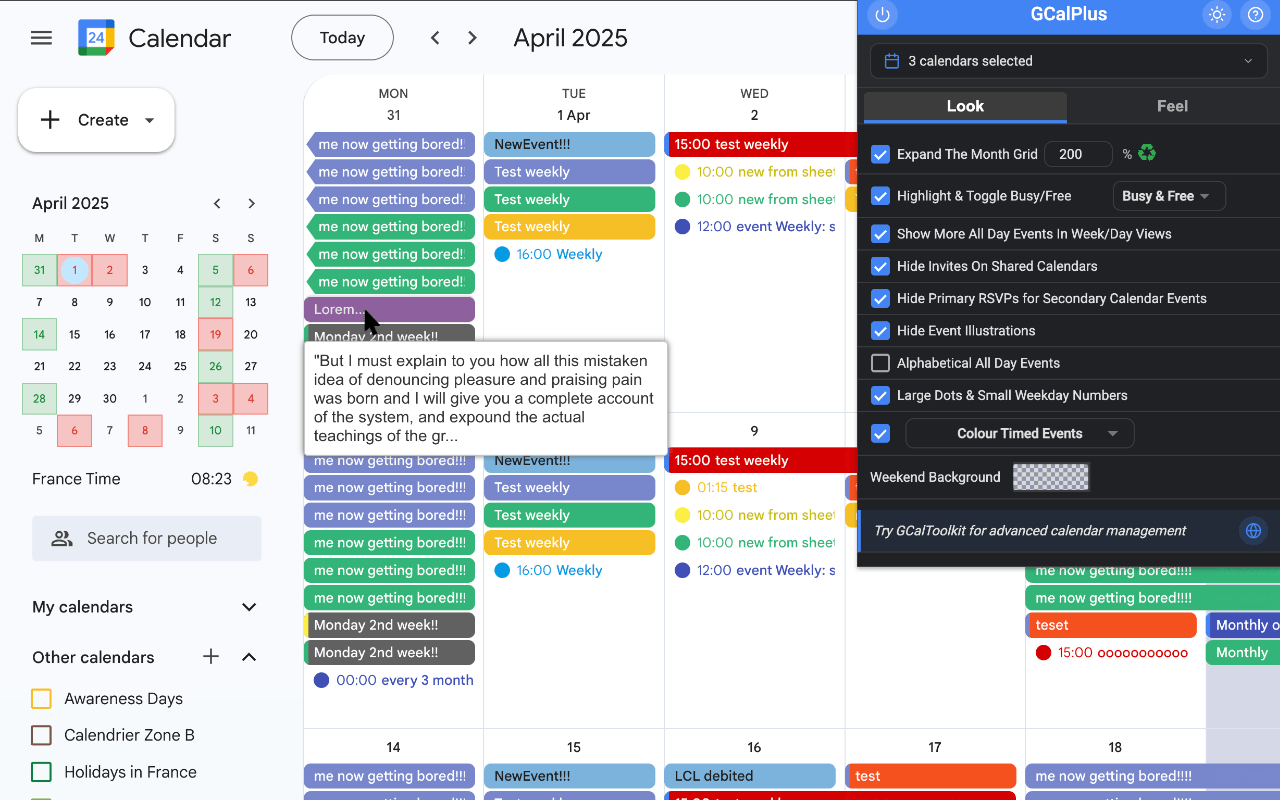
GCalPlus adds a wide range of customization options to enhance your Google Calendar experience. It gives you more control over how events look and behave, with features like expanded month grids, hover-to-view descriptions, and quick tools to duplicate or move events.
Use case
Perfect for anyone who wants to make Google Calendar fancy with better visuals, extra features, and more flexibility in managing events.
Pricing
Completely free to install, with optional paid tools from the GCalTools suite for advanced calendar management.
Key features
- Expand month, week, and day views to display more events at a glance.
- Toggle events between Busy and Free directly from the popup.
- Hover over events to see full titles and descriptions.
- Quickly duplicate or move events with a multiple copy button.
- Change event calendars from the popup without opening the full edit screen.
- Customize weekend backgrounds, event colors, and text styles.
Pro / Con
+ Highly customizable, making it easy to tailor Google Calendar to your workflow.
– Some settings require refreshing the page to take effect.
GQueues For Google Workspace™
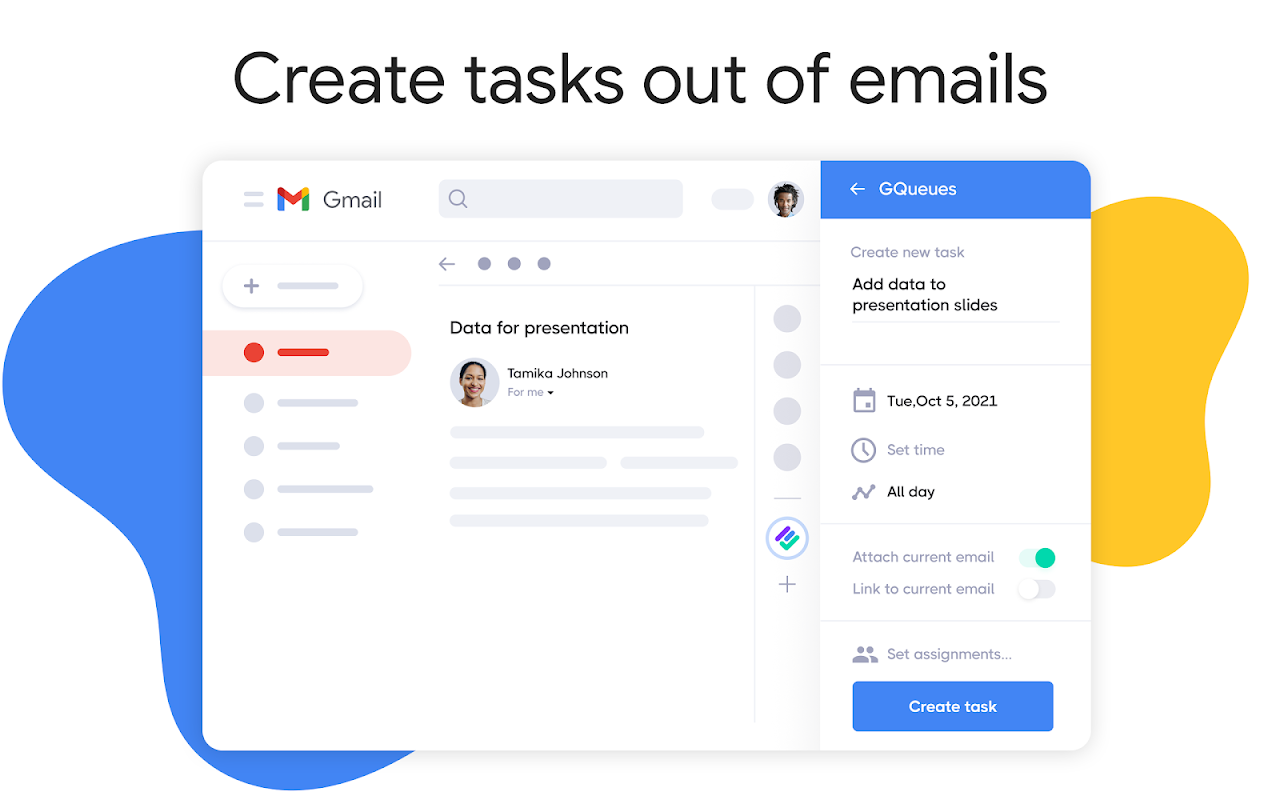
GQueues is a task management tool built for Google Workspace users, letting you manage to-dos directly from Gmail, Google Calendar, and Google Drive. You can create tasks from emails, edit them within your calendar, and keep projects organized without switching apps.
Use Case
Ideal for professionals and teams who want to track tasks alongside their existing Google tools to reduce inbox clutter and stay on top of deadlines.
Pricing
Free 2-week trial available (no credit card required).
Key Features
- Convert emails into tasks or attach them to existing ones.
- View and update tasks directly from Google Calendar.
- Search for and create new tasks in Google Drive.
- Add comments, adjust details, and mark tasks as complete.
- Helps keep emails actionable and prevents missed follow-ups.
Pro / Con
+ Integrates deeply with multiple Google Workspace apps.
– Best suited for those already committed to the Google ecosystem.
How to Use Tactiq with Your Google Meet Calls
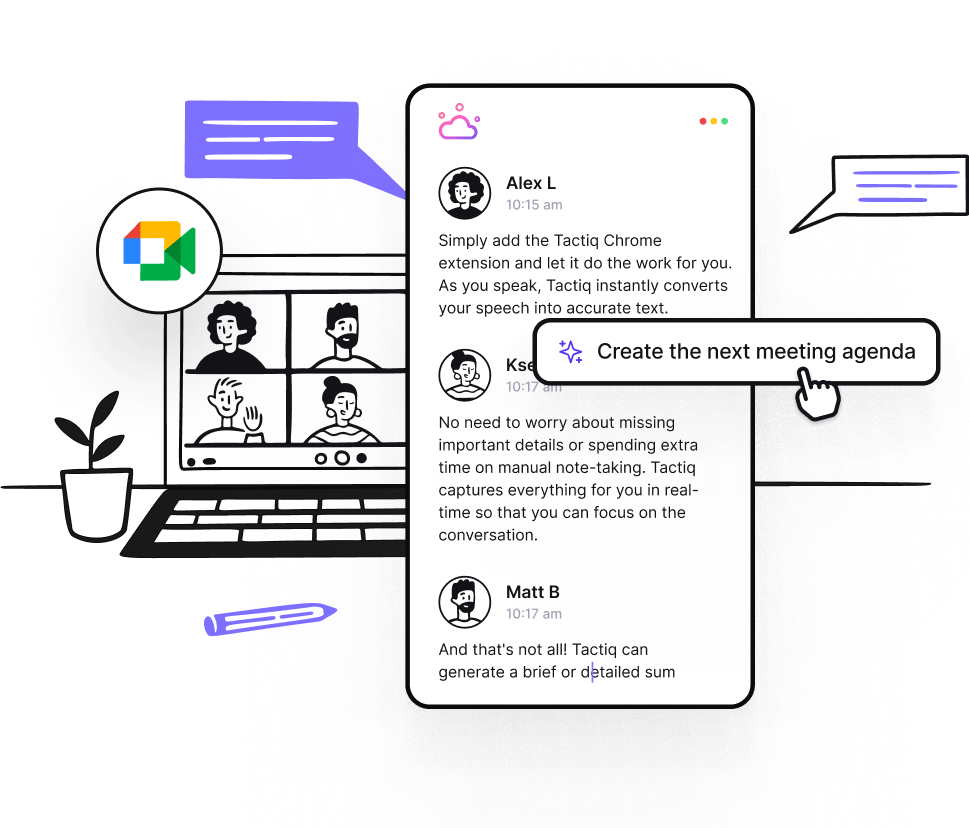
After exploring the best Google Calendar extensions and add-ons, you might want a tool that improves what actually happens in your meetings.
Tactiq does exactly that. It captures live transcripts, summaries, translations, and action items from your Google Meet calls.
{{rt_cta_ai-convenience}}
How to get started
- Install the Tactiq Chrome extension and click Add to Chrome.
- Sign in with your Google account.
- Schedule your Google Meet in Google Calendar.
- Join the meeting. Tactiq starts transcribing automatically.
- Save, share, or export transcripts and summaries.
Why it’s great for Google Meet calls
- Live transcription in 30+ languages — follow conversations without missing a word.
- Real-time translation so multilingual participants can understand instantly.
- AI prompts and meeting kits to generate summaries, action items, follow-up emails, and more.
- Quick search to find exactly what was said during the meeting.
- Privacy-first — no recordings are stored.
Tip: You can also upload past meeting recordings or audio files to Tactiq for instant transcripts and summaries.
✅ Try Tactiq for free. Download the Chrome Extension and start turning every Google Meet into actionable insights today.
{{rt_cta_ai-convenience}}
Wrapping Up
Google Calendar add-ons help you work smarter by keeping tasks, meetings, and reminders in one place. They save time, reduce context switching, and make it easier to stay organized throughout the day.
Tactiq is a great example of how an add-on can enhance your workflow. By adding live transcription, AI summaries, and automatic follow-ups to Google Meet calls, it ensures you capture every important detail without extra effort.
If you’re looking to make your calendar even more useful, try adding Tactiq to your setup. It’s free to start and can help you turn meeting discussions into clear action steps.
Yes. Popular options include GoTo for Google Calendar, GQueues, and Shared Contacts for Google Calendar, each designed to enhance scheduling, collaboration, or customization.
You can customize views, use color-coding, add holidays, and set working hours in Google Calendar.
Install customization tools like GCalPlus to change colors, expand views, and add hover-to-view event details.
Go to the left panel, click the plus sign next to “Other calendars” > “Browse calendars of interest”, and select from holidays, sports, and other options.
Tactiq is a strong choice for remote teams, offering transcription, AI-generated summaries, and actionable meeting insights for Google Meet calls.
Related articles


Want the convenience of AI summaries?
Try Tactiq for your upcoming meeting.
Want the convenience of AI summaries?
Try Tactiq for your upcoming meeting.
Want the convenience of AI summaries?
Try Tactiq for your upcoming meeting.