
Claude Team: preços, recursos e benefícios para equipes remotas
- Publicado:
- February 18, 2026
- Updated:
- September 15, 2026

Your team's expertise is scattered across different people, projects, and tools. Getting everyone aligned and moving in the same direction takes constant effort.
Claude Team (abre em uma nova aba) is Anthropic's collaboration plan. It gives your whole team shared Claude Projects, workplace connectors, and admin controls that keep institutional knowledge accessible instead of siloed.
Here's what we'll cover:
- What Claude Team offers and how it works for collaboration
- Pricing for standard and premium seats
- Key benefits that make remote teamwork smoother
- How to connect Tactiq to Claude Team through the Connectors Directory
TL;DR
Claude Team now starts at just two members and scales up to 150 seats. Standard seats run $20 to $25 per month, and premium seats run $100 to $125 per month.
Tactiq is now listed directly in Claude's Connectors Directory. Your team can pull meeting transcripts and summaries into Claude Team projects in a couple of clicks, instead of pasting transcripts in manually.
What is Claude Team?
Claude Team is Anthropic's collaboration plan for teams that need to work with AI together. It supports groups of 2 to 150 members and sits between Claude Pro (for individual users) and Claude Enterprise (for large organizations).
Instead of each person working with Claude individually, your whole team gets shared Claude Projects, connected workplace tools, and centralized management that keeps everyone aligned.
Claude Team Pricing
Claude Team requires a minimum of two members. You can choose between two seat types depending on how much usage your team needs.
Standard vs premium seats
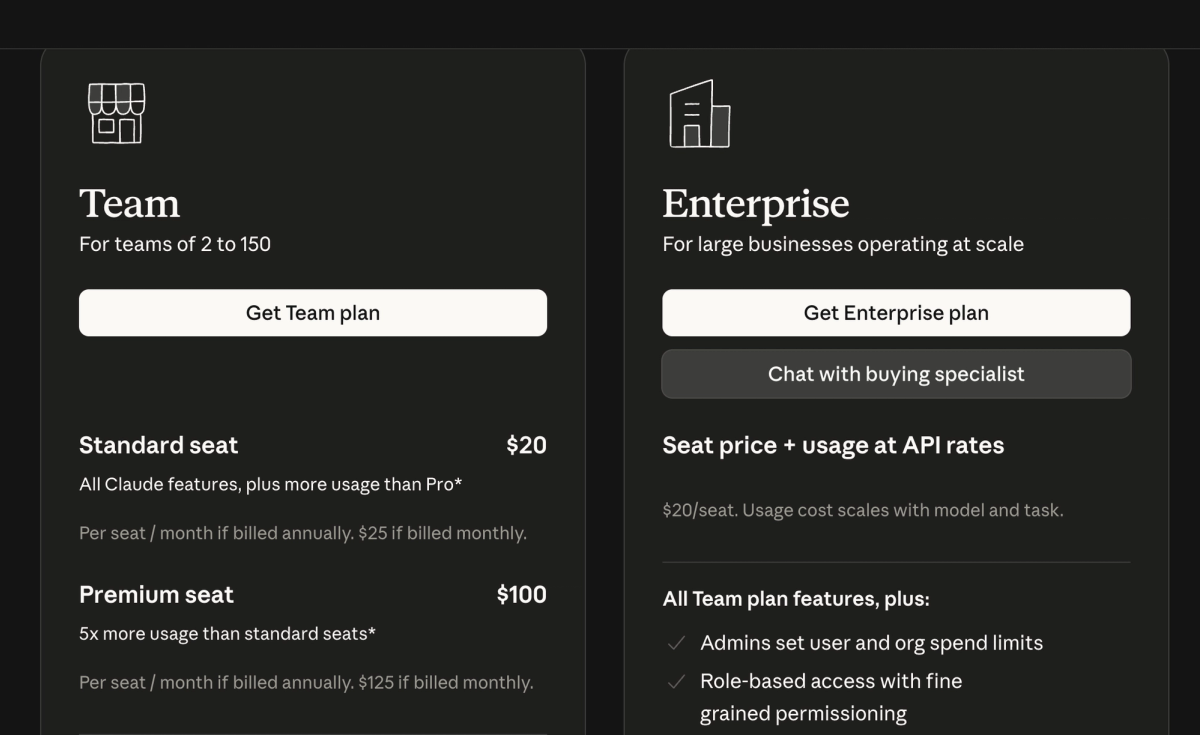
Standard seats:
- $25 per member per month, billed monthly
- $20 per member per month, billed annually
Premium seats:
- $125 per member per month, billed monthly
- $100 per member per month, billed annually
Premium pricing suits teams running heavier workloads across multiple teammates.
Pricing varies by region and excludes applicable taxes. Check Anthropic's Team plan pricing page (abre em uma nova aba) for current rates in your location.
What's included in standard seats:
- Access to all available Claude AI models
- Access to Claude Code to delegate complex coding tasks, write tests, and work across existing code, all from your terminal or IDE
- Shared projects where you can add documents and files as context
- Workplace connectors (abre em uma nova aba) for Google Drive, Gmail, Google Calendar, GitHub, Microsoft 365, and Slack
- A 200K context window for long documents and complex work
- Admin tools for billing and access management
- Single sign-on and domain capture for security
- 1.25 times more usage per session than Claude Pro
What premium seats add:
- Everything in standard seats
- More usage for team members with heavier Claude Code workloads
- 6.25 times more usage per session than Claude Pro
- Two weekly usage limits: one across all models, one specifically for Sonnet models
A note on Claude Fable 5: Fable 5 (abre em uma nova aba) is available on all paid plans, but access works differently by seat. On premium seats, Fable 5 draws from your existing weekly limit, up to 50% of it, at no extra cost. On standard seats, Fable 5 runs on pay-as-you-go usage credits from the start.
Claude Team Benefits for Remote Teams
Claude Team addresses the core challenges that slow distributed teams down. Here's how the features translate into real efficiency gains.
Centralized collaboration and shared projects
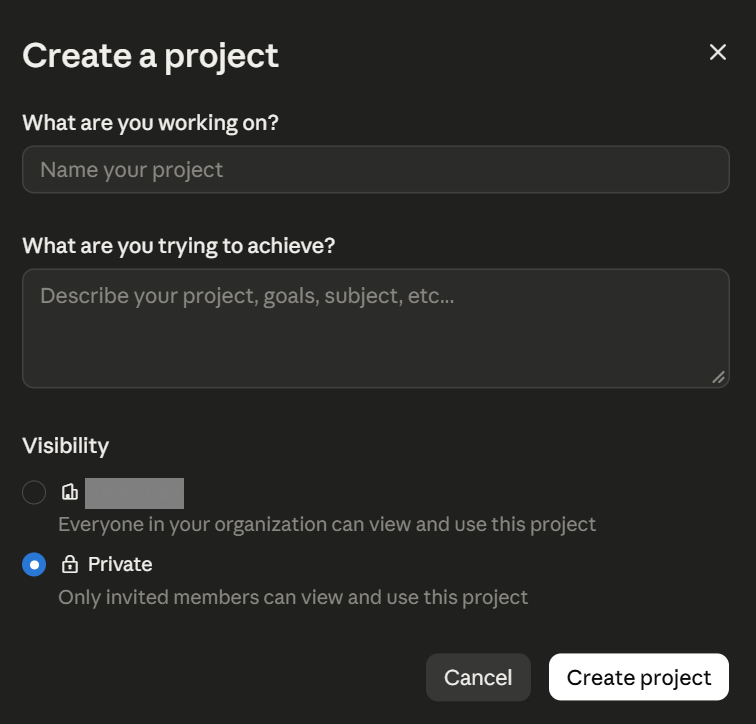
Projects (abre em uma nova aba) in Claude Team act as shared workspaces where your entire team can access the same context. Add product specs, customer research, or brand guidelines once. Every team member who opens that project has the full background they need.
How teams use shared projects:
- Sales teams create projects with customer personas and pitch templates
- Engineering teams share existing code so any developer can jump in with full context
- Marketing teams maintain brand assets so everyone creates on-brand content
- HR teams organize employee resources and policies in one place
Administrative controls
Team admins get centralized tools to manage the organization:
- Single sign-on and domain capture streamline how your team logs in
- Role-based permissions control who accesses specific features or projects
- Spending caps at the organization and individual user levels keep costs predictable
- Centralized billing management in one dashboard
Workplace connectors
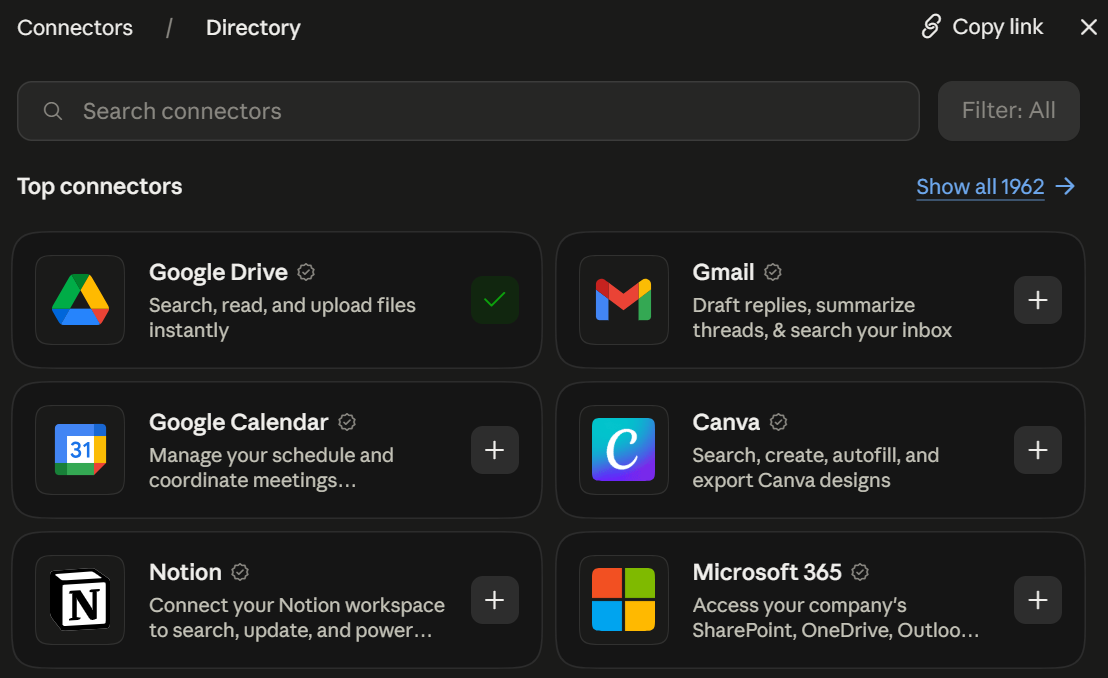
Claude Team connects directly to the tools your team already uses: Google Drive, Gmail, Google Calendar, Microsoft 365, Slack, and GitHub. Claude searches and retrieves information from your existing documents, emails, calendars, and team communications, so your team stops switching between apps to gather context.
The plan also includes enterprise search across Slack, Microsoft 365, and custom connectors, giving every team member one place to find information. Usage limits apply per person rather than to the whole team, so one member reaching their cap never blocks anyone else's work.
💡 Pro Tip: Tactiq is now listed in Claude's Connectors Directory. Connect it once (abre em uma nova aba), then ask Claude about any meeting directly from your Claude Team projects; no exporting or uploading required.
Using Meeting Transcripts With Claude Team and Tactiq
Claude Team works well for complex projects and content creation. For meeting workflows specifically, Tactiq now connects directly through Claude's Connectors Directory, so your team never has to leave the chat to bring meeting context in.
Tactiq (abre em uma nova aba) transcribes your Google Meet, Zoom, and Microsoft Teams meetings in real time. It captures speaker labels, timestamps, and full conversation context, with no bots and no recordings.
Connect Tactiq from the Claude directory
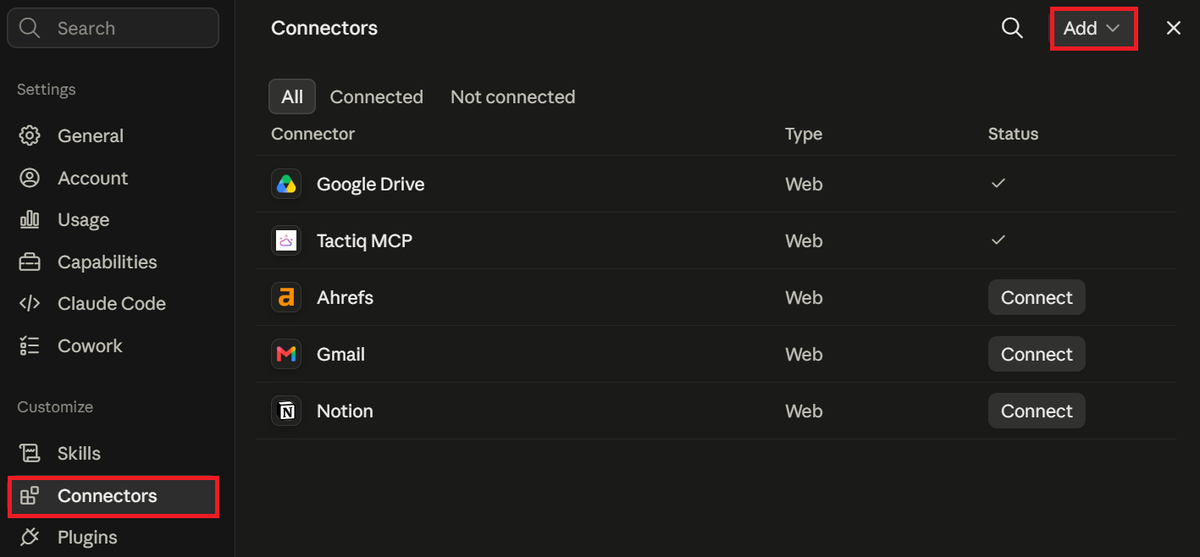
Tactiq is listed in Claude's connector directory, so setup takes under a minute:
- Go to Customize > Connectors in Claude, click Add > Browse connectors, and search for Tactiq (or open the Tactiq listing directly).
- Click Connect.
- On the Tactiq screen, click Allow to authorize the connection.
Once connected, you can ask Claude things like:
- "Summarize my last Tactiq meeting."
- "What were the key decisions from yesterday's call with the design team?"
- "Draft a follow-up email based on this week's customer call."
What Claude can access depends on your Tactiq plan. Free and Pro accounts let Claude search and list meetings. Team accounts and above unlock meeting details, summaries, and full transcription.
Setting it up for your whole team
Nos planos Team e Enterprise, um proprietário do Claude pode adicionar o Tactiq uma única vez no nível da organização, para que os membros não precisem conectá-lo individualmente primeiro:
- Vá para Configurações da organização > Conectores no Claude.
- Clique em Adicionar > Personalizado > Web.
- Insira https://mcp.tactiq.io e clique em Adicionar.
Cada membro deve então ir para Personalizar > Conectores e clicar em Conectar para vincular sua própria conta do Tactiq.
Quando o Zapier ainda faz sentido
Se você estiver encaminhando transcrições de reuniões para fluxos de trabalho totalmente fora do Claude, a integração do Tactiq com o Zapier (abre em uma nova aba) continua funcionando bem para automatizar essa transferência sem a necessidade de um comando no chat.
Quer a conveniência dos resumos de IA?
Experimente o Tactiq para sua próxima reunião.
Trabalhe de forma mais inteligente com o Claude Team
O Claude Team oferece à sua equipe as ferramentas necessárias para trabalhar com mais agilidade e manter o alinhamento. Projetos compartilhados mantêm o conhecimento institucional acessível, evitando que fique isolado. Os conectores de ambiente de trabalho centralizam as informações das suas ferramentas atuais em um só lugar. Controles administrativos permitem gerenciar acessos e custos a partir de um painel centralizado.
Para fluxos de trabalho de reuniões especificamente, o Tactiq agora se conecta diretamente através do Diretório de Conectores do Claude. Transcreva, resuma e pesquise todo o seu histórico de reuniões dentro de qualquer conversa no Claude. Sem necessidade de exportação.
FAQ
Your questions, answered.
If you have any further questions, Get in touch (abre em uma nova aba) with our friendly team
O que é o plano Claude Team?
Quanto custa o Claude Team?
O Claude Team possui limites de uso?
É possível compartilhar projetos do Claude com membros da equipe?
O Tactiq funciona com o Diretório de Conectores do Claude Team?
Artigos relacionados
Engenharia de contexto vs. engenharia de prompts: o que falta aos seus agentes de IA

Memória do Claude: Como importar e gerenciar seu contexto de IA

Conectores do Claude Cowork: Automatize o trabalho recorrente

Suporte ao MCP no Google Gemini: Onde funciona e dicas de configuração

Melhores habilidades do Claude: principais escolhas para reuniões, conteúdo e código

Os 5 melhores assistentes de agendamento com IA

Microsoft Teams MCP: Como acessar o conteúdo de reuniões com IA

Como desativar o Google Gemini?
Descubra ferramentas
- Gerador de transcrição AI
- Automação de reuniões com IA para Zoom
- Automação de reuniões com IA para equipes da Microsoft
- Automação de reuniões com IA para o Google Meet
- Automação de reuniões com IA
- Criador de fluxo de trabalho de IA para reuniões do Microsoft Teams
- Criador de fluxo de trabalho de IA para reuniões Zoom
- Criador de fluxo de trabalho de IA para reuniões do Google Meet
Quer a conveniência dos resumos de IA?
Experimente o Tactiq para sua próxima reunião.
Trazer a IA para suas reuniões nunca foi tão fácil.
Adicionar ao Chrome - É grátis!(abre em uma nova aba)Experimente Tática em sua próxima reunião!
Inscreva-se agora